What's new

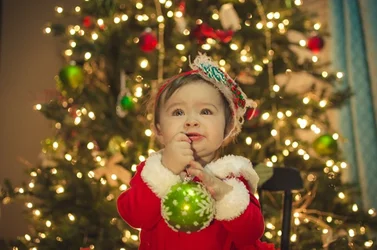
Taking pictures of a toddler in front of Christmas tree. Help??

1. Shoot the Christmas tree / lights you want to use for the background.
2. Shoot the toddler shot you want to use against a solid background (I used black)
3. Composite them.

Christmas_Baby_0214.jpg


Once again, Buckster FTW! :hail:
 
Put the camera on a good, sturdy tripod, set up the baby so it doesn't fall over and shoot in rear curtain sync.
 
Set up shots and toddlers do not mix well (unless you follow Bucksters advice). Put the kid down. Let them play. Take photos. You get what you get. I am sure your family will love the cards even if they are not award winning photographs.


p!nK
 
I'd use a large aperture, and rather than put the child immediately in front of the tree, I'd put quite a distance between the child and the tree. (as a general guideline, I almost never put a subject immediately in front of any background... I want a LOT of space. I make exceptions to this, but more often I find a background looks better if it's "in the background" and not immediately behind the subject.

Here's an example:


Holiday Bokeh by Tim Campbell1, on Flickr

Ok, it's not a child (but that shouldn't matter). This shot was taken with a 70mm focal length at f/2.8 and there's at least 10' (probably closer to 15') between my subject and the tree.

Deliberately de-focused holiday lights create beautiful orbs of soft light. You need a low focal ratio (preferably at least f/4 or lower) and a long-ish focal ratio (this works at 70mm... at 50mm it'd still be pretty good. But if we dropped to, say, 18mm then we would lose most of this effect.)

The result is a sharp subject, but the tree gets soft holiday light bokeh. Not only is it not necessary for the Christmas tree to be sharply focused, being out of focus gives it even more beauty. It's clear to everyone that the background is a Christmas tree.

I also toyed with the white balance and while this is FAR from being correctly white balanced, I decided the "warm" look of tungsten light helped create a warmer holiday look. (I don't always want "accurate" white balance.)

Not to take over the thread but thanks for posting this, I've been researching all week about subject positioning for holiday bokeh as I want to do it tomorrow w/family. Upon getting a new rig and learning about photography it seems family comes out of the woodwork wanting pictures done. While I'm still learning and they know this, I feel it is a good opportunity for me. I have a ton of notes, plan to try a bunch and see what result I'm leave with afterward, hopefully a few good shots they'll be happy with. :)
 
Try shooting in the night portrait mode. ( Person with star icon). Put a little space between your child and the tree. Perhaps sit them in a chair with a few books to entertain them for 3 seconds. Stand back, zoom a bit to compose your frame and shoot. Hold still for about 3 seconds after the flash so the exposure can capture the ambient light in the background. Adjust the flash compensation + or - if need be. This may be the quickest method with a toddler.
 
manipulating shutter speed and handheld incident/flash light meter


[TABLE="width: 195"]
[TR]
[TD="width: 260"][/TD]
[/TR]
[/TABLE]
 
Buckster..... a little work with the liquify tool on his ears and you have an elf. lol
 
$smallemmy2.webpI used a warm video light, high ISO and a pretty open aperture(2.0-1.8 or something) with my 50mm and they came out pretty good considering it was done on the fly while my daughter was stealing ornaments off the tree.
 
I like this new one .... just brighten it up a little. I like her eyes looking up and the big Christmas ball, nice job!
 
I am really new at photography but did some research online about taking pictures of a tree to see what worked for others. In the attached photo (at the bottom) I was going for clarity and sharpness to detail the beautiful job my wife did on the tree this year, however with a subject in front I would want the tree to have some amount of bokeh. That's just my taste but I've also seen photos where both subjects were in focus and it turned out amazing, see "lil blue boo" photo immediately below (not mine, just borrowed for example of what I was trying to recreate but without the subjects in front).
I shot the following attached picture with my 50mm on a tripod (ISO 6400, f/2.5, 1/50), room/outside was fully dark- only lights were the tree, adjusted white balance and sharpness in PP.

Based on title of the post... the toddler is probably more important than the tree! And your shots are toddler-less.... how is that going to help? (oh.. and the first shot you posted is badly in need of fill on the foreground subjects - bad example)! Shooting a just a tree is much simpler than exposing for a foreground subject, and the tree also...
 
I am really new at photography but did some research online about taking pictures of a tree to see what worked for others. In the attached photo (at the bottom) I was going for clarity and sharpness to detail the beautiful job my wife did on the tree this year, however with a subject in front I would want the tree to have some amount of bokeh. That's just my taste but I've also seen photos where both subjects were in focus and it turned out amazing, see "lil blue boo" photo immediately below (not mine, just borrowed for example of what I was trying to recreate but without the subjects in front).
I shot the following attached picture with my 50mm on a tripod (ISO 6400, f/2.5, 1/50), room/outside was fully dark- only lights were the tree, adjusted white balance and sharpness in PP.

Based on title of the post... the toddler is probably more important than the tree! And your shots are toddler-less.... how is that going to help? (oh.. and the first shot you posted is badly in need of fill on the foreground subjects - bad example)! Shooting a just a tree is much simpler than exposing for a foreground subject, and the tree also...
Relax forum police, I did post a picture of a child in front of a tree, albeit not a toddler nor did I take it but I did follow her suggestions and then posted my resulting photo. Tim posted a photo of an adult in front of a tree yet you chose to jump on my case? No disrespect but responses such as yours cause beginners like me to be reluctant to post, I don't see that as beneficial to TPF, are you trying to help or hinder?? Both of your posts help the OP in no way whatsoever, I would venture to guess my post was more of a help than your 2. We're not all professionals, this was posted in the "beginners" forum so if you don't like something posted by a beginner please ignore it.
 
Last edited:
I am really new at photography but did some research online about taking pictures of a tree to see what worked for others. In the attached photo (at the bottom) I was going for clarity and sharpness to detail the beautiful job my wife did on the tree this year, however with a subject in front I would want the tree to have some amount of bokeh. That's just my taste but I've also seen photos where both subjects were in focus and it turned out amazing, see "lil blue boo" photo immediately below (not mine, just borrowed for example of what I was trying to recreate but without the subjects in front).
I shot the following attached picture with my 50mm on a tripod (ISO 6400, f/2.5, 1/50), room/outside was fully dark- only lights were the tree, adjusted white balance and sharpness in PP.

Based on title of the post... the toddler is probably more important than the tree! And your shots are toddler-less.... how is that going to help? (oh.. and the first shot you posted is badly in need of fill on the foreground subjects - bad example)! Shooting a just a tree is much simpler than exposing for a foreground subject, and the tree also...
Relax forum police, I did post a picture of a child in front of a tree, albeit not a toddler nor did I take it but I did follow her suggestions and then posted my resulting photo. Tim posted a photo of an adult in front of a tree yet you chose to jump on my case? No disrespect but responses such as yours cause beginners like me to be reluctant to post, I don't see that as beneficial to TPF, are you trying to help or hinder?? Both of your posts help the OP in no way whatsoever, I would venture to guess my post was more of a help than your 2. We're not all professionals, this was posted in the "beginners" forum so if you don't like something posted by a beginner please ignore it.

lol! yea.. you posted a bad photo of kids (that were underexposed) in front of a tree. You did not take the photo. You did not say that it was bad.. you intimated that it was good. You did not explain how to even achieve that bad photo... or how to improve on the bad photo. How does that help the OP? You also posted an image of a tree (and only a tree) that you did shoot... and gave your settings for that shot. Those settings would only be helpful if the OP was shooting only a tree... and also only a tree that had approximately the same lighting as your tree. If the OP's tree is much brighter, or much dimmer... your settings wont work! So how did you help the OP? Especially when your settings wont work with a child in front of the tree... (except it might give results similar to the bad photo you posted)!

I was trying to help you... (since the OP had already received adequate and competent suggestions on how to shoot what she asked for, which was a tree with a child in front of it). But I probably won't make that mistake again!
 
Last edited:

Create an account or login to comment

You must be a member in order to leave a comment

Create account

Create an account on our community. It's easy!

Log in

Already have an account? Log in here.

New Topics

Back
Top Bottom