What's new

Tell me how bad this is

revenater

TPF Noob!
Joined
Nov 28, 2011
Messages
261
Reaction score
22
Location
Rogers AR
Can others edit my Photos
Photos OK to edit
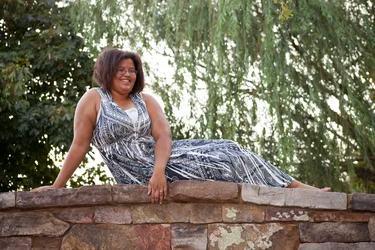
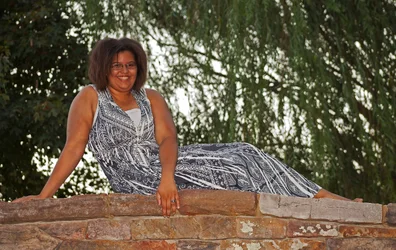
This is my niece, we went out shooting this evening and had lots of fun. She was my practice model for a night. please C&C so I can learn and move forward. It was very windy and hot. Let me know how I can improve in the future.
$IMG_5547_edited-1.webp
 
1. Whiten her teeth - they look a bit dull.

2. Did you edit her skin? She looks to be a bit orange (WB issue?) and the skin looks a bit uneven - if you edited her skin, what technique did you use?

Composition is good though and aside from the above, I really like the pose and location.
 
It's not bad at all- one thing comes to mind. The lock of hair over her right eye; that should have been moved, as it's a very distracting element.
 
Unless you are purposely wanting a power shot of your model (one which makes them appear to be in a position of power) try to take the shot at eye level or slightly above. This will be more flattering to anybody prone to 'double chinning' :)
 
Did you use flash? on camera?

I think the way she is posed makes her look large. With her shoulders square to the camera it is not a flattering angle.

Also you really want to create a space between arms and the body, pull them away from the body, with her hand in front, she could have layed in on her leg and then gently pulled it up, creating a nice triangle there, the same with the arm supporting her body, look at the weight she is adding to her self by the upper arm being flat against her body.

What are your settings and what are you shooting with?
 
Yes I used and on camera after market flash (which I am returning and getting a canon speedlite) I have a canon 5d mark II with a 70-300mm f4 lens it was at
ISO 100
F4.5
Speed 40
focal length of 90mm

I have done some post processing (i am still learning) I did some skin softening which may be why it looks uneven. She does have some large birth marks that make her natural skin uneven also.

It was very windy and we had trouble keeiping her hair our of her face all evening.
 
I was thinking that this isn't a pose that makes her look smaller, yep.

On the one hand, it makes her look "large and in charge" and maybe that's a vibe she's cool with.

It's not so much "this pose makes you look fat" in the way that standing with hips square to the camera, say, does. As a previous commenter pointed out this is a "power pose" (love that phrase, never seen it before) which plays into her physical size, and emphasizes it. Hence, it's more about the vibe than the actual composition. The actual composition actually de-emphasizes her hips quite a bit.
 
The background is very distracting with bright sections and dark sections. It would improve your portraits if you could focus on the background and not the model, and make sure your backgrounds are more consistent. Pull the model away from the background, shoot a shallow DOF and blur out the background.

Just my $0.02. YMMV.
 
$SHayla 2.webp
the wind was very hard to work with. Does anyone have advice on that?
 
Angle is off, she's looking down on you. Also if you pose her at a different angle than straight on body she's appear slightly more slender (unless she just doesn't want that look)
 

Create an account or login to comment

You must be a member in order to leave a comment

Create account

Create an account on our community. It's easy!

Log in

Already have an account? Log in here.

New Topics

Back
Top Bottom