What's new

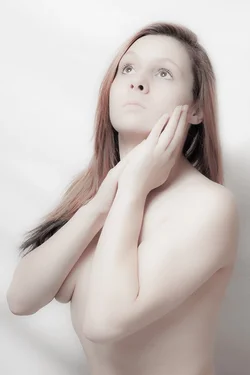
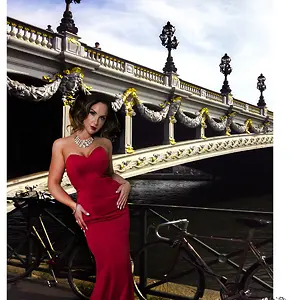
The Porcelain Look (almost NSFW-ish)... C&C Please...

You can mask with a greyscale copy of the layer, blurred somewhat, to reduce the effects in the dark areas, preserving some of the drama, if you have not shot with a bunch of extra contrast. "clarity" is a pretty simplistic control used alone.
 
Thanks for that link Michael90000000000000000000000000000000000000000000000! :)
 
I made some changes to the post-processing technique, mostly to address the clarity issue. Is this an improvement? My concern now is that the image is too sharp, and the dreamy creamy effect is gone. Your thoughts?

$tpfIMG_1058a.webp
 
I think there needs to be more contrast and more sculpting in the face. You lost all detail in portraiture. Did you use a layer mask?

You and Tee gave the same feedback, so I'll give you both the same reply. :) Thanks for your critique. The processing was weird by design... The method was to raise the exposure (in RAW editor) by 1 to 1.5 stops and drop the contrast, clarity, and vibrance dramatically. I would've probably done better to adjust the lighting to produce stronger shadows SOOC. That could've produced a more detailed final image while still retaining the 'porcelain' feel. Your thoughts?

I would ease up on the clarity slider, add contrast back in, and give a bit more saturation. For Portraiture, I would use a layer mask and add back in the detail (around hair, eyes, creases) after you run it. Just so everything isn't so blended. I like the first 2 poses, but the last pose is too straight on. I like your idea behind this though.
I truly agree.
 
I think that it also depends on the lighting. With your current lighting setup, some of her features almost seem to blend together, particularly around her nose. Of course, it could just be the processing, but I'll bet it would be easier to get the porcelain effect with lighting that distinguishes the features a little bit more.
 
You need a smaller (or farther) light source and more highlights if you want to replicate what he's done in that video.

If you were photographing actual porcelain, you'd have reflections of the light glaring off of the surface, so to make a model look like porcelain, that's going to be one of the key things to reproduce. What he does in the video is basically use lights to make a very high-contrast photo and then suck all the contrast out of them - but if you look at what his final product is, he still has some close-to-blown highlights (in fact, that's WHY he brought the exposure up as his first step).

Her hair might also be a little too dark to use as a test model for the high-key look.
 

Create an account or login to comment

You must be a member in order to leave a comment

Create account

Create an account on our community. It's easy!

Log in

Already have an account? Log in here.

Back
Top Bottom