What's new

Thoughts?

shelby16

No longer a newbie, moving up!
Joined
Mar 6, 2013
Messages
415
Reaction score
45
Location
USA
Can others edit my Photos
Photos OK to edit
Hello,
So I recently had my photos looked at in the Nature and Wildlife form, but my cousins came into town and I thought it would be a perfect opportunity to try some people photography.
I am still shooting in my compact camera actually, but as I said in my other thread, I just ordered a Nikon D5100 and I'm so excited to practice shooting on there. :) But, I want feedback with my photos now, so I can do even BETTER when my new camera arrives.
I can't wait to be a SLR user.

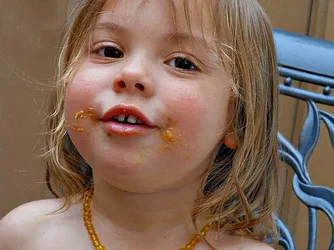
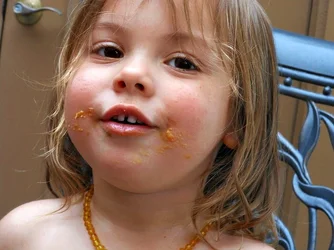
Anywho, if you could take a look at my baby cousin Price, I'd be so thankful.

Shelby
$DSCN0577.webp
I tried to do some editing, but there was so much light outside, that it affected the nose/upper-mouth area and gave it a white look. Feel free to edit differently if you feel the need!
(Yes, that is peanut butter on her face. ;) )
 
Edit: I don't mind C&C at all. I'd rather have honest opinions so I can learn.
Oh, and I'm a big newbie. BIG. haha
 
I think your observation about the outside light was quite astute; you can see the blanched areas on the tops of her cheeks and her nose.
But the lower parts of the cheeks have a dusky grainy look that overall gives more contrast than is pleasant in a baby's face.
You need a little brighter, more diffuse light.
It looks sharp enough but posting a larger image would help.
I tried lowering the exposure to get some texture in the cheeks and brightening the mid tones.
Light from overhead just doesn't help.

Try shooting at a larger f stop to shorten the DOF and remove the background distractions, shoot in portrait aspect ratio and get a more diffuse light source.

Oh, and back up a bit so you don't chop off so much of the top of her head.

Nice start, she isn't camera shy so you have a good model for the future.

$DSCN0577lll.webp
 
I think your observation about the outside light was quite astute; you can see the blanched areas on the tops of her cheeks and her nose.
But the lower parts of the cheeks have a dusky grainy look that overall gives more contrast than is pleasant in a baby's face.
You need a little brighter, more diffuse light.
It looks sharp enough but posting a larger image would help.
I tried lowering the exposure to get some texture in the cheeks and brightening the mid tones.
Light from overhead just doesn't help.

Try shooting at a larger f stop to shorten the DOF and remove the background distractions, shoot in portrait aspect ratio and get a more diffuse light source.

Oh, and back up a bit so you don't chop off so much of the top of her head.

Nice start, she isn't camera shy so you have a good model for the future.

View attachment 38507

Thank you so much! :D I appreciate the advice. Can I ask what photo editing software you used to edit this?
I've been using a free online source, but I just ordered PS Elements, so I'm hoping I'll be able to use that to get the same effect you did.
 
It's quite a cute shot mate, not bad IMO. Composition wise, I find the doorknob and the door ajar a bit distracting, so try and be aware of the background in your shots too. It's hard though and I'm no claiming to allways get it right either!


"One time me and three friends dropped acid and drove around in my dad's car. He has one of those talking cars, we're tripping, and the car goes, "The door is ajar." We pulled over and thought about that for 12 hours. "How can a door be a jar?" … "Why would they put a jar on a car?" … "Oh man, the freeway's melting!" … "Put it in the jar." - The Great Late Bill Hicks.
 
Last edited:
Its quite a cute shot mate, not bad IMO. Composition wise, I find the doorknob and the door ajar a bit distracting, so try and be aware of the background in your shots too. It's hard though and I'm no claiming to allways get it right either!
Thank you so much. I appreciate it! I love the advice, I just want to get better.
 
I used PS but there are lots of very elaborate free programs or, as you have already ordered, PSE.

The key is that you are already able to look critically at a photo and see the places where changes could improve it.

Learning how to make the changes then will come naturally.
 
I used PS but there are lots of very elaborate free programs or, as you have already ordered, PSE.

The key is that you are already able to look critically at a photo and see the places where changes could improve it.

Learning how to make the changes then will come naturally.
I'm so glad. Thank you so much!
 

Create an account or login to comment

You must be a member in order to leave a comment

Create account

Create an account on our community. It's easy!

Log in

Already have an account? Log in here.

New Topics

Back
Top Bottom