What's new

trying to improve beach sunset pictures

theregoesjb

TPF Noob!
Joined
Nov 4, 2011
Messages
158
Reaction score
5
Location
boston
Can others edit my Photos
Photos OK to edit
here we go-

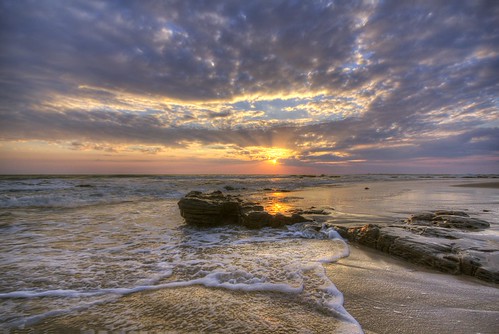
Sunset 011513 by justinbin84, on Flickr

So framing the picture could probably use something, (and feel free to C&C on it) but I am more so trying to improve the actual quality of the exposure. Getting crisp waves/splashes and well exposed foreground along with the sunset thats not blown out.

Right now my best attempt is an HDR (3 exposures -2,0,+2) and running them through photomatix. But I am just not a huge fan of the results, the overall quality seems to be diminished by just going through photomatix; loss of sharpness and added image noise. And I still feel like there's too much of that cotton candy feel to it. I also feel like the colors arent coming through, the sand and the rocks all seem to fall into this dull greyish color, even after playing with the white balance and some color correction.

I do not have a flash, but am i right in thinking that a fill flash would solve this in a way that avoids HDR?

This is an image i saw that struck me as much better quality in terms of color, sharpness, contrast Cloudy in conchas chinas | Pvbeat - Puerto Vallarta Photos
 
Yes - you have a few options.

You can get something called a "reverse gradient neutral density" filter.

A "normal" GND looks like this. Here's a link to one at Adorama: Schneider Optics 6.6x6.6" Graduated Neutral Density 0.6 Water-White Glass Filter 68-050666

Note how it's clear on the bottom, tinted at the top. The idea is if you shoot a landscape and need to darken the sky so you can increase the exposure in the foreground, this is the filter for you. Keep in mind that ND filters change your shooting circumstances. In a way they're correcting your camera's dynamic range by taming areas that would otherwise be too bright so you can increase the exposure in areas that would otherwise be too dark.

Now let's look at a REVERSE GND. Here's another link (this time to Singh-Ray): Singh-Ray Filters: Galen Rowell Graduated Neutral Density Filters

Notice how this time the filter is still clear on bottom, but instead of gradually getting darker at the top half, it's immediately darker in the middle and then gradually gets LIGHTER as you go to the top (and of course you can insert it into the filter holder with the dark side down as well.)

These filters were mostly made with sunset photos in mind. The brightest area is generally where the sun is located near the horizon and that needs the most taming. The clouds above don't need to be darkened so much. The filter allows you to increase the foreground exposure.

Also notice the filters aren't round screw-on filters... they're rectangular plates. You need a filter holder (Cokin makes them in various sizes you just need to make sure you get the right size holder for your filters and that it's wide enough that the edges of the filter holder don't show up in your photos when you shoot with wide angle lenses. HOWEVER... some photographers will just hold the filter in front of the lens with their hand and not use a holder (the camera is on a tripod.)

The filters come in various strengths and you can find variations where the center is dark and the top isn't tinted at all.

(EDIT: BTW, the links happen to be to fairly high-end filters. There are lower cost versions as well. I mostly provided the links so you'd get to see what a GND & Reverse GND filter look like and get some idea how they work.)

You could use fill-flash. Since the angle of reflection equals the angle of incidence, the flash will do virtually nothing for the water. It will probably put highlights on the white foam. It should light up the parts of the rock which are facing you (the darkest areas and they needed the most help anyway). But you need to get the light equally spread around in the image and it might require more than one light. Large reflectors could also work but you'd need several friends holding them and I'm not convinced they'd work this close to sunset.
 
Last edited:
I agree you need the hard to soft ND for this type of shot. You see see drastically better results with it.
 
hmm.. I'm still a noob, but to my eyes the photo is suffering softness perhaps due to not using the correct hyper focal distance for the aperture used. Have you tried increasing the aperture to around f11 or f16? Also, there's a bit of noise in the image perhaps due to using iso 800. Can you re-shoot at iso 100-200?
 
I think in order to get a dramatic effect one should move closer to the rock and use a wide angle lens.
 
Learn to mask in photoshop although it will take longer then photomatix you can get the results you want.
 

Create an account or login to comment

You must be a member in order to leave a comment

Create account

Create an account on our community. It's easy!

Log in

Already have an account? Log in here.

New Topics

Back
Top Bottom