What's new

Trying to learn pp!!!!! How would you edit this photo?

amg

TPF Noob!
Joined
Oct 1, 2011
Messages
67
Reaction score
5
Location
British Columbia
Can others edit my Photos
Photos OK to edit
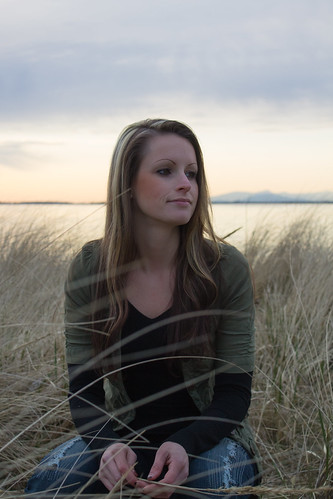
Hello Everyone trying to learn how to edit I love this picture but cant seem to make it pop...Any suggestions out there??? It would be great to see a few different edits and then try and get the same look myself :IMG_3049 by ashleymg, on Flickr
Thank you
 
What editing software are you using?
 
1. Up the exposure by 1 stop
2. Warm up the WB
3. I probably add dark vignette

OR

1. Keep the exposure the way it is and use adjustment brush on the face and neck to bring up the exposure
2. Warm up the WB.
 
I would start with adding some fill. Then play around with the contrast and increase it til I got some punch. Then I'd think about increasing the exposure a tad and go from there.
 
1. Up the exposure by 1 stop
2. Warm up the WB
3. I probably add dark vignette

OR

1. Keep the exposure the way it is and use adjustment brush on the face and neck to bring up the exposure
2. Warm up the WB.

NO VIGNETTE! :P
 
1. Up the exposure by 1 stop
2. Warm up the WB
3. I probably add dark vignette

OR

1. Keep the exposure the way it is and use adjustment brush on the face and neck to bring up the exposure
2. Warm up the WB.

NO VIGNETTE! :P

Actually a little bit to balance out that top left corner might not hurt. BUt definitely bump the exposure up one whole step the adjust from there. Exposure is much to dark for my taste.
 
How about giving some like to the beautiful OP?
 
Slight S put into curve.

Used Shadow Protection to bring up the dark areas.

Saturation increased to 28

9 Controls Points used to brighten face, black clothing, and darken sky.

pppop.jpg


With an original, full-size file I could proably do better.

But truthfully, a flash would have helped.
 
I have Lightroom 4 and the software that came with my canon would love to see some photoshop edits I am just trying to get a idea of what these programs can do..... and then I will play around and see if I can get close to others edits I thought it might be a good way to learn :)
 
LR4 is more than enough for photo-editing. Don't get caught up in the "I need photoshop" web. It's a great program but you can do everything you need with what you have now.
 
First of all I wouldn't, looks like you caught her in the weeds doing something else and looks slightly annoyed about it, her head is bisected from her body by the horizon.

If you must... crank the exposure up until her face is exposed properly let the background go.
You could clean those weeds out of the front of her dark sweater with the clone tool and some patience.
Click between her hands in the dark area, (hopefully will still be black after you increase the exposure? to check your color.
Take a small crop off the top and a smaller crop from the left side.
Take a look at this as a black and white with a vignette, may be a good option.

 
Is this you are someone you were shooting?

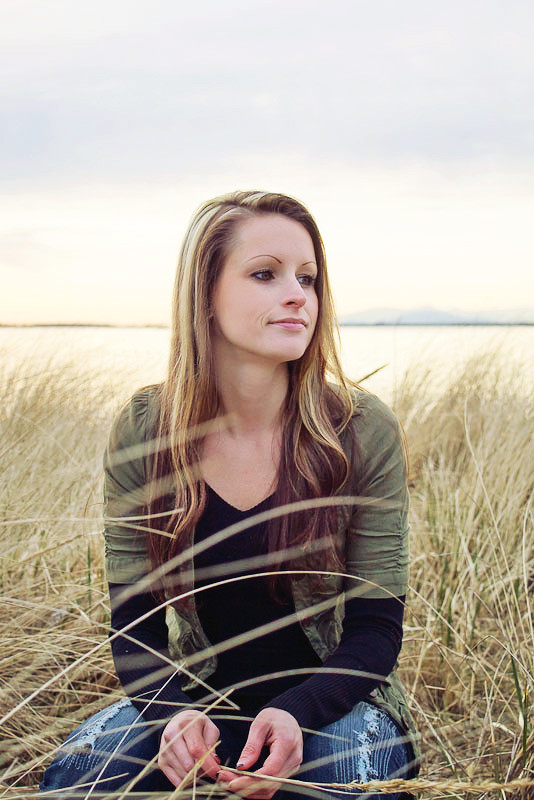
In lightroom I added fill light and warmed the temperature a bit. Then I used photoshop to add a blank layer on top of the original and smoothed out cheek makeup. Photoshop ran actions: (If you use photoshop, "pioneer woman" makes several free sets of both photoshop actions and lightroom presets that are a good place to start. Deviant art and coffee shop blog also have free actions. ).

Photoshop actions- nelly nero basic contrast, OSP small things with great love (love couture) but it was too yellow so I reduced opacity to 50%, OSP shower them with color at 15%, then adjusted color less yellow and more blue in both mid tones and hilights about 5-10. This may be a little too much for some, but here is my edit. (I also cloned out the piece of grass coming out of the ear).

ETA- I see you use LR. I would go to youtube and watch some videos on using presets, then google free lightroom presets. I just wish lightroom let you adjust the strength of them instead of all or nothing. (LR4 may do this, but LR3 doesnt).


edit 1 by awaagen, on Flickr
 

Create an account or login to comment

You must be a member in order to leave a comment

Create account

Create an account on our community. It's easy!

Log in

Already have an account? Log in here.

Back
Top Bottom