What's new

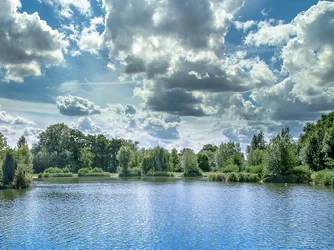
Two picture of a Lake

These are not too bad. I think my major concern is that the shoreline is tilted to the right in both images. That is easy to correct. I would like to see the first one in colour for comparison purposes.

WesternGuy
 
Thanks for the reply. I did try looking for the straightening tool in Lightroom, but couldn't find it. I just googled it and found it. I'll re-do. Thank you for the comment.

Is there anything else you don't like about it or that you do like? I spent some time on these, so would like to know :-)

Thanks again.

Bluffkin
 
I like the B&W image. The color of the water in the second shot is not pleasing, so it works better as a B&W. I think a photographer should plan for B&W and not let it be decided as an afterthought or offered as one of the options. And I don't agree that a B&W image needs a color comparison. Either it works, or it doesn't. Besides, the second color shot is the same scene with a different perspective.

I do agree the horizon needs to be level. There are several ways to do that in processing, so I hope you were able to find them all.

Just my opinion.

Jim
 
Thank you Jim :)

Is there any kind of colour enhancement/modify I should be doing in these situations? Or merely just accept the water is that colour as shot and as you suggest, convert to B&W? I really liked it in colour more for the sky and trees, but nobody wants to see murky water :0)

Bluffkin
 
Like the B&W shot, don't like the colour one. The sharp contrast in the sky which looks good in the first shot becomes kinda painful in the second.

Regarding enhancements in LR which could improve the colour of the water, yep there are a few ways to do it, either with the grad filter tool or by faffing about painting the whole thing with a brush - neither are perfect but can go some way to saving an image if you really like it. As has already been said, it's worth making friends with the straighten tool, although this image proved a challenge to straighten due to the broken up lines of horizon. I'd also consider cropping for thirds.

This is a very crude and exaggerated edit to illustrate my comments - grad filter to recolour the water, crop and (tried to) straighten - hope I haven't ruined it.

$14870681101_3dc06e2e5a_k-2.webp
 
Last edited:
Oh wow, thank you Pejacre! I really like what you did. Both my original pictures do have graduated filters, but mainly on the sky. Did you use Lightroom? What did you do to get the outcome of your edited pic? I would really like to learn.

I've also ran through my pictures again and straightened them. Let me know if I did them right.

Bluffkin
 
Yes I used Lightroom. I didn't do anything clever and there are folks on here with much better processing skills than mine but briefly here's what I did:

To recolour the water I used the Graduated Filter tool in the Lightroom Basic module and dragged up from the bottom of the frame to select the water. I dropped the exposure by -22 and the colour temperature around -70. From the bottom of the panel I used the colour selection box in the bottom right and chose a deep blue shade. I then desaturated to stop it looking too Disney and pushed clarity and highlights a little. I cropped the full image to put the horizon on the bottom third line, just to avoid having a dead central horizon. I then pushed whites and vibrance a little, dropped exposure and pushed a little contrast back in. I also altered what looked to me like an odd white balance in your sky.

Please don't take this as any kind of professional edit - I'm just an enthusiast like you. I've used some ideas picked up from more skilled people and filled in gaps in my knowledge with my own efforts - some work, some maybe not.

Just one more thing to add - I really like the composition of your first image, the B&W. Good luck with your photography - it's an addictive and rewarding hobby!
 
Thank you very much for the advice. Yeah I am certainly new to it all and learning all I can. Your information will really help me.

I like my my colour photo without the crop so I will adjust it like you said and will have another play and post back here.

Thanks Timor :-)
 

Create an account or login to comment

You must be a member in order to leave a comment

Create account

Create an account on our community. It's easy!

Log in

Already have an account? Log in here.

New Topics

Back
Top Bottom