What's new

What are your thoughts on this picture?

clipse

TPF Noob!
Joined
Mar 14, 2010
Messages
74
Reaction score
11
Can others edit my Photos
Photos OK to edit
Keep in mind. I am still very green. I took my little brothers senior pictures. I told them if they didn't like them or wanted to go to someone more professional that I would understand. This is one picture that I came up with. I like it but I would like to get outside unbiased opinion one what could be different to make it better.

Thanks.


8x10_s by clipse94, on Flickr
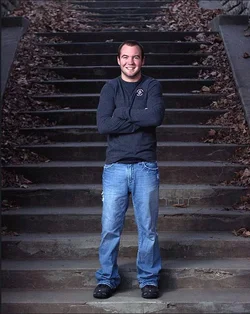
 
It appears to be underexposed.
 
Yeah looks a bit under exposed. It can be easily fixed in post. Maybe by a stop?
 
As mentioned, underexposed but quite nice character and backdrop. How was it lit and what lighting gear do you have at your disposal? I'm visualising the steps behind his head/torso being softly lit for seperation; perhaps even with a coloured gel.

Keep in mind. I am still very green. I took my little brothers senior pictures. I told them if they didn't like them or wanted to go to someone more professional that I would understand. This is one picture that I came up with. I like it but I would like to get outside unbiased opinion one what could be different to make it better.

Thanks.


8x10_s by clipse94, on Flickr
 
Underexposed as mentioned... the edit below is based on the white on his shirt, and color balanced according to that also!

Question to OP.. do you calibrate your monitor?

$Capture.webp
 
Agreed with PP on exposure, he also looks cold by the way he is standing.
 
No I don't calibrate my monitor. Honestly I haven't looked into. Like I said, I am still very green. I am on a budget so out side of just messing with the setting, I don't really know what to do.

I have a shoot through umbrella (33 inch) with a neewer flash. My dad was holding it above my brother.

I have had issues with pictures being under exposed. Especially when I go to print them.
 
I can't comment on the technical stuff cause I'm clueless, but I LOVE the back drop :thumbup:
 
I am fairly green as well but here are my thoughts...
The expression and backdrop are great. His arms look uncomfortable though, like his shoulders are hunched forward.
I kind of think the bottom steps look too bright. I wonder if it would look more even if you moved the flash in closer and dropped the power one stop. That would darken the front steps. Then you could open the aperture a bit to get a brighter background.
 
No I don't calibrate my monitor. Honestly I haven't looked into. Like I said, I am still very green. I am on a budget so out side of just messing with the setting, I don't really know what to do.

I have a shoot through umbrella (33 inch) with a neewer flash. My dad was holding it above my brother.

I have had issues with pictures being under exposed. Especially when I go to print them.

The edit I did should look overexposed on your monitor, I am assuming. Adjust your monitor to make the edit look normal, and you will probably be closer than you were.

How far away was the umbrella from your brother?
 
Umbrella was about 5 feet away. Approximately.
 
I like the edit. . . as for the expression, face wise, GREAT smile. As for the "pose", well, it looks like he is freezing his nips off, or needs the rest of the "team" around him, it looks like a rugby club pic without the rest of the club to a degree, but that's just me. . .why not more relaxed?
 

Create an account or login to comment

You must be a member in order to leave a comment

Create account

Create an account on our community. It's easy!

Log in

Already have an account? Log in here.

New Topics

Back
Top Bottom