What's new

Why cant i get nice sharp landscapes?

Xbethx

TPF Noob!
Joined
Nov 28, 2012
Messages
22
Reaction score
1
Location
Kentucky
Can others edit my Photos
Photos OK to edit
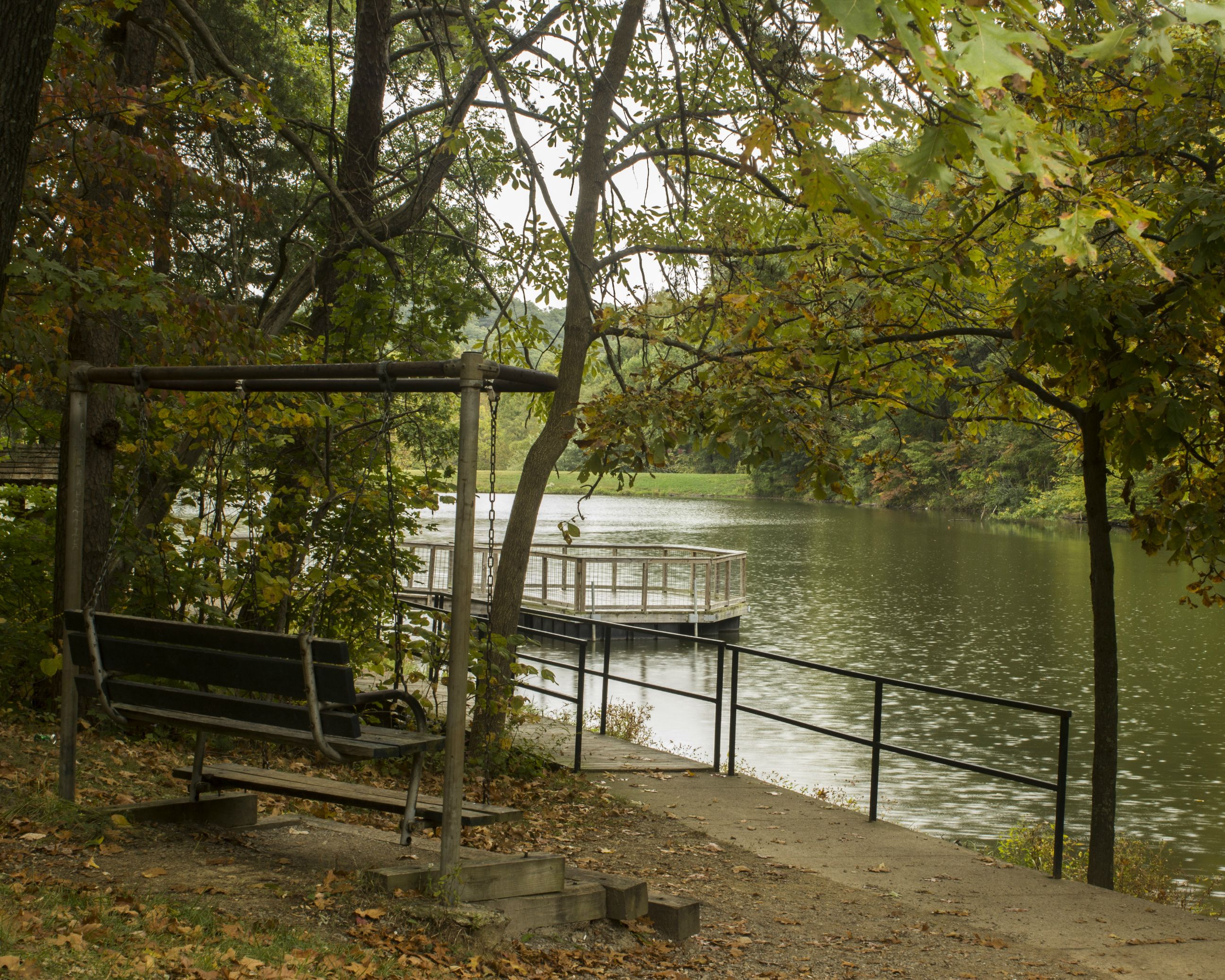
Using Canon T3i with kit 18-55mm lens with a tripod

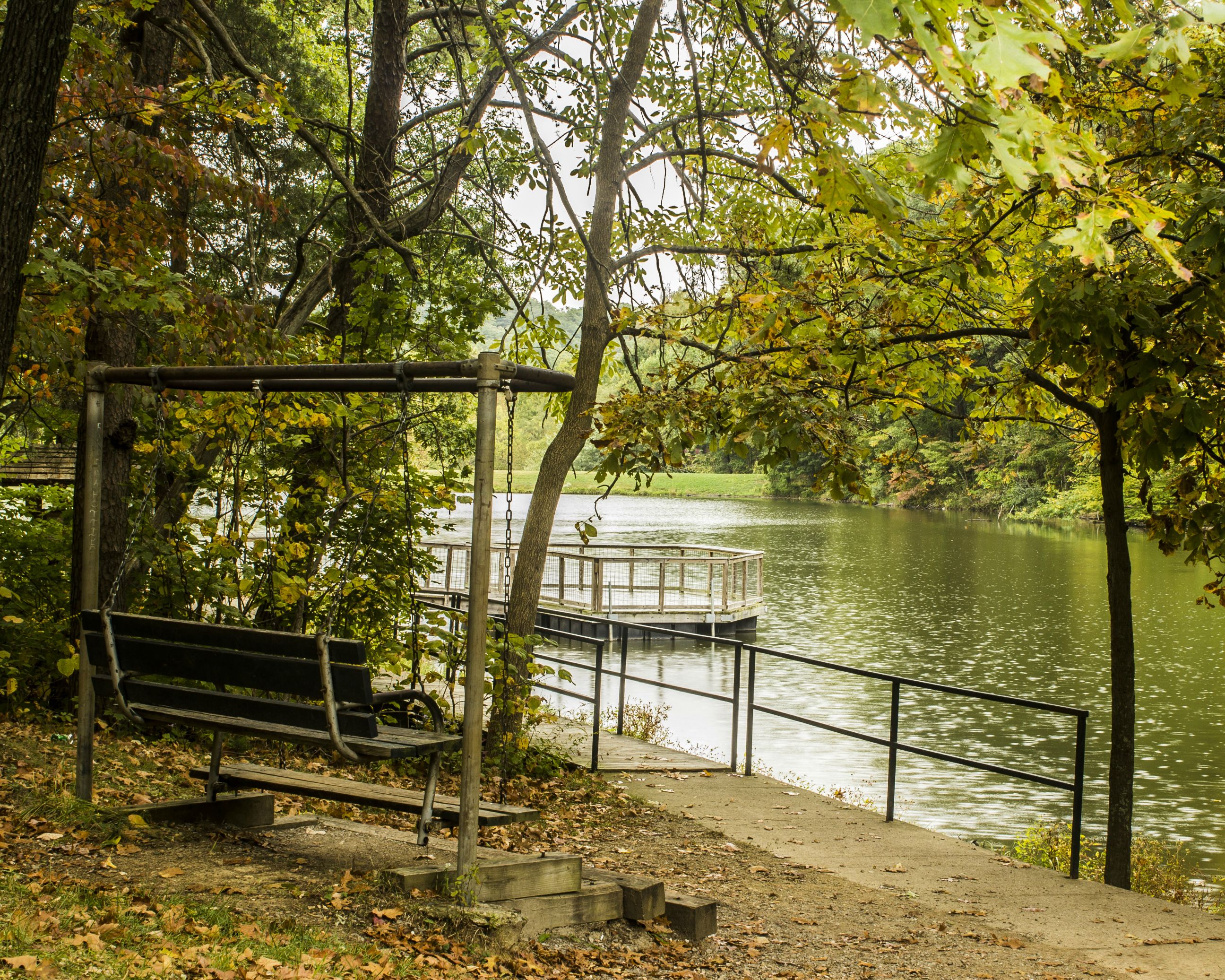
This was a shot from today
ISO 400
f/13
1/13 sec
36mm
gZDNFLq.jpg


Not sure about the composition of this image either so critique on that would be welcome as well,
but its just not as sharp as i think it should be

Thanks
Beth
 
Personally, I think the composition and exposure are bigger issues here than sharpness. It looks reasonably sharp to me (but then, I have poor vision, so don't take my word for that!), but the problem here is:

1. It's a little underexposed and flat. The lighting was clearly not too good and it's just left the photo very flat looking; nothing is popping. Boosting your exposure and contrast might help somewhat, but the other problem is…
2. I don't know what I'm looking at, or more specifically, I don't find what I'm looking at interesting. My eye wants to make the bench the focal subject here, but that little round pier area out in the water is brighter and so the eye is drawn to it, but it doesn't seem to be the subject either. There's just no clear, compelling subject here.
 
It looks about what I would expect for that lens. I'm not on an especially good monitor at the moment, but at 1/13 of a second, there could be a slight bit of movement blur. Did you use mirror-lock-up and a remote release/timer?
 
What he ^^ said. Tripod or Hand Held?
It's not really that bad but it sure is begging for some post processing. Rather flat image.
 
Sharpness is related to lens characteristics, f stop, depth of field, shutter speed, quality of light.

So, on a very dull day without distinct micro-shadows around edges, shooting at a slow speed and a pretty small aperture, without protection against mirror shock, things will look less than optimally sharp.
 
Thanks guys

I did use a timer on the shutter release although im not familiar with the mirror lock up. Im not seeing movement blur so much as it just seems that the focus is soft.
I do have a version with slightly better color i just wasnt sure with the composition and sharpness if it was even worth fooling with a lot.
The swing is what i had in mind as the focal point looking over the lake but i wasnt sure if it was working
 
^^ what they've all said. I've taken some shots of great objects on sun flat days and it just looks "blah". there's alot to "composing" right .. picking the right time of day, good sunlight with hopefully a thin layer of clouds to diffuse it a bit and prevent hard shadows, etc.

You may not see "motion blur" but you are outside. any wind and the leaves, twigs, branches and trees may be slightly moving. Plus as said above, mirror lockup, wait 3-5 seconds then shoot on a very sturdy tripod would make it as sharp as possible with your equipment.

Ironically, the focus is pretty good (though not super sharp) on those leaves in the foreground (top right).
 
Key issue - 18-55 mm kit lens.

Pretty much any digital photo made with an 18-55 mm kit lens is going to need have some sharpening applied to it post process.
If you shoot in-the-camera JPEG files the sharpening options and settings the camera offer are pretty crude.
There a many post process sharpening techniques and good image editing application sharpening controls usually include several controls, like Amount, Radius, Threshold, and Masking sliders.

Note that JPEG is intended to be a finished, ready to print, 8-bit color depth file that won't have any post processing applied.
Photo Editing Tutorials
 
I did some quick edits using Adobe Photoshop CC 2014 and it's plug-in Camera Raw.
I used Camera Raw 1st to:
Correct the white balance, capture sharpen (Amount 25, Radius 2.0, Detail 25, Masking 0), I added Clarity (boosts mid-tone contrast) and Vibrance.
I straightened the photo because it was tilted to the right.
In CC 2014 I added a narrow black border.

gEditZDNFLq.jpg
 
Now thats better...
 
f/13
1/13 sec

Why?

You're on a tripod. Drop to F/8 and use an ISO that will allow a fast enough shutter speed to eliminate subject movement.
Also, what are you focusing on - or what did you WANT to focus on? The chair is blurry but the rail is reasonably sharp.
Even at f/13 the DOF will not be wide enough for everything to be in focus. Decide what your subject is and shoot/focus accordingly.
 
f/13
1/13 sec

Why?

You're on a tripod. Drop to F/8 and use an ISO that will allow a fast enough shutter speed to eliminate subject movement.
Also, what are you focusing on - or what did you WANT to focus on? The chair is blurry but the rail is reasonably sharp.
Even at f/13 the DOF will not be wide enough for everything to be in focus. Decide what your subject is and shoot/focus accordingly.

I guess the reason is because im still learning camera techniques and figured f/13 would be enough to get everything in focus and thought a higher iso would give too much noise. I thought the use of the tripod and slower shutter speed would allow me to keep the aperture small enough to have everything in focus.
Ill know to try some different things next time
 
Next time take a long tape measure.
And measure things up - distance from your camera to the subject.
and use a calculator like this to determine your depth of field - what will be in focus.
It will increase your understanding of your settings and equipment alot faster.

hey .. the link isn't there .... try this ==> A Flexible Depth of Field Calculator
 
Last edited:
Heres the edit i had done on it.

LmN1nAT.jpg


other then the straightening i cant decide which one looks better mine or the one above?
 
I don't think it's the lens per se, but how it's used. A lot more have been done by photographers with a lot less tech behind their gear. With that said though, make sure you turn image stabilization off when shooting from a tripod. Even if you do mirror lock up, remote trigger, and use a thousand dollar tripod, the IS will counteract movement that is not there, and introduce unwanted blur.
 

Create an account or login to comment

You must be a member in order to leave a comment

Create account

Create an account on our community. It's easy!

Log in

Already have an account? Log in here.

Back
Top Bottom