What's new

Wintery family photo shoot. C&C please

crimbfighter

Been spending a lot of time on here!
Joined
Jun 4, 2010
Messages
2,219
Reaction score
1,784
Location
Wisconsin, United States
Can others edit my Photos
Photos OK to edit
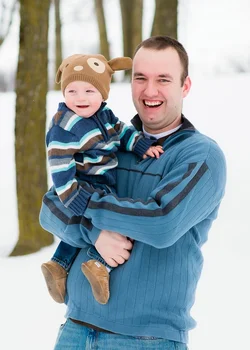
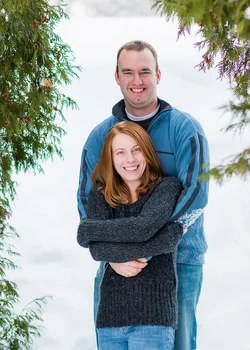
This was technically my first paid gig. The mom asked me to take some family photos of her, hubby, and the wee one after seeing some photos I took for a friend of mine. She insisted on paying me, even though I told her I wasn't really interested in being paid for it. This park was important to them, because they had their wedding and maternity photos taken here. These are what I feel are the five best. Mind you it was 20 deg F when we did this... I was cold. Mom and Dad were cold. I can only imagine how baby felt... C&C appreciated.

Full set can be seen here: http://flickr.com/gp/54751692@N08/JU6341/

1.
12167785035_f1f01e5766_h.jpg


2.
12168429186_562463a597_h.jpg


3.
12168426566_b97dbf97c1_h.jpg


Same, just B&W
12168425416_cf2cf7437c_h.jpg


4.
12168557744_5dfdcbeab0_h.jpg


5.
12168402266_f4b332f568_h.jpg
 
Last edited:
I like the mood and color of #4 the best, but it has some chromatic abberation in the trees, top right.

The only other suggestion I have is playing with levels/curves a bit to give them a little more snap.

Congrats on your first paid gig!
 
I like the mood and color of #4 the best, but it has some chromatic abberation in the trees, top right.

The only other suggestion I have is playing with levels/curves a bit to give them a little more snap.

Congrats on your first paid gig!

Thanks for pointing out the CA, totally didn't even see that!

I did feel like they lack just that last little something in my final edits. Any suggestions on playing with the tone curves? I seem to do more harm than good when I start venturing down that path.
 
For the 1st shot, maybe something like this ...


I use PS CC, my steps were:

1. Curves:
First point: Input-186/Output-196; 2nd point: Input-200/Output-221

2. Levels: 15/1.07/245

3. Gradient: Light Spectrum; soft light 19% opacity

4. Vibrance & Saturation: Vibrance (-5) Saturation (+20)

5. Selective Color-Red
Black (-21)
Yellow (+21)

The last two steps were to add some warmth to his face. He was a tad grey/blue.

Hope this helps!
 
Like them all. My favortire though is #3. I bet they are happy. Would parents be ok ih you photoshopped baby's chapped face in #5
 
The fleshtones have the look of people who are very cold. It looks accurate, and real, and believable, but not especially appealing. All of the snow on the ground has made a massive fill-in reflector, so the lighting is pretty low in contrast. It's not that these look bad or anything, it's just that they look cold, and ever-so-slightly uncomfortable.
 
$12167785035_f1f01e5766_h-2.webp$12168557744_5dfdcbeab0_h-2.webp I played with these.. I don't normally edit on this PC though so take them with a giant grain of salt. lol
FWIW.. I bet this family is thrilled with them.. they look a bit cold, but I'm guessing they ARE and I think that's ok. I personally would warm them slightly.. to more go with the happiness you can clearly see in the photos. Watch for the branches growing out of dads head in the one and I 2nd maybe fixing the chapped skin on the boy in the last.
 
First, thank you everyone for the feedback! It was very helpful. Fortunately, I wasn't planning to deliver the photos until tomorrow, so I had the chance to incorporate many of your suggestions.

For the 1st shot, maybe something like this ...

I use PS CC, my steps were:

1. Curves:
First point: Input-186/Output-196; 2nd point: Input-200/Output-221

2. Levels: 15/1.07/245

3. Gradient: Light Spectrum; soft light 19% opacity

4. Vibrance & Saturation: Vibrance (-5) Saturation (+20)

5. Selective Color-Red
Black (-21)
Yellow (+21)

The last two steps were to add some warmth to his face. He was a tad grey/blue.

Hope this helps!

That was very helpful, thank you! I'm using LR5, so I wasn't sure if your values translated directly, but with your edit, I saw what you were going for.

Like them all. My favortire though is #3. I bet they are happy. Would parents be ok ih you photoshopped baby's chapped face in #5

Thanks! I thought about removing the chapped skin, but I haven't settled on it yet. I still may..

The fleshtones have the look of people who are very cold. It looks accurate, and real, and believable, but not especially appealing. All of the snow on the ground has made a massive fill-in reflector, so the lighting is pretty low in contrast. It's not that these look bad or anything, it's just that they look cold, and ever-so-slightly uncomfortable.

Thanks Darrel. Now that I think about it, it makes total sense how the snowy day can reduce contrast, and thus reduce the richness of the color tones.

I played with these.. I don't normally edit on this PC though so take them with a giant grain of salt. lol
FWIW.. I bet this family is thrilled with them.. they look a bit cold, but I'm guessing they ARE and I think that's ok. I personally would warm them slightly.. to more go with the happiness you can clearly see in the photos. Watch for the branches growing out of dads head in the one and I 2nd maybe fixing the chapped skin on the boy in the last.

Thanks for your edits, it helps me see the end result, or potential, in my photos. We were definitely all cold... The outfits were entirely up to them, so I was surprised to see they were willing to brave the cold in what they were wearing. We took a couple breaks back at the warm cars, so that helped, but still..

Ok, so overall, what I was hearing was to bring up the contrast, colors, and return some warmer skin tones to them. Here's what I came up with. I removed the CA, and adjusted the red and orange channels to bring some skin tones back to fleshy. I bumped the vibrancy by a fair margin, and I pulled the darks and lights apart a tad with tone curve adjustments. I think it made a big difference, making them pop more without feeling like I overcooked them. But, I'd like to hear any thoughts on the re-edits. Good? Bad? Right direction? There or almost there?

1.
12183772704_683e5402e5_b.jpg


2.
12183587123_142375c60a_b.jpg


3.
12183347305_ea3052466a_b.jpg


4.
12183334515_ca828d5076_b.jpg


5.
12183322575_61a8196725_b.jpg


And one more of the baby that I liked..
6.

12183559473_d103eeb773_b.jpg
 
A substantial improvement in these edited images: added color vibrance, without being over-the-top. Major improvement in the "feel" and "look"! Eliminating that strong purple CA in #4 is a major boost to the shot. The man-and-woman pairings look much better, better skin tone and color. Overall, way better with these simple edits!
 
It's a pity about the background/subject placement in the first one, if you'd taken a step or two to your left he wouldn't have a tree coming out of his head.
 
A substantial improvement in these edited images: added color vibrance, without being over-the-top. Major improvement in the "feel" and "look"! Eliminating that strong purple CA in #4 is a major boost to the shot. The man-and-woman pairings look much better, better skin tone and color. Overall, way better with these simple edits!

Thanks! I'm glad I had a chance to implement the changes before delivery.

It's a pity about the background/subject placement in the first one, if you'd taken a step or two to your left he wouldn't have a tree coming out of his head.

Yeah, I kept looking at that afterward. I kinda wanted to re-shoot a couple of those without the trees, but we were all too cold. It's definitely something I need to pay more attention to when composing my shots..
 
Much better I think! #4 may need more warming than the others.. they still look pretty blue to me in that one.
 
Nice set, I'm a sucker for the B&W! Congrats on getting paid and for braving the cold!
 
Much better I think! #4 may need more warming than the others.. they still look pretty blue to me in that one.

Thanks! It's funny you mentioned that, because I thought the same thing and bumped the tones a little bit more before sending them out, haha

Nice set, I'm a sucker for the B&W! Congrats on getting paid and for braving the cold!

Thanks HL45! It was cold, but worth it in the end! I liked the same one, in large part because that was one of the only ones where he had a nice, natural smile!
 

Create an account or login to comment

You must be a member in order to leave a comment

Create account

Create an account on our community. It's easy!

Log in

Already have an account? Log in here.

New Topics

Back
Top Bottom