What's new

Airplane Landing Shots

poker_jake

No longer a newbie, moving up!
Joined
Dec 1, 2011
Messages
321
Reaction score
55
Location
Duluth, MN
Can others edit my Photos
Photos OK to edit
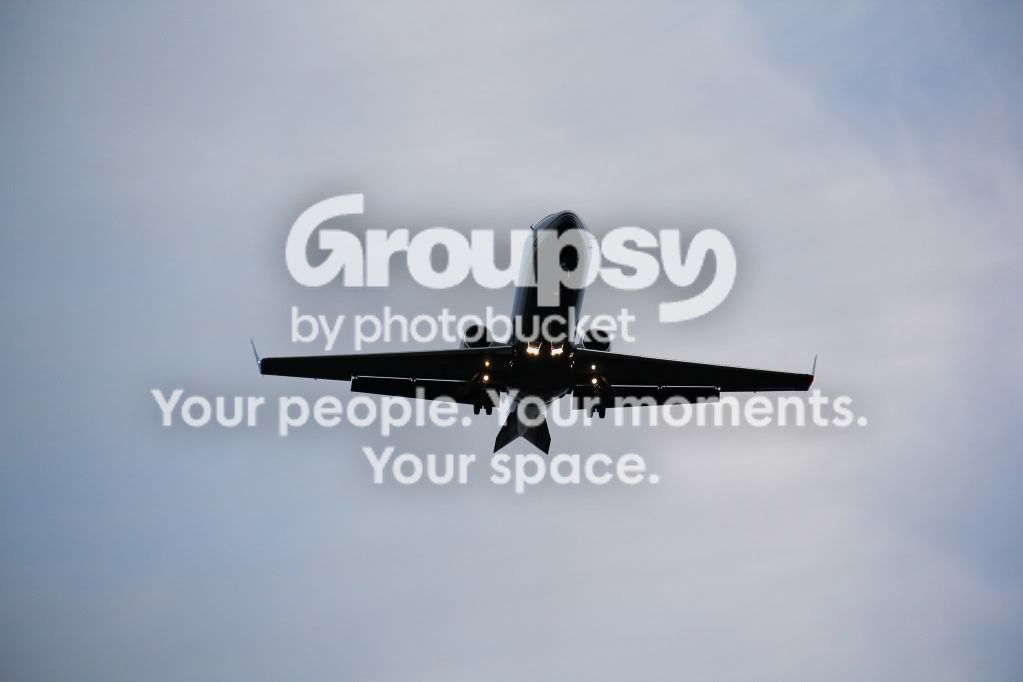
Does anybody have any tips on how to get sharper airplane shots? These just seem way to soft and grainy. They were shot at about 30 min before sunset so light was low and at my back.


135mm 5.6 1/1000sec ISO-250

IMG_2228.jpg


135mm 6.3 1/1000sec ISO-640
Seems too grainy also

IMG_2274.jpg


135mm 5.6 1/1000 ISO-400
IMG_2317.jpg
 
It is grainy because:
1. The subject is underexposed
2. You are a pixel peeper.

From the screen resolution, it is not grainy at all.
 
Well I'm gonna take a guess at what the pro's would say.... Maybe close (step down, How the heck do you say this correctly! I know I'm wrong here!)your aperture? To about 11 or 16? So that it has the whole picture in focus.
 
Well I'm gonna take a guess at what the pro's would say.... Maybe close (step down, How the heck do you say this correctly! I know I'm wrong here!)your aperture? To about 11 or 16? So that it has the whole picture in focus.

I thought about that after the fact, and possibly lower the shutter speed to 320 or so which would still require an increase in ISO, but for someone the 400 ISO seems grainy.
 
^^ What Schwetty said.... keep in mind that "white" at the top of the fuselage is supposed to be a Brilliant Clean WHITE...and it isn't! That should clue you in to having to make an EV adjustment on the Plus Side!

Got a spot meter mode on your body? Use it! :)
 
It is grainy because:
1. The subject is underexposed
2. You are a pixel peeper.

From the screen resolution, it is not grainy at all.


What's a pixel peeper?

What do you mean from screen resolution?
Photobucket resized them to a smaller resolution, which is why (I think) they appear sharper, but full size they appear grainy and soft.
 
Pixel peeper means you zoom in 100% on your screen and you are very critical on how it looks (each pixel on your screen = pixel of the high resolution), but in reality you will never print it that big.
 
Schwettylens said:
Pixel peeper means you zoom in 100% on your screen and you are very critical on how it looks (each pixel on your screen = pixel of the high resolution), but in reality you will never print it that big.

That sounds about right
 
They are underexposed because the expanse of open sky is fooling your meter. As CGipson said, use spot metering. My preference for something moving like that is center-weighted but either should work.
 
SCraig said:
They are underexposed because the expanse of open sky is fooling your meter. As CGipson said, use spot metering. My preference for something moving like that is center-weighted but either should work.

I swore I had spot metering set but must not have
 
Well I'm gonna take a guess at what the pro's would say.... Maybe close (step down, How the heck do you say this correctly! I know I'm wrong here!)your aperture? To about 11 or 16? So that it has the whole picture in focus.

I thought about that after the fact, and possibly lower the shutter speed to 320 or so which would still require an increase in ISO, but for someone the 400 ISO seems grainy.

I think you are confused. Lowering your shutter speed will require a lower ISO to achieve the same exposure. And for these types of shots, unless you are going for a panning style, you want your shutter speeds to be relatively quick (about 1/500th is most likely enough). And technically, you wouldn't be "lowering" the shutter speed--you would be lengthening it. 1/1000th of a second is a shorter duration than 1/320th. Check out this link, as I think you could use some clarification on the exposure triangle.

Camera Exposure: Aperture, ISO & Shutter Speed
 
D-B-J said:
I think you are confused. Lowering your shutter speed will require a lower ISO to achieve the same exposure. And for these types of shots, unless you are going for a panning style, you want your shutter speeds to be relatively quick (about 1/500th is most likely enough). And technically, you wouldn't be "lowering" the shutter speed--you would be lengthening it. 1/1000th of a second is a shorter duration than 1/320th. Check out this link, as I think you could use some clarification on the exposure triangle.

Camera Exposure: Aperture, ISO & Shutter Speed

I know, it just presents itself on the camera as 1000, 500, 320, not in fractions. Same with f stops.

I was thinking more along the lines of if go to 11 on aperture (that's up 2 stops) and down to 500 shutter speed (down 1 stop), I would need to add a stop in the ISO for the same quantity of light according to "understanding exposure"
 
Last edited:
D-B-J said:
I think you are confused. Lowering your shutter speed will require a lower ISO to achieve the same exposure. And for these types of shots, unless you are going for a panning style, you want your shutter speeds to be relatively quick (about 1/500th is most likely enough). And technically, you wouldn't be "lowering" the shutter speed--you would be lengthening it. 1/1000th of a second is a shorter duration than 1/320th. Check out this link, as I think you could use some clarification on the exposure triangle.

Camera Exposure: Aperture, ISO & Shutter Speed

I know, it just presents itself on the camera as 1000, 500, 320, not in fractions. Same with f stops.

I was thinking more along the lines of if go to 11 on aperture (that's up 2 stops) and down to 500 shutter speed (down 1 stop), I would need to add a stop in the ISO for the same quantity of light according to "understanding exposure"

Ahh, i see where you were going with that. You don't need to go to such a small aperture. But before I say more, which lens were you using?
 

Create an account or login to comment

You must be a member in order to leave a comment

Create account

Create an account on our community. It's easy!

Log in

Already have an account? Log in here.

New Topics

Back
Top Bottom