What's new

C&C My Wedding Pics

margosoriginals

TPF Noob!
Joined
Aug 20, 2011
Messages
117
Reaction score
12
Location
Ohio
Can others edit my Photos
Photos OK to edit
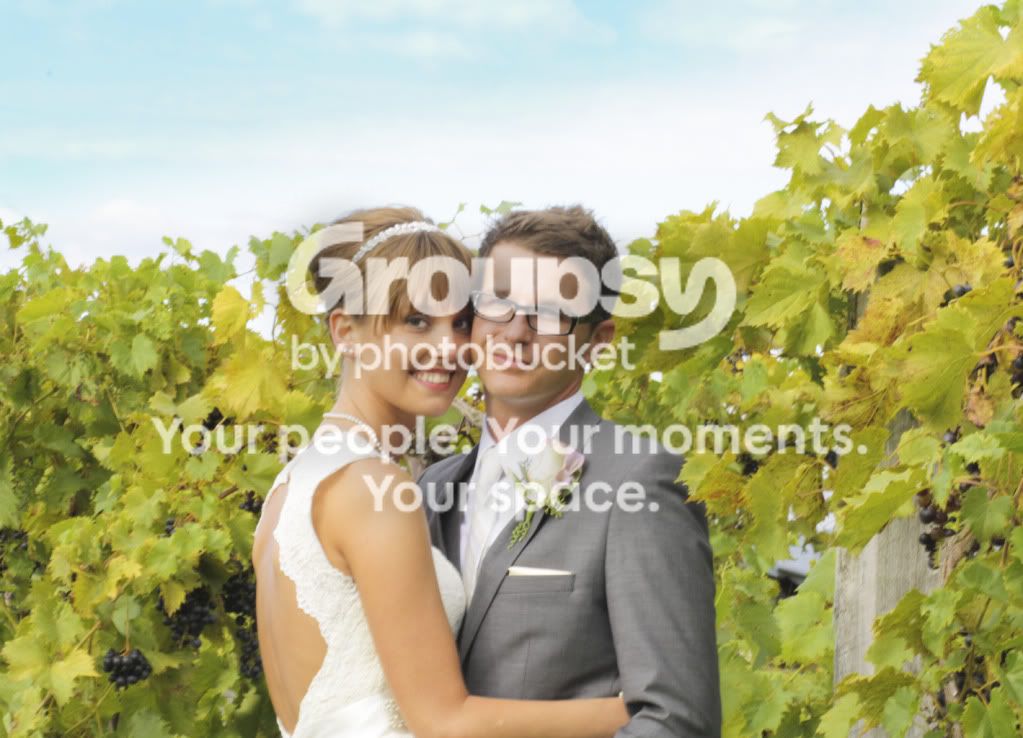
I was recently a bridesmaid in my cousin's wedding and I brought my Canon dslr along. Shot with a canon ef 85mm/1.8 lens and canon speedlight 320EX flash. I'd love to hear how I can improve! Thanks!
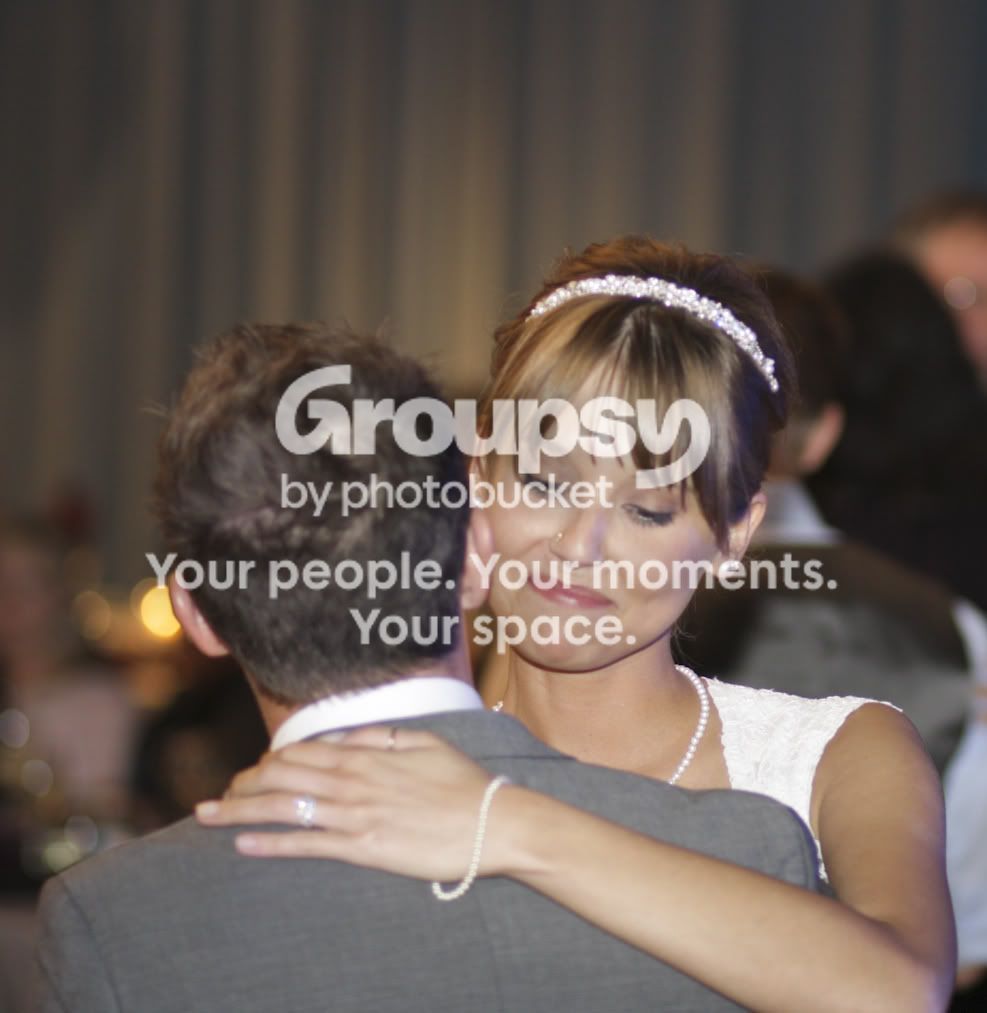
346.jpg

291.jpg
 
They both look soft. As for #2, you could have metered for the sky and used your flash for the people to have it all properly exposed...
 
C&C per req:

1. Looks to me like you missed focus here. The bride seems rather soft,and there's a bit of her elbow missing. Watch your focus points, especially in low-light situations.

2. Looks like about 1/3 stop over-exposed here. You've lost some deteail in the whites; a common challenge when shooting weddings. I would also suggest a crop to move the couple a off centre slightly.

Just my $00.02 worth - your mileage may vary.

~John
 
Ok thanks! Now that the wedding is over, we are doing a bridal shoot and maybe a trash the dress. I will take your advice and re-post some hopefully improved photos!
 
not only is there too much head room in #1 and the focus. but if you do a custom crop know that they will have a hard time printing the pic and framing
i always crop to 8x12x300dpi this gives the client the best usability for the image and if they want bigger they can request that
 
not only is there too much head room in #1 and the focus. but if you do a custom crop know that they will have a hard time printing the pic and framing
i always crop to 8x12x300dpi this gives the client the best usability for the image and if they want bigger they can request that

Thanks, I will definitely keep that in mind.
 
Both of these are soft b/c of motion blur due to too long of shutters.

I have a question about #2 though, It's daytime, why in the heck are you shooting at 1/20 and f20?! To cut down on motion blur, with 85mm (on a cropped body), you shouldn't shoot below 1/127th (Rule is, safe bet, don't shoot a shutter lower than your zoom. On a full frame 1/85 would have been fine, but cropped body is 1/127) Of course, with a steady hand, you can shoot much less than that. F/20th and 1/20 is just inexcusable imo lol. Your shot, at f/20 won't be as sharp as say f/11, but still give you the DOF you wanted.
 
Thanks for your critiques! I had a lot of blurred images from the wedding, I just need to keep practicing.
 
Both of these are soft b/c of motion blur due to too long of shutters.

I have a question about #2 though, It's daytime, why in the heck are you shooting at 1/20 and f20?! To cut down on motion blur, with 85mm (on a cropped body), you shouldn't shoot below 1/127th (Rule is, safe bet, don't shoot a shutter lower than your zoom. On a full frame 1/85 would have been fine, but cropped body is 1/127) Of course, with a steady hand, you can shoot much less than that. F/20th and 1/20 is just inexcusable imo lol. Your shot, at f/20 won't be as sharp as say f/11, but still give you the DOF you wanted.

This may sound idiotic but bare with me... I don't remember what shutter speed or aperture setting I was at, because I wasn't paying enough attention to remember it. (I was kind of taking shots when the professional photographer was done so my photos were a rushed after thought) so how did you know that it was 1/20 and F/20?
I also edited these and brightened them a bit, so the original images might have slightly better exposure, but still blurred. Does that question even make sense?
 
You can download an exif data reader as a firefox add-on. I can view most of your settings. You were also in shutter priority, which means you set the 1/20 and the camera set f/20.
 
I learned quickly that although 1.8 gives you more light, the dof is a mere inch or so, so when the subject is moving you will tend to miss focus alot. Using flash will help reduce the need for this and also freeze the motion so you can shoot at more around 3.2 or smaller, I would say this is the main reason for your blurred pictures. Not having the 85mm myself I would still think the sweet spot would be around f4 to f7.
F20 is best for landscape pictures, stand subject about 6' from background and go with f4 to 5.6 and the background will be nicely blurred.
This might help Online Depth of Field Calculator
 
Both of these are soft b/c of motion blur due to too long of shutters.

I have a question about #2 though, It's daytime, why in the heck are you shooting at 1/20 and f20?! To cut down on motion blur, with 85mm (on a cropped body), you shouldn't shoot below 1/127th (Rule is, safe bet, don't shoot a shutter lower than your zoom. On a full frame 1/85 would have been fine, but cropped body is 1/127) Of course, with a steady hand, you can shoot much less than that. F/20th and 1/20 is just inexcusable imo lol. Your shot, at f/20 won't be as sharp as say f/11, but still give you the DOF you wanted.

This may sound idiotic but bare with me... I don't remember what shutter speed or aperture setting I was at, because I wasn't paying enough attention to remember it. (I was kind of taking shots when the professional photographer was done so my photos were a rushed after thought) so how did you know that it was 1/20 and F/20?
I also edited these and brightened them a bit, so the original images might have slightly better exposure, but still blurred. Does that question even make sense?

This data would be attached to your original file. Practice focusing and watch your exposure. Also with a f1.8 you probably didnt need the flash at all if you compensate by raising the ISO some.
 
I agree that both are very soft. (The second seems to have missed focus completely). As for the settings, I TOTALLY agree with Geaux. Are you sure you weren't shooting AV mode, because that is totally what it looks like to me.
 

Create an account or login to comment

You must be a member in order to leave a comment

Create account

Create an account on our community. It's easy!

Log in

Already have an account? Log in here.

Back
Top Bottom