What's new

Cactus flower

Josefsteyn

TPF Noob!
Joined
Oct 16, 2012
Messages
14
Reaction score
0
Location
Hogsback, South Africa
Can others edit my Photos
Photos OK to edit
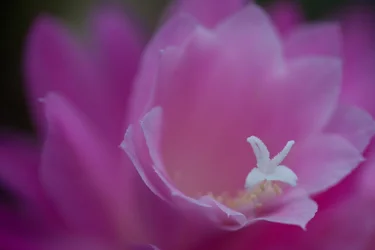
$Cactus.webp I shot this image in my greenhouse using my camera on a tripod and my 100mm macro lens at f/2.8. I went in very close to get only the stigma and the edges of some petals in focus.
 
It's rather underexposed quite a bit. I think if you raise exposure to proper it might be quite gorgeous! If you change your permissions to allow editing we can then play and show you.
Is your monitor calibrated?
 
Thanks. I will look at changing my options and also up the exposure on my image. Monitor calibrated? No unfortunately not. Advice will be welcome.
 
Very nice photo.

MLeek is right, your display has to be calibrated: Amazon.com: Xrite EODIS3 i1Display Pro: Camera & Photo

Looking at the EXIF data for your photo -- some questions:

1. You had a -.5 exposure comp set. I assume you're aware of that and if so what was your thinking in doing that?
2. LR is listed as the processing software but there are no details listed for raw conversion parameters. That suggests you are using LR to manage (and process?) camera generated JPEGs. Is that correct? Did you process this from a raw capture or use the camera JPEG?

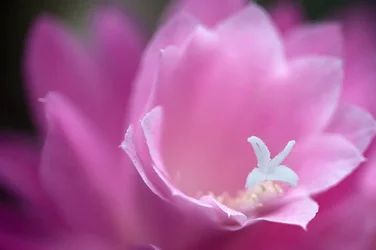
Your photo does appear very dark. Here's an adjusted version:


$cactus.webp

Here's what was wrong with your photo.

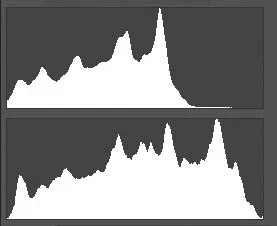
$histograms.webp

The top histogram is your posted original. It is shifted left (dark) and fails to reach the right corner -- not even close. The bottom histogram is my edited version of your photo. I've stretched the data out over the full range of available tonality and brought it up to the right corner (white). The question to investigate further then is how did your original get that way to begin with.

Joe
 
Thanks Joe for your advice and the lot of trouble you took with my photo. I really do appreciate it. I took this photo in JPEG and I was just starting out when I did this one. This cactus is again flowering just now and I plan to do much better this time. I am aware of the effect of exposure compensation, but when I took this photo it is quite possible that I did not check my exposure compensation. Since I took this photo I have changed over to RAW and I have also acquired Photoshop. I am sure my next one will be better.
 
Until you calibrate your monitor editing and processing is pretty useless. It's a shot in the dark.
Monitors out of the box are designed for internet and gaming use. They are extremely bright with high contrast. For starters you can turn the brightness and contrast down to somewhere between about 70% and 80%. Yep, it will look dim. You want white to be white, but not LIT up, black to be black and the shades of gray to be evident.
Monitors also tend to error to the cool side which will make you think your images are very blue. You'll then warm them up and make humans look like oompa loompas.
There are MANY images on the web that are designed to help you get somewhere close in hand calibrating. It'll work pretty OK, but if you want your photographs to print anything like what you are seeing on your computer you need to get a calibrator.

 

Create an account or login to comment

You must be a member in order to leave a comment

Create account

Create an account on our community. It's easy!

Log in

Already have an account? Log in here.

New Topics

Back
Top Bottom