What's new

Camera refusing snap a photo in auto mode?

Notchy

TPF Noob!
Joined
Aug 25, 2012
Messages
6
Reaction score
0
Location
Canada
I've noticed on my new (used) Cannon Rebel XS that sometimes in Auto mode or any of the different "basic" modes that sometimes it'll refuse to snap the shot. It's not that the flash needs to cool, or that it's "busy" with something, it just flat out refuses to snap. I can hold the button halfway to focus/pre-flash or whatever, but then when I go for the photo nothing happens as if I didn't even press the button.

The only possible connection I can notice is that it seems to mostly happen when one large (or up close) object is filling out almost the whole photo. Like a large dark boat, or a close up of a TV, or a large navy blue building. That's the times I've noticed it happening EVERY time and refusing to take the shot.

I'm a total newbie to DLSRs so this is fairly frustrating to me and I have no idea what's doing it. I know the camera is supposed to be smarter than me because I'm new to photography, but why the heck can't I take these photos? lol

P.S.: Another thing I've wondered, is what is the purpose of the sort of "count down" meter that appears when half-pressing and focusing? It starts full and then "shrinks down" to empty.
 
Your camera hasn't locked focus on something.
Focus is achieved by your camera locking onto something of contrast. If it can't find anything to lock on to it won't fire. Your options then are to increase lighting so it can see something to lock on, back out to give it some contrast to lock onto or manually focus
 
I agree with MLEEK. I'm unsure as to what "countdown" you're referring to.. it might be your camera is determining the proper shutter speed and the value is decreasing maybe?

Unsure though.
 
Your camera hasn't locked focus on something.
Focus is achieved by your camera locking onto something of contrast. If it can't find anything to lock on to it won't fire. Your options then are to increase lighting so it can see something to lock on, back out to give it some contrast to lock onto or manually focus
That's my guess as well. Usually, the only time your DSLR will refuse to snap the pic when you press the button, is when you are in "One Shot" auto focus mode and when the camera/lens hasn't yet achieved focus.

So if you are trying to focus on something that is too close (under the lens's minimum focus distance) or if you are trying to focus on something with very little contrast (could be caused by low light)...then you may run into this problem.

To see for sure, switch the focus mode to AI Servo (must take the camera out of fully auto mode first). In this mode, the camera will snap the photo even if it hasn't achieved focus...but you run a greater risk of getting an out of focus image.
 
P.S.: Another thing I've wondered, is what is the purpose of the sort of "count down" meter that appears when half-pressing and focusing? It starts full and then "shrinks down" to empty.
My only guess is that you are talking about the exposure meter. [-2..-1..0..1..2].

In any of the auto modes, the 'needle' should be at the zero, unless you have adjusted your exposure compensation. But it shouldn't change while just focusing.
However, if you put the camera into manual (M) mode, that needle is no longer locked and is free to move as it reads the scene through the lens. And if you are moving the camera, or if the scene is changing, then it might indeed move as you are getting ready to take the shot.
 
In 'auto' mode it uses "focus priority". It also uses "focus priority" if you're in any other mode by set the drive to "One Shot" mode.

"Focus priority" says that the priority (when you press the shutter button) is to lock focus before shooting. Areas that are dark, or simply lack enough contrast can confuse a focus sensor.

If you were to take it out of 'auto' mode and use, say 'Program' mode (which is very similar to auto except you're allowed to override things) then you can take the camera from "One Shot" mode to "AI Servo" mode. "AI Servo" uses "shutter priority" which means the priority is that the camera must take the shot when you fully press the button (and it will do this whether the camera had a chance to focus or not -- so when using that mode, you should make sure you're comfortable that the camera has obtained focus on your subject before you fully press the button.)

If you switch the lens to manual focus, it'll also take the shot immediately because the computer knows the camera isn't in auto-focus mode, so it'll make no attempt to guess what you wanted to focus on and just shoot when you tell it to shoot.
 
Get out of Full Auto anyways! You'll be glad you started learning what all the settings on your camera do... But yes, it sounds like the other responses, your focus is trying to lock on something and unable to do so. If you must stay in full auto, switch the focus over to Manual on the actual lens.
 
P.S.: Another thing I've wondered, is what is the purpose of the sort of "count down" meter that appears when half-pressing and focusing? It starts full and then "shrinks down" to empty.
My only guess is that you are talking about the exposure meter. [-2..-1..0..1..2].

In any of the auto modes, the 'needle' should be at the zero, unless you have adjusted your exposure compensation. But it shouldn't change while just focusing.
However, if you put the camera into manual (M) mode, that needle is no longer locked and is free to move as it reads the scene through the lens. And if you are moving the camera, or if the scene is changing, then it might indeed move as you are getting ready to take the shot.

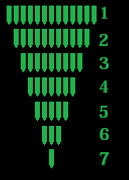
Nope, it's not that. I know what you mean, but it's not that. lol It's basically a bar, umm, picture a "health bar" in an oldschool video game or something. lol It starts out "Full" and then shrinks down and vanishes to nothing when half-pressing. It shrinks down at the same rate every time, it's almost just like a timer.

I drew what it looks like real quick, it starts at one and then shrinks down by one on each side each time like shown here:
DLSRCountdown.png

And then "frame 8" would be it vanishing entirely.

Thanks everyone else, that must be the issue. And yeah I'm constantly playing with shutter speed and such, I don't want to use auto always either but I'm still learning. lol
 
Last edited:
camera doesn't want that silly mode
 
Looks like bracketing or self time
 
I bet you have the self-timer on, yeah. That would prevent it from taking a photograph until the timer goes pop, and might also produce the sort of display you're seeing.
 
Notchy said:
It's basically a bar, umm, picture a "health bar" in an oldschool video game or something. lol It starts out "Full" and then shrinks down and vanishes to nothing when half-pressing. It shrinks down at the same rate every time, it's almost just like a timer.

I drew what it looks like real quick, it starts at one and then shrinks down by one on each side each time like shown here:
DLSRCountdown.png

And then "frame 8" would be it vanishing entirely.

Good one! Some day people will be able to say, "Great story, bro!" to you when you tell this one! I think we have ALL "been there" before at one timer or another.
 
amolitor said:
I bet you have the self-timer on, yeah. That would prevent it from taking a photograph until the timer goes pop, and might also produce the sort of display you're seeing.

Oh yeah ! Did that myself ! :)
 
I bet you have the self-timer on, yeah. That would prevent it from taking a photograph until the timer goes pop, and might also produce the sort of display you're seeing.

No, it's not that. I can snap the photo before that bar drops at all. It doesn't affect photo taking. :/
Still not sure what it is.
 

Create an account or login to comment

You must be a member in order to leave a comment

Create account

Create an account on our community. It's easy!

Log in

Already have an account? Log in here.

New Topics

Back
Top Bottom