What's new

Can someone answer a quick question...

TamiAz

Been spending a lot of time on here!
Joined
Sep 26, 2011
Messages
1,004
Reaction score
524
Location
Arizona
Can others edit my Photos
Photos OK to edit
I'm trying to take a picture of the moon again and I can't get my lens to focus on the moon. I have a Nikon D5100 and I have it set on manual focus and I can't get it to focus at all...What am I doing wrong. I have my ISO at 200, F/11, and 1/250s and nothing is working. I'm new at this and I have looked in my owner's manual and I can't figure it out. Uggghhhhhh...:grumpy:
 
you are turning the focus ring?
 
How long has your camera been outside? is there a chance you have condensation on one or more the lens elements/eye-piece/mirror/pentamirror? Any those will cause a big soft blur.
 
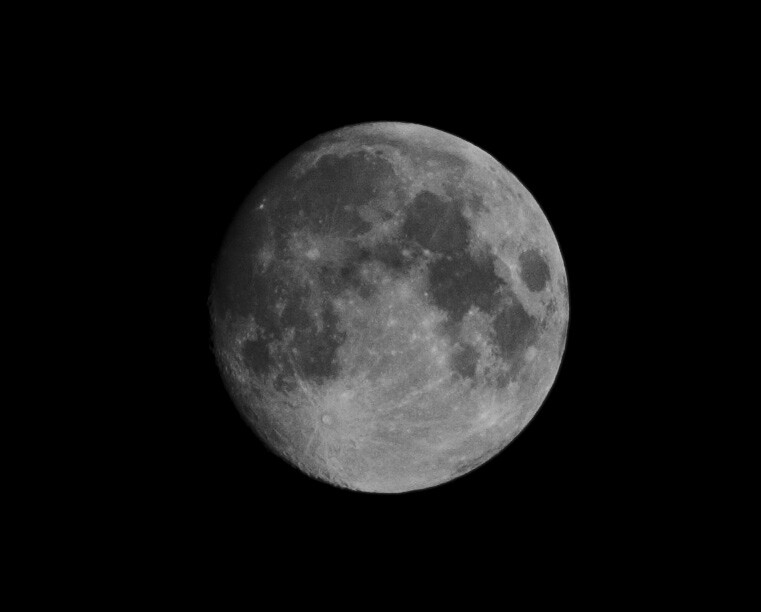
I'm in Arizona and it's dry right now...It wasn't a soft blur, it was a big white blob. I could not get a clear view of the moon on my screen. I did put my camera back on AF and took some shots and this is what I got..

moon3.jpg


I thought I would be able to fill my entire screen with the moon and it would be in focus, but that wasn't the case. All the pictures taken at 300mm on AF the moon looked small.
 
Last edited:
Hey, without pro gear, that's a pretty decent moon shot. Getting really good moon pictures is a LOT tougher than most people think.
 
diopter adjusted properly?
 
diopter adjusted properly?

I actually just discovered this little dial tonight...I'm not sure if it was adjusted properly. Could that have caused my issues with Manual focus?
 
Hey, without pro gear, that's a pretty decent moon shot. Getting really good moon pictures is a LOT tougher than most people think.

Thank you! :)

I was getting a little frustrated tonight.
 
If you are in live view you may just need to adjust your exposure compensation. The screen shows you what it thinks you want to see based on the light the camera's light meter registers. This results in the moon being too bright on the screen to see any details. I can't remember if there is a dedicated button on the D5100 for exposure compensation or not, but if there is, it should be near the shutter release button and have a symbol that looks kind of like this +/- on it. Refer to your manual to see where it is and how to use it. Just compensate into the negative and the moon will darken on the screen until you can see detail.
 
If you are in live view you may just need to adjust your exposure compensation. The screen shows you what it thinks you want to see based on the light the camera's light meter registers. This results in the moon being too bright on the screen to see any details. I can't remember if there is a dedicated button on the D5100 for exposure compensation or not, but if there is, it should be near the shutter release button and have a symbol that looks kind of like this +/- on it. Refer to your manual to see where it is and how to use it. Just compensate into the negative and the moon will darken on the screen until you can see detail.

Thank you... This helped and I was finally able to see the moon in focus on the screen. There are so many dials and buttons on these cameras that it can get overwhelming, but I can say that I actually learned quite a bit tonight. The forum is very helpful! :)
 
Glad I could help. You can magnify what you see in live view to see more detail. I assume you already knew that but it doesn't hurt to make sure.
 
He is shooting at 300mm.
I would suggest shooting the moon when it is not full or almost full. You will get the most detail if the craters are side-lit which will show more texture.

Here is one of my earlier shots with my Nikkor 55-300mm.
Copy-_DSC1001-1.jpg
 
That is the best you are going to get @ 200mm.

I pretty much get the same results

In size yes, but you still have something to go on when it comes to sharpness compared to the shot from OP!
 

Create an account or login to comment

You must be a member in order to leave a comment

Create account

Create an account on our community. It's easy!

Log in

Already have an account? Log in here.

Back
Top Bottom