What's new

Colors in Photography

Ironlegs

No longer a newbie, moving up!
Joined
Oct 7, 2013
Messages
198
Reaction score
67
Can others edit my Photos
Photos NOT OK to edit
Hello everyone,

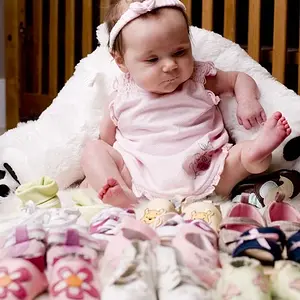
Not sure if i am posting in the correct section. For few weeks i have been thinking about the fact, that my photos are missing something and i realised that they were missing the beautiful colors professionals have. Could someone please explain me how to get colors like in this picture ? Loveliness by Miki | 500px
Thanks for answers.
 
what's so special about it?
 
The answer is : I dont know... but there is something special about it for me, i cant achieve similar colors... is it by post processing or cause of lens or lighting ? I will soon have a portrait photoshoot so i will post my results but i bet they wont be anywhere close to this.
 
And which one of these three has the highest value ? :D

By the way, i see in your equipment that you won Tamron 70-200 mm f/2.8, is the lens worth getting for portraits ?
 
...Tamron 70-200 mm f/2.8, is the lens worth getting for portraits ?

I absolutely love this lens.

here's the last portrait i took with it:


Erin Posing for me by The Braineack, on Flickr


with a little bit of post work, im sure I could make it look very similar to the link you posted.
 
I know its off topic, but whats the lighting ?
 
I know its off topic, but whats the lighting ?

that was taken at 4:45pm on July 4th in bright brilliant sun (to camera rightish). We were standing in the complete shade of trees.

I exposed for the ambient and she's filled using a diffused beauty dish with my YN560.
 
Ah, thanks... What do you think about flashbender for portraits ?
 
I've always wanted to get the large one with the diffuser panel, but haven't yet. People seem to have good results/experience with them.
 
my two cents. Low Aperture. a little flash on her (not sure what). then they went to a post editing source (EX: lightroom). brought out the orange and yellow in saturation/luminace. Slightly messed with split toning. and if she still did not have the smoth look to her, then you can go and brush the skin on areas you want to be more smooth. and when you brush you bring take out clarity, and play with moise and noise on the brush.

but to give it that more POP and smooth look. you want to be looking into a program and start shooting on raw.
 
2iqo9jm.jpg
View Raw Image">
before I messed with it.

2hfqp2s.jpg
View Raw Image">
and after.

I'm just giving a point on with the skin. I know the temp colour, edging and etc is off.

So this is just a basic (very basic) of what you can do. I can keep working on this picture for another 5 minutes and have it looking close to that one you posted.


and if you want to go nuts with clarity with the brush..........
10450073_260188354189290_1820453691661488668_o.jpg

This picture looks great in person and not dubbed down into a JPEG for the internet.
 
The photo in the posted link has been edited quite a bit.

Local edits to the white balance temperature of her face were made (warmed up) and one of the many types of skin softening was also locally applied.
Note the different color of her hand and legs.
 
The photo in the posted link has been edited quite a bit.

Local edits to the white balance temperature of her face were made (warmed up) and one of the many types of skin softening was also locally applied.
Note the different color of her hand and legs.
I meant to mention that and forgot, about the legs. I was trying to figure out why that was not brought up.
 

Create an account or login to comment

You must be a member in order to leave a comment

Create account

Create an account on our community. It's easy!

Log in

Already have an account? Log in here.

Back
Top Bottom