What's new

Could someone look at this for me?

Joined
Jan 2, 2014
Messages
242
Reaction score
62
Location
Atlanta, GA
Can others edit my Photos
Photos NOT OK to edit
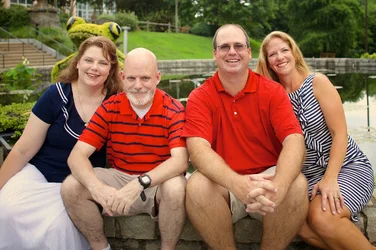
$IMG_3364.webp
Here's the best of show for the day if this says anything. This was a shoot last Wednesday where I stood in the *blazing* sun while the clients rushed me through all of the photographs.

Could I share a Dropbox folder with someone over email?
 
Looks ok.

I would try to keep spacing between there heads closer. And the Frog behind the girl on the left is kinda in the way.
 
Blazing sun and clients rushing you is never an excuse. You could have moved the group to your right and eliminated the building and maybe the hideous frog. But the best part is the pretty good expressions.
 
I edited it a bit in Photoshop. Removed some polls in the background, feathered to shadows and modified colors and tones.

edited.jpg
 

Attachments

  • $edited.webp
    $edited.webp
    1.7 MB · Views: 184
I see overcast skies and light that has less than optimal direction and that is than high quality.

Dark eye sockets, and no 'pop'. Both can be addressed by using off camera flash.
 
I see overcast skies and light that has less than optimal direction and that is than high quality.

Dark eye sockets, and no 'pop'. Both can be addressed by using off camera flash.

Well, I didn't have a flash with me. Would you be willing to look at a Dropbox? I am debating on whether to just refund my client's money for this shoot at this point in the game. I just am NOT happy with my work on this particular shoot.
 
Ok... promise me that you won't melt. Promise?

I'll say it: Ouch!

It's not great work but I think you knew that already when you posted.

It's a bit overexposed, there's lots of dead-space in the top and around the subjects. The posing needs work. The white balance is "cold" (warm that up just a touch -- easily remedied after the shot). Crop in because I'm not sure if my eye is supposed to looking at the pond and background or these people in front of it. The shot should be composed for the subjects but your subjects are in the lower half of the frame. Again, that's also easily remedied after the shot but you may as well think about it at the time you're shooting.

The water could have benefited from some polarizing to reduce the strong sky reflection. The background also doesn't look particularly appealing and as I look the right of the frame I see some nice tall trees and I'm wondering how this shot would have looked if you would have composed with a different background.

The good news is that it is, however, salvageable.

Since you marked your profile "My Photos are OK to Edit"... I did.

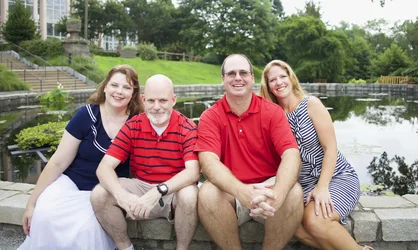
Here's what I could do with that image in just a few moments:

$IMG_3364 (1).webp

Notice I cropped in... way in (In the "if your photos aren't good enough... you're not close enough" school of thought).

The red was pretty intense on those shirts... I desaturated the reds a bit.

The image was pretty "cold"... I bumped up the white balance to "warm" the image a little bit and this naturally has the tendency to green up the grasses and intensify some colors (though I never added any saturation). I'm not thrilled with the white balance here -- I could have done some "brushing on" of this adjustment since your subjects on the left side are a bit fairer skinned than your subjects on the right but I just did a global adjustment. The subjects on the right look slightly over-warm (particularly the lady on the far right) which is why if I was fussing over this I would start brushing my adjustments on and off the image rather than using global image-wide adjustments.

I _very_ slightly reduced the exposure.

I also used "shadows and highlights" adjustments -- but only to cut the highlights (trying to take the strong lighting off their faces.) I could also have applied a brushed on "burn" but chose to do a quick global adjustment instead.

I applied a touch of sharpening that I "brushed on" around their faces. I also _very_ slightly added an overall sharpen. I might weaken the sharpening on the gentlemen on the right's neck to reduce the razor stubble.

I applied a weak gamma-vignette to the image ... this very slightly dims the corners and edges and helps draw attention to the middle. If you can tell that I added a vignette then I've overdone it (I like everything in moderation).

All of this in just a couple of minutes.

Now... we still have froggy popping up out of the head of the very nice lady on the far left (bad you!) so we'd have to be quite elaborate in the editing software to eliminate that. Don't be confused about WHY you're there. You aren't there to photograph the park... you're there to photograph THEM. The park is just a backdrop. Find a pleasant looking background that is less cluttered and not so high contrast. According to my EXIF data you shot this at f/2.8... but you also used the 24mm focal length. Had you stepped back several feet and increased to 70mm then you'd decrease the depth of field and add some blur to that background for a more pleasant look (you never get a lot of blur at 24mm.)

Now remember... you DID promise not to melt and I'm hoping you get at least some useful constructive feedback for posting this.

 
Ok... promise me that you won't melt. Promise?

I'll say it: Ouch!

It's not great work but I think you knew that already when you posted.

It's a bit overexposed, there's lots of dead-space in the top and around the subjects. The posing needs work. The white balance is "cold" (warm that up just a touch -- easily remedied after the shot). Crop in because I'm not sure if my eye is supposed to looking at the pond and background or these people in front of it. The shot should be composed for the subjects but your subjects are in the lower half of the frame. Again, that's also easily remedied after the shot but you may as well think about it at the time you're shooting.

The water could have benefited from some polarizing to reduce the strong sky reflection. The background also doesn't look particularly appealing and as I look the right of the frame I see some nice tall trees and I'm wondering how this shot would have looked if you would have composed with a different background.

The good news is that it is, however, salvageable.

Since you marked your profile "My Photos are OK to Edit"... I did.

Here's what I could do with that image in just a few moments:

View attachment 77788

Notice I cropped in... way in (In the "if your photos aren't good enough... you're not close enough" school of thought).

The red was pretty intense on those shirts... I desaturated the reds a bit.

The image was pretty "cold"... I bumped up the white balance to "warm" the image a little bit and this naturally has the tendency to green up the grasses and intensify some colors (though I never added any saturation). I'm not thrilled with the white balance here -- I could have done some "brushing on" of this adjustment since your subjects on the left side are a bit fairer skinned than your subjects on the right but I just did a global adjustment. The subjects on the right look slightly over-warm (particularly the lady on the far right) which is why if I was fussing over this I would start brushing my adjustments on and off the image rather than using global image-wide adjustments.

I _very_ slightly reduced the exposure.

I also used "shadows and highlights" adjustments -- but only to cut the highlights (trying to take the strong lighting off their faces.) I could also have applied a brushed on "burn" but chose to do a quick global adjustment instead.

I applied a touch of sharpening that I "brushed on" around their faces. I also _very_ slightly added an overall sharpen. I might weaken the sharpening on the gentlemen on the right's neck to reduce the razor stubble.

I applied a weak gamma-vignette to the image ... this very slightly dims the corners and edges and helps draw attention to the middle. If you can tell that I added a vignette then I've overdone it (I like everything in moderation).

All of this in just a couple of minutes.

Now... we still have froggy popping up out of the head of the very nice lady on the far left (bad you!) so we'd have to be quite elaborate in the editing software to eliminate that. Don't be confused about WHY you're there. You aren't there to photograph the park... you're there to photograph THEM. The park is just a backdrop. Find a pleasant looking background that is less cluttered and not so high contrast. According to my EXIF data you shot this at f/2.8... but you also used the 24mm focal length. Had you stepped back several feet and increased to 70mm then you'd decrease the depth of field and add some blur to that background for a more pleasant look (you never get a lot of blur at 24mm.)

Now remember... you DID promise not to melt and I'm hoping you get at least some useful constructive feedback for posting this.

Thank you! Yeah, I did use a 24mm...prime.. Probably a bad choice. I don't really have the budget right now to invest in a 24-70 for example, but I'm working on it.. Thanks for the constructive criticism, I haven't melted just yet but I might if you guys were to see the other photos. They are quite terrible. I don't even know if the rest are salvageable without some really heavy editing.
 
The frog and the building shouldn't be a part of the photograph, they are distracting, and take away the photo's balance. Good work though
 
They are happy people captured on film having a good time enjoying each others company. The fact that the technical photo elements are not the best they can be is more than likely of little or no interest to your client. Give them the photos with a smile and take your money for capturing these folks at their best.
 
Blazing sun and clients rushing you is never an excuse.
This! One of the most difficult things for many photographers is 'taking charge'. You can't allow the clients to control the shoot; you're the professional, and you know what is required. If they insist on doing this or that, you explain to them that in your opinion, that will not provide an optimal result, however, you are willing to try it, as long as they'll also do it your way. Out of curiosity, at your pre-shoot consult, did you explain to them how long it would take? I always add at least an extra 30 minutes onto whatever time I expect the shoot to take in the hope that the clients will set aside at least as much time as I need.
 

Create an account or login to comment

You must be a member in order to leave a comment

Create account

Create an account on our community. It's easy!

Log in

Already have an account? Log in here.

Back
Top Bottom