What's new

Experiment v. 1.1 Comments?

Jeff/fotog

TPF Noob!
Joined
Jul 8, 2005
Messages
135
Reaction score
3
Location
East Coast
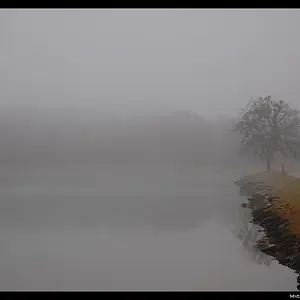
westonbarn.jpg


This is an 8x10 B & W negative converted to digital; I am trying to get some feedback on how it looks from your end.

This isn't a 'Gee Whiz, Knock 'em dead' image, rather an attempt to see how it looks. I had posted some earlier images and the feedback was that the images were too big.

Thank you.

www.jefferyraymond.com
 
Well, this one is nice and small and very pleasing to look at. I like the tones... did you add these later in photoshop or are these the tones you got from the scanned negative?
 
I personally think an optimal size is:
  • width: upto 600px
  • Height: upto 400px
So a regular landscape image would be 600 x 400, a regular portrait image would be 267 x 400 and a panoramic image may be something like 600 x 200.

That's the way I like to see/show them, anyway. ;)
 
This was a Zone System development process; the whites on the fence and trim were beyond the ability of the film to hold detail; therefore development was reduced about
-1.5...In PS, the negative had a decided blue-ish cast to it (due to the emulsion), so I modified the blue into a slight sepia cast. The print is huge (which has been my problem here) and doesn't work well in a small version in B & W; so part of the experiment is to try to make the image work in a smaller scale.

At 400dpi, this image is about 38Mb, and crashed PS.

There is so much more 'data' on an analogue neg than on a digital neg, it seems you have to be cutting down size and pixels to get a smaller and still 'punchy' image over to someone else's computer screen (assuming not everyone has DSL!)

Long answer to a kind question.

Appreciate your observation!

www.jefferyraymond.com
 

Create an account or login to comment

You must be a member in order to leave a comment

Create account

Create an account on our community. It's easy!

Log in

Already have an account? Log in here.

Back
Top Bottom