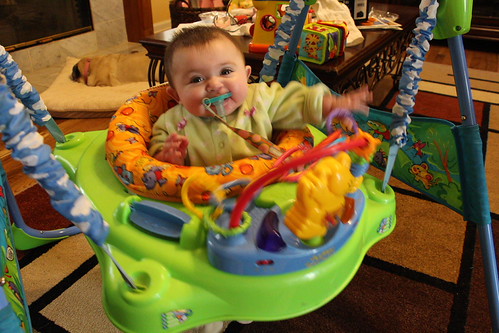
Here's the first picture that I tried with my new camera. I grabbed the camera and just snapped a quick shot. Part of the problem is that there's a door that shines light from behind me right on her when I'm taking the picture. And the blur is because she was jumping. This was on the camera's auto setting which I want to not be in the habit of using. I've been playing with the ISO setting today. I'm thinking that if I try this shot in the am with an ISO of 1600 that might help with the color. Any tips for not blurring when she's moving? And what other setting should I start playing with?
In this one, her back is to that door, with an ISO of 6400. I think this one looks better.
My $.02:
Here we see a fine example of how Auto can let you down. There are artistic uses for "motion blur", but IMO, this isn't one of them, and I'm guessing you would have preferred the photo be sharp.
Little kids just love to make quick/erratic movements, so this is going to continue to happen if you don't learn how to force your camera to use a quick shutter speed. The typical kit lenses aren't the best for indoor shooting without a flash, so you're going to need to open up the aperture all the way in most situations.
Try aperture priority mode on the dial, and set your aperture to wide open (smallest numerical f/number). Take a reading of the scene with your camera (press the shutter button down half way). In the viewfinder, you will see the shutter speed the camera is planning to use. If it is slower than, oh, 1/80th of a second then bump the ISO and try again. Actually, 1/100th would probably be even safer if you can swing it.
The wide open aperture is going to mean some areas of the photo will be out of focus. Set the focus on the kid's eyes--a little bit of a soft focus on the hands (for example) is not a big deal if the eyes are sharp.
Once you get a handle on that, start paying attention to what is in the background. The cluttered coffee table, sleeping dog, and adult feet are kind of a drag.

If you want to get into flash photography, everything changes.