What's new

first time hdr

halestorm

TPF Noob!
Joined
Aug 10, 2011
Messages
146
Reaction score
10
Location
Savannah Ga
Can others edit my Photos
Photos OK to edit
So I tried my hand at recreating an hdr look with photoshop cs. I had to do it manually since cs doesnt have the magic hdr button.
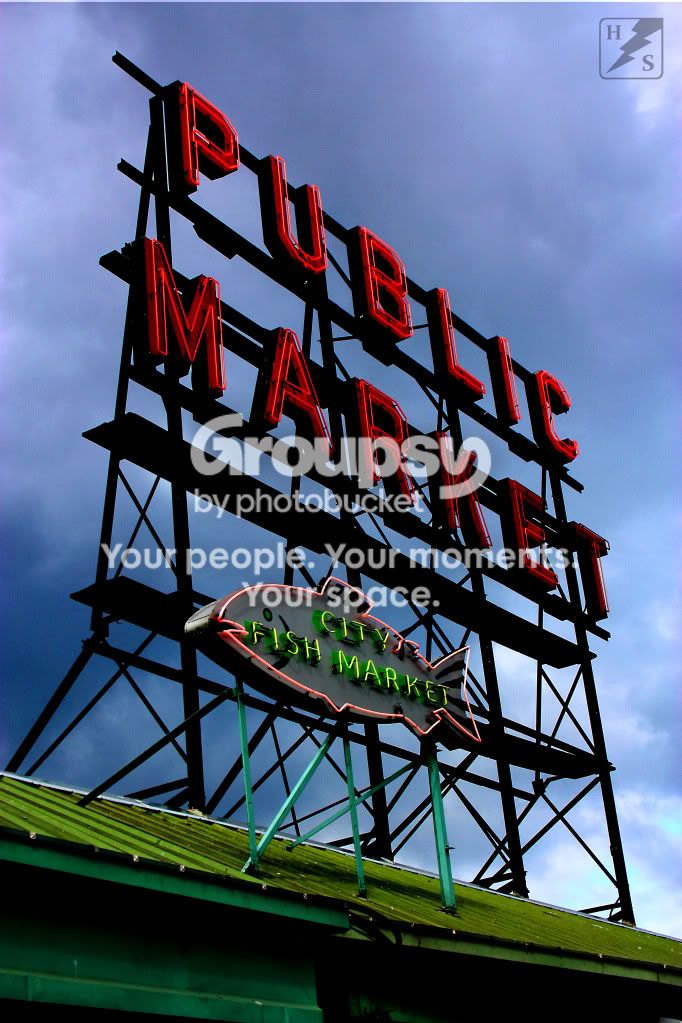
pikesplacesign1.jpg
 
If you want to do an HDR, then do HDR. Take several shots at different exposure.
 
Don't use "magic buttons", use exposure bracketing...
And please learn what HDR actually means ;)
 
Or... do both. Learning to imitate the effect is not without its merits. I mean, it is just not within my budget or uses to get a tilt-shift lens, but that doesn't mean I'm not going to try to imitate the effect using Photoshop or that learning that technique is somehow useless. But yes, to get the best HDR effect possible; exposure bracketing all the way (although, I am having a bit of trouble with it myself).
 
nickzou, you don't need any special equipment for exposure bracketing, so I'm not sure if I get your example... We don't do HDR "for the effect", but because we want to include more information within the image and that can't be simulated or imitated.
 
Can be imitated, it's just not as good as proper multiple exposures.

Here's a really good tutorial on it:

 
Last edited by a moderator:
That tutorial shows only the process of recovering some of the clipped data. You can do that to some degree, but I don't consider that to be a HDR, because you're not really extending your camera's dynamic range. ;) Not mentioning the quality of the final image comparing to the true HDR.
What's the point of using photoshop/lightroom/..../ technique? Because someone was lazy to take 2/4/6 extra pictures? Come on... If you want to include all the details in the scene, don't be lazy and do it properly.
 
yeah so what i did with this photo was i made 3 layers of the same picture and left one layer normal exposure and increased the exposure on one layer using levels and decreased exposure on one layer using the same method then i went in and erased undesired (way over or underexposed) areas upped the saturation slightly and created an unsharpen mask and voila.

I was told this was the proper way to do this by someone on here.
 
That tutorial shows only the process of recovering some of the clipped data. You can do that to some degree, but I don't consider that to be a HDR, because you're not really extending your camera's dynamic range. ;) Not mentioning the quality of the final image comparing to the true HDR.
What's the point of using photoshop/lightroom/..../ technique? Because someone was lazy to take 2/4/6 extra pictures? Come on... If you want to include all the details in the scene, don't be lazy and do it properly.

This is all true. However, some scenes dont sit still for you to take 3 or 4 identical photos at different exposures. It is also just as effective to change the exposure in pp as long as the original shot was properly exposed.
 
No it isn't. It's nowhere near as close to being as effective.

You don't know what you are taking about.
 
That is not HDR.

Try again.
 
I know what HDR means I am just trying to learn a new technique I found out about that is why I said (HDR look)! Thanks for assuming though that seems to be an ongoing trend on this forum. But I'm not mad. ;)
 
yeah so what i did with this photo was i made 3 layers of the same picture and left one layer normal exposure and increased the exposure on one layer using levels and decreased exposure on one layer using the same method then i went in and erased undesired (way over or underexposed) areas upped the saturation slightly and created an unsharpen mask and voila.

I was told this was the proper way to do this by someone on here.
Proper way is to shoot at least 3 differently exposed photos of the same thing, not to disassemble one and put it back together.

This is all true. However, some scenes dont sit still for you to take 3 or 4 identical photos at different exposures. It is also just as effective to change the exposure in pp as long as the original shot was properly exposed.
Not exactly. The problem is, that you're not getting a real HDR. If you look at your picture more carefully, you'll see, that you have still some dark areas in your image. Such black areas have no place in HDR images... Those areas are COMPLETELY black without any detail. You can recover some of the detail using the video-tutorial mentioned in this thread, but it has its limits as you surely see. And it isn't HDR by any means...
If you would have taken 3 or more bracketed photos to cover the whole dynamic range, you'd get a different image without pitch black areas. ;) That means changing the exposure in pp ISN'T as effective as exposure bracketing with more photos.
 
That's not TONEMAPPING either, which is using one exposure to make a faux HDR image. I mean, your shadows are BLACK. That is just a slightly underexposed shot. Sorry.
 
in the original photo the bottom portion was way underexposed and the sky was way overexposed I think I did a decent job of saving this photo using multiple layers aat different exposures and learned some new tricks along the way. Isn't the whole point of HDR to have all the details of a photo as equally exposed as possible so that it pops? I may not be explaining this right but I do understand what HDR is!
 

Create an account or login to comment

You must be a member in order to leave a comment

Create account

Create an account on our community. It's easy!

Log in

Already have an account? Log in here.

Back
Top Bottom