What's new

First time Yongnuo flash usage!

90foxbox

TPF Noob!
Joined
Apr 11, 2013
Messages
126
Reaction score
25
Location
Michigan
Can others edit my Photos
Photos OK to edit
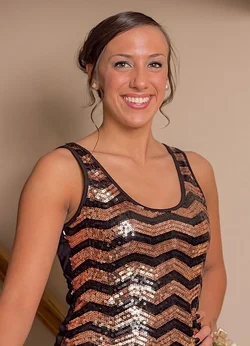
I was asked by my G/F's parents to shoot some pictures of their other daughter before her senior homecoming dance. I obliged, warning them I'm no professional but that I'd do my best.

It was my first time using the Yongnuo 565ex (or any flash for that matter). It was mounted on camera straight out of the box. I did some Googling and YouTube'ing to try and get an idea of what I was doing. I mainly just winged it once I was there though.

I had my variable ND filter on my 50mm because I had read that it was necessary for usage of more wide open f stops under bright conditions.

Here are the two photos I liked the most. One from outside and one inside.
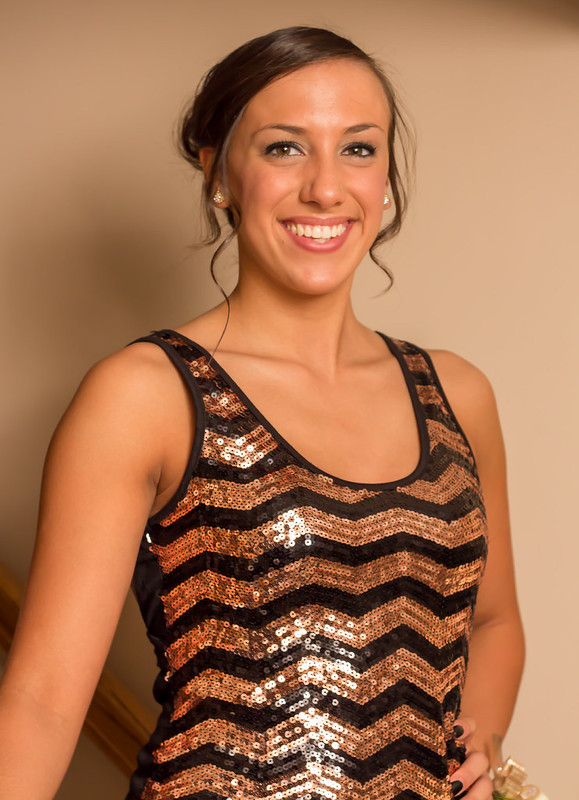

IMG_1922 by 90FoxBox, on Flickr
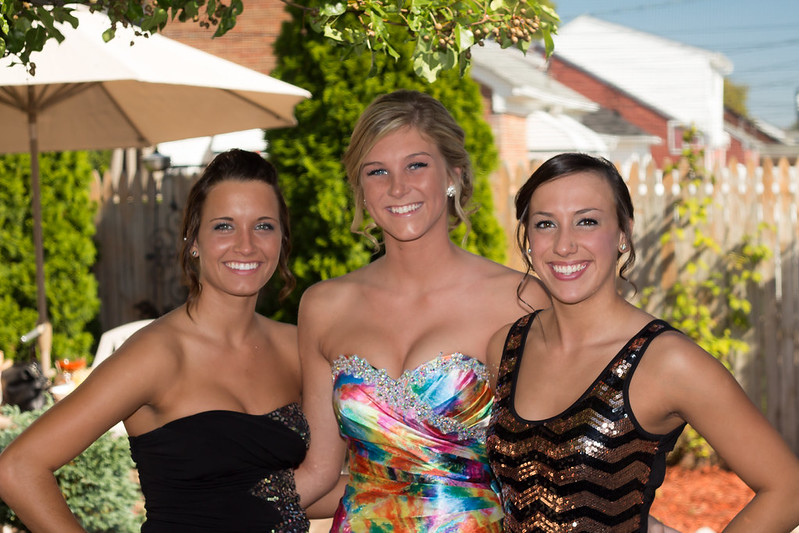

IMG_1904 by 90FoxBox, on Flickr

Go easy on me!

0_0
 
#1 White balance is off. I think you see some issues with firing the flash in the hotshoe with no modifier. Do the girl a favor and touch up the dark area at the armpit.

#2 You should strive to either get the flash off the camera or at least modify it. (hint) try bouncing the light from a white reflective surface, either to one side or mostly behind you.
 
Really try and get that flash off camera, and modify it in some way!!!!
 
yup, ill take the one in the middle..
 
You know what? For the conditions you described and keeping it on camera, you did well. I'd say the outdoor image is pretty good for the method you used. Not sure if you used your ND filter for the indoor shot - if you did, not really necessary for indoor.
 
#1 White balance is off. I think you see some issues with firing the flash in the hotshoe with no modifier. Do the girl a favor and touch up the dark area at the armpit.

#2 You should strive to either get the flash off the camera or at least modify it. (hint) try bouncing the light from a white reflective surface, either to one side or mostly behind you.

Thanks for the comments.

I believe the WB is off in #1 due to the color of the walls in the house. IIRC I tried to bounce the flash off the ceiling and it's not a white ceiling.

???

As for the arm pit I will definitely look into how I can fix that. I'm still new to the post processing side of things as well so I'll have to see what I can do.

I will eventually get the required equipment for OCF. I did order a small cheap soft box that I can attach to the flash. I figured it won't work that well for OCF stuff but quick shots in my home of friends and such with the flash on the hotshoe it should help.


You know what? For the conditions you described and keeping it on camera, you did well. I'd say the outdoor image is pretty good for the method you used. Not sure if you used your ND filter for the indoor shot - if you did, not really necessary for indoor.

Thanks for the positivity, really appreciate it.

I did have the ND filter on the lens while inside but it was set to absolute MIN darkening. Idk if that still may have had a slight affect on the pictures?
 
I'm looking at the image on my phone but I'm not seeing a huge deal with the white balance in image 1. The subjects skin tone is golden which may lead to the belief of off WB.
 
I'm looking at the image on my phone but I'm not seeing a huge deal with the white balance in image 1. The subjects skin tone is golden which may lead to the belief of off WB.


she looks orange compared to the outdoor shot below.

I think both were successful for OnCF, but had you been able to even just take that flash and hold it out to the side from you as far as you could and do the same in #2, you'd have a much more interesting image by throwing the shadows to one side and not washing out all the features.

But again, you did a great job exposing for both the background and foreground.
 
That filter ruined most of your shots. I looked at them in Original size on Flickr...that poorly-made filter has caused almost a diffraction effect on the catchlights in the eyes...the shots look terrible at original size...soft, with an almost ghost-like, sort of double-image veiling. The shots look okay when down-sized, but the originals all show horrible image quality. Again...look at the catchlights in the eyes...can you see the cross-star-like effect, caused by that variable ND filter? That thing is junk. Get rid of it.
 
That filter ruined most of your shots. I looked at them in Original size on Flickr...that poorly-made filter has caused almost a diffraction effect on the catchlights in the eyes...the shots look terrible at original size...soft, with an almost ghost-like, sort of double-image veiling. The shots look okay when down-sized, but the originals all show horrible image quality. Again...look at the catchlights in the eyes...can you see the cross-star-like effect, caused by that variable ND filter? That thing is junk. Get rid of it.

Yeah it's definitely a cheap-o filter. It's all I had at the moment. Now that I have another use for the filter other than video i'm definitely going to get a different one.

Any recommendations?
 
I'm looking at the image on my phone but I'm not seeing a huge deal with the white balance in image 1. The subjects skin tone is golden which may lead to the belief of off WB.


she looks orange compared to the outdoor shot below.

I think both were successful for OnCF, but had you been able to even just take that flash and hold it out to the side from you as far as you could and do the same in #2, you'd have a much more interesting image by throwing the shadows to one side and not washing out all the features.

But again, you did a great job exposing for both the background and foreground.

Thanks for the advice I'll definitely try it!
 
That filter ruined most of your shots. I looked at them in Original size on Flickr...that poorly-made filter has caused almost a diffraction effect on the catchlights in the eyes...the shots look terrible at original size...soft, with an almost ghost-like, sort of double-image veiling. The shots look okay when down-sized, but the originals all show horrible image quality. Again...look at the catchlights in the eyes...can you see the cross-star-like effect, caused by that variable ND filter? That thing is junk. Get rid of it.

Yeah, looks like Flickr's built in unsharp mask really fixed these on the resize. Throw that filter away, when looking at the full size, it appears like the focus was missed as well, but I really think that's the fitler ruining the shot.
 
I believe the WB is off in #1 due to the color of the walls in the house. IIRC I tried to bounce the flash off the ceiling and it's not a white ceiling.

That may be so, and it also might have to do with the actual light color. My speedlight came with some gel covers to mitigate the effects of the lighting color, but if yours did not include that, you can either select a custom white balance or make adjustments in post.

FWIW: I fiddled some with shot #1:

$10001598364_2d02d6af94_c - Version 2.webp
 
I believe the WB is off in #1 due to the color of the walls in the house. IIRC I tried to bounce the flash off the ceiling and it's not a white ceiling.

That may be so, and it also might have to do with the actual light color. My speedlight came with some gel covers to mitigate the effects of the lighting color, but if yours did not include that, you can either select a custom white balance or make adjustments in post.

FWIW: I fiddled some with shot #1:

View attachment 57084

Thanks for the advice and the edit. Really appreciate it.
 
That filter ruined most of your shots. I looked at them in Original size on Flickr...that poorly-made filter has caused almost a diffraction effect on the catchlights in the eyes...the shots look terrible at original size...soft, with an almost ghost-like, sort of double-image veiling. The shots look okay when down-sized, but the originals all show horrible image quality. Again...look at the catchlights in the eyes...can you see the cross-star-like effect, caused by that variable ND filter? That thing is junk. Get rid of it.

Yeah, looks like Flickr's built in unsharp mask really fixed these on the resize. Throw that filter away, when looking at the full size, it appears like the focus was missed as well, but I really think that's the fitler ruining the shot.

Yeah I don't doubt the filter is hurting the photos. It's just a cheap Polaroid filter.

I guess I have the same question for you as I had for Derrel. Any recommendations on a variable filter?
 

Create an account or login to comment

You must be a member in order to leave a comment

Create account

Create an account on our community. It's easy!

Log in

Already have an account? Log in here.

Back
Top Bottom