What's new

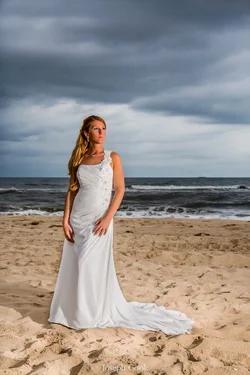
From my first Wedding!

I think either the light missed her face or the light itself is low. A lot of it is hitting the ground in front of her and her dress, but not enough on her face. The horizon is right in the middle, which makes the composition rather bland. I have accidentally done that many times, so now I pay attention to it a lot. lol Other than that, it's a nice image. I like how she twisted her body, which creates very nice flowing lines and accentuates her curves.

I noticed that while I was editing and decided to leave it. I try really hard to mind my horizons and backgrounds. All very much a learning experience.

OP, lets say you keep the setting the same.. after you shoot this shot you have the groom with black suit pose at the same spot. I guarantee you your groom shot will be totally different.

I wouldn't argue that because you are 100% right. No black suit for this wedding though.

Hello everyone! This one is from my first wedding. She is a little orange but that is literally just her tone. Any C&C is appreciated!
She's really orange because she's really underexposed. You lit the ground, not her.

Sorry my friend but you are wrong on this one. She was orange it almost every shot on the day. She even mentioned that she over did the spray tan.

Texkam, Perfect exposure on the sand was exactly what I was looking for! :NAILED IT: :lmao:
 
Well, you're the professional..
 
Well, you're the professional..

I appreciate sarcasm as well but if you weren't trying to be sarcastic let it be known that I have never stated or made claim to be a professional photographer nor do I advertise myself as one. When I meet with a potential client I definitely make it a very well known thing that I am not a professional but that is my goal and clearly define my abilities.
 
I gave it a quick shot at a post-process. Here is my result plus method below:

$Amanda Brown-3.webp

Basic Adjustments:

Exposure: +0.71
Contrast: +19
Highlights: -100
Shadows: +48
Whites: -29
Blacks: +48

Vibrance: -2
Clarity: +12

Local Adjustments:
Using the brush tool I selected the sky and gave it adjustemments:
Exposure: +0.19
Contrast: +43
Highlights: -10
Saturation: 24

Then I made a new selection with the brush for the sand, using these adjustments:
Exposure: +0.86
Highlights: +21
Shadows: +48

Then I just did an overall sharpen to the image and reduced noise ever so slightly.

The aim being to lighten the image. That was my 2 minute edit.

 
I gave it a quick shot at a post-process. Here is my result plus method below:

View attachment 45539

Basic Adjustments:

Exposure: +0.71
Contrast: +19
Highlights: -100
Shadows: +48
Whites: -29
Blacks: +48

Vibrance: -2
Clarity: +12

Local Adjustments:
Using the brush tool I selected the sky and gave it adjustemments:
Exposure: +0.19
Contrast: +43
Highlights: -10
Saturation: 24

Then I made a new selection with the brush for the sand, using these adjustments:
Exposure: +0.86
Highlights: +21
Shadows: +48

Then I just did an overall sharpen to the image and reduced noise ever so slightly.

The aim being to lighten the image. That was my 2 minute edit.

While I like the edit...it just completely destroys what I was going for with the direct lighting from the off camera flash.
 
I gave it a quick shot at a post-process. Here is my result plus method below:

View attachment 45539

Basic Adjustments:

Exposure: +0.71
Contrast: +19
Highlights: -100
Shadows: +48
Whites: -29
Blacks: +48

Vibrance: -2
Clarity: +12

Local Adjustments:
Using the brush tool I selected the sky and gave it adjustemments:
Exposure: +0.19
Contrast: +43
Highlights: -10
Saturation: 24

Then I made a new selection with the brush for the sand, using these adjustments:
Exposure: +0.86
Highlights: +21
Shadows: +48

Then I just did an overall sharpen to the image and reduced noise ever so slightly.

The aim being to lighten the image. That was my 2 minute edit.

While I like the edit...it just completely destroys what I was going for with the direct lighting from the off camera flash.

Haha, my bad, I didn't know that was the look you were going for.
 
Maybe something like this? I'm obviously no pro with Photoshop :D Sorry I had to crop out your name to move the horizon a bit.

bridal_sky.jpg
 

Create an account or login to comment

You must be a member in order to leave a comment

Create account

Create an account on our community. It's easy!

Log in

Already have an account? Log in here.

New Topics

Back
Top Bottom