What's new

Getting sharp product photography

jimmykoli12

TPF Noob!
Joined
Apr 11, 2016
Messages
24
Reaction score
0
Can others edit my Photos
Photos OK to edit
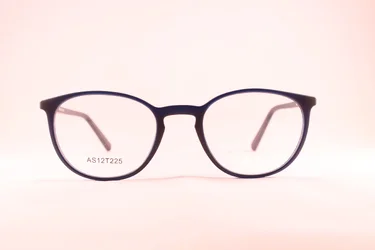
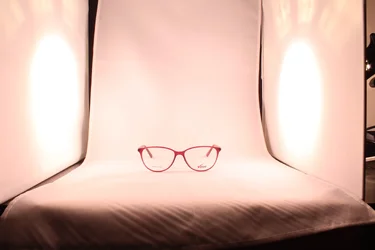
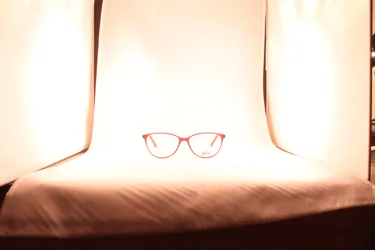
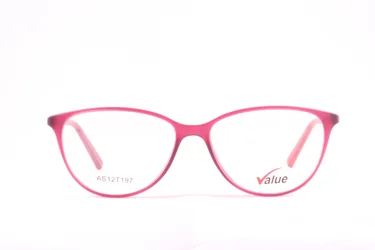
In the below photograph for the red spectacle, I have used a 50mm lens at F/22 and an exposure of 8sec. In the next photograph for the black one I have used at 18-55mm lens at F/9 with an exposure of 1/2 sec.

But in both the photograph, I am not getting a sharp product photograph. Can anyone suggest why?
 

Attachments

  • IMG_9585.webp
    IMG_9585.webp
    104.6 KB · Views: 296
  • IMG_9557.webp
    IMG_9557.webp
    184.5 KB · Views: 304
At f/22 diffraction will kill resolution.

The 18-55mm picture looks OK to me. That lens is probably just not tack sharp.
 
Hi,

In my opinion, it could be several factors.

It could be your camera settings on sharpening, it could be affected by chromatic aberration (although I can't see anything obvious on your photos). Sometimes it could be micro vibration (did you have a tripod)?

I don't think it's to do with your aperture considering it's a relatively small object and both your aperture should be more than enough to cover the depth of field.

Most of the time, photos straight out of the camera needs some sharpening done in post-processing. Maybe that will solve the problem? :)
 
Use a shorter exposure and make sure the lens is focusing correctly with a few test shots. If it needs it, calibrate the focus for your lens.
 
Tripod, remote shutter release, look up your optimal zoom length and aperture (NOT F22), make sure you're not too close to the subject.
 
F/22 is a very small lens aperture, being only 1/22 nd as wide as the lens focal length (F) of 50 mm, or only 2.2 mm wide.
As mentioned you've lost some focus sharpness by using to small a lens aperture.
How much focus sharpness you've lost depends on what camera your lens is on.
Most digital cameras have an anti-aliasing (AA) filter in front of the image sensor. How aggressive the AA filter is affects how sharply the camera can focus, regardless the lens aperture.

At any rate, virtually all digital photographs benefit from being sharpened, and there are many techniques we can choose from to sharpen our digital photographs.
Sharpening is a book length subject and here is a good one on the subject:
Real World Image Sharpening with Adobe Photoshop, Camera Raw, and Lightroom (2nd Edition)

With as small an aperture as f/22 the size of each pixel on the image sensor of your camera becomes important.
Note that the pixels in a Nikon D5100 or D7000 are only 4.8 µm wide while the pixels in a Nikon D2x, D90, D300, D5000 are bigger at 5.5 µm wide.
When the Airy Disk diameter gets bigger than the pixel size focus sharpness is lost.
Resolution won't be lost until the Airy Disk diameter is 2 to 3 times wider than the pixel size.

For more information about diffraction and other basic digital photography tutorials:
Diffraction Limited Photography: Pixel Size, Aperture and Airy Disks
Photo Editing Tutorials
Learn Photography Concepts
 
Last edited:
I'll reiterate:

Have a nice tripod (not a cheap one - those long exposures of 1/2 and 8 secs will show any slight movement what so ever.

Have your camera do Mirror Up (which is a feature on mid to higher end cameras, not the cleaning feature) - don't know what you have. But this will prevent any shaking from the mirror and you doing essentially long exposures.

Remote Trigger - either wired or wireless to activate the Cameras MuP (Nikon speak) and then to take the shot.

Don't be too close. confirm the lenses Minimum Focus Distance. And learn about Depth Of Field by using a DOF calculator. Though if you are just getting hte width of the frame you should be okay.

Learn proper exposure. Looks like you blasted the first one which can take away detail.
Did you manually focus this ?

Can you provide us a extremely detailed description of your setup. Don't assume anything as we would have to review your total equipment and technique and provide suggestions.

I did get this from the first EXIF
Camera: Canon EOS 1100D
Lens: Canon EF 50mm f/1.8 II
Exposure: Manual exposure, 8 sec, f/22, ISO 100
Flash: Off, Did not fire
Focus: Manual Focus (3), with a depth of field of from 0 m to infinity.
AF Area Mode: Single-point AF

 
I'll reiterate:

Have a nice tripod (not a cheap one - those long exposures of 1/2 and 8 secs will show any slight movement what so ever.

Have your camera do Mirror Up (which is a feature on mid to higher end cameras, not the cleaning feature) - don't know what you have. But this will prevent any shaking from the mirror and you doing essentially long exposures.

Remote Trigger - either wired or wireless to activate the Cameras MuP (Nikon speak) and then to take the shot.

Don't be too close. confirm the lenses Minimum Focus Distance. And learn about Depth Of Field by using a DOF calculator. Though if you are just getting hte width of the frame you should be okay.

Learn proper exposure. Looks like you blasted the first one which can take away detail.
Did you manually focus this ?

Can you provide us a extremely detailed description of your setup. Don't assume anything as we would have to review your total equipment and technique and provide suggestions.

I did get this from the first EXIF
Camera: Canon EOS 1100D
Lens: Canon EF 50mm f/1.8 II
Exposure: Manual exposure, 8 sec, f/22, ISO 100
Flash: Off, Did not fire
Focus: Manual Focus (3), with a depth of field of from 0 m to infinity.
AF Area Mode: Single-point AF

Thanks for the in detail reply. I am currently using a light tent for photography. This is the link for the setup.
CowboyStudio Table Top Photo Studio Light Tent Kit in a Box - 1 Tent 2 Light Set 1 Stand 1 Case: Amazon.in: Electronics

My camera is a Canon 1100d, with one 18-55 lens and the other is a 50mm lens. I have not used flash as such for the photo. Any more info you require from my side.
Is there any book from where I can learn this product photography. Since the terms Minimum focus distance and DOF Calculator too new for me.
 
This is the look I am trying to achieve. How sharp is the photography! What kind of lens they must have used.

Please do not post images to which you do not hold rights. You may post a link.
 
Last edited by a moderator:
Minimum focus distance is just how close you can get to your subject before the lens cannot focus anymore. Look it up for your lens. Don't shoot closer than that.

DOF calculator is a calculator that will help you determine your depth of field. Depth of field is how much distance before and after the point of focus that will be in focus when you take your shot.

Generally a smaller aperture (larger number) will have a large depth of field, but will have increased refraction (light bends around the edges of the aperture blades, which causes blur and other effects). A larger aperture (smaller number) will have a clearer picture due to less refraction, but will suffer from a smaller (more shallow) depth of field.

Every lens has an optimum aperture for clarity, which you can look up in lens test results. Same goes for focal length for zoom lenses. Generally, though, if you're two stops down from widest aperture (so not 2.8 but rather something like 5.6), and if you're zoomed in about 1/3 of the way on the lens, you're in a good spot.

You do NOT need high quality lenses to get relatively sharp photos. YES a higher quality lens will give you sharper photos more easily, and NO a low-quality lens is generally not going to be able to be AS sharp as a high quality one, but the real key in ALL cases is you need to know your lens, know it's strengths and limitations, and then work within them.
 
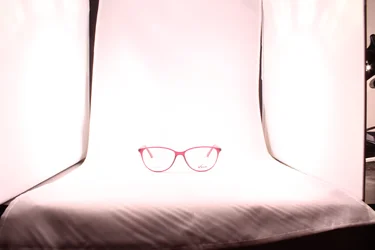
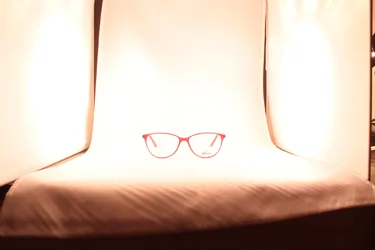
Here are some of the shots I have shot recently. In the same the image is coming out sharper than before, but the light around is giving it a yellowish tinge. Is it due to the yellow lights of the bulb or due to improper white balance.Should I change the bulb. They have been all shot in AWB.
 

Attachments

  • IMG_9613.webp
    IMG_9613.webp
    286 KB · Views: 227
  • IMG_9614.webp
    IMG_9614.webp
    218.2 KB · Views: 243
  • IMG_9616.webp
    IMG_9616.webp
    227.8 KB · Views: 223
  • IMG_9616.webp
    IMG_9616.webp
    227.8 KB · Views: 242
White balance issues. Set your white balance. Use better lighting. Or both.
 
Don't know if you are using software to do any Post Processing such as Adobe LIghtroom.

But it would be advantageous to use a 18% grey card to set white balance, such as this ==> Amazon.com : White Balance Card 18% Gray Grey Card. Use for Video, DSLR and Film. Custom Calibration Camera Checker Cards. Premium Exposure Photography Card Set. Free Ebook Included + Instruction Guide : Camera & Photo

The use Lightroom to correct the WHite Balance in the software. ie, take a photo of the glasses with the card as the first shot, Also shoot in the RAW format for best WB flexibility.
Then use software such as Lightroom to correct your light balance.

Also learn about how to set WhiteBalance in the camera by using a grey card
 
Go back and read AstroNikon's response again. Since you are using hot lights, you cannot get sharp images without a tripod. Hand holding the camera causes motion blur at the relatively long exposure times required. High ISO produces digital noise which also hurts sharpness.

The color issue is caused by the color temperature of the lights. You can correct that by setting your white balance manually by lighting a white background with the lights.
 

Create an account or login to comment

You must be a member in order to leave a comment

Create account

Create an account on our community. It's easy!

Log in

Already have an account? Log in here.

New Topics

Back
Top Bottom