What's new

Getting sharp product photography

Go back and read AstroNikon's response again. Since you are using hot lights, you cannot get sharp images without a tripod. Hand holding the camera causes motion blur at the relatively long exposure times required. High ISO produces digital noise which also hurts sharpness.

The color issue is caused by the color temperature of the lights. You can correct that by setting your white balance manually by lighting a white background with the lights.

I am using the hot lights provided with the tent box. BTW I am using a tripod for the shoot. I will try to set the white balance today and then shoot the pics.
 
I am using the hot lights provided with the tent box. BTW I am using a tripod for the shoot. I will try to set the white balance today and then shoot the pics.

As an example, I threw a pair of sunglasses in my light tent and shot it. It isn't what I would consider a marketable image but it does illustrate what a sharp image should look like. In this case, the camera was hand held because the light tent is lit with studio strobes at 1/32 power. That is an exposure of about 1/32,000 sec. In your case you need a very stable platform. You should be able to get the same shot with your equipment with some care and practice.

tifosi.jpg
 
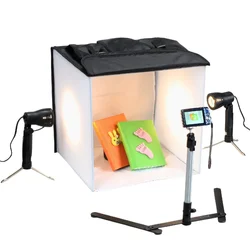
I don't have strobe lighting but have a halogen lamp setup. It throws a continuous yellow light. Attached is the sample photo of my setup.
 

Attachments

  • 81no8H6+cLL._SL1500_.webp
    81no8H6+cLL._SL1500_.webp
    82.8 KB · Views: 130
I don't have strobe lighting but have a halogen lamp setup. It throws a continuous yellow light. Attached is the sample photo of my setup.

Yes, I understand. I wasn't trying to get you to buy equipment. I was simply providing a sharp product shot as an example for you to emulate. Your equipment will get the job done. It will take some care and practice. It won't be as quick and easy as the shot I uploaded but it can be done.

You have the tripod. You need to correct your white balance for your lights and get a feel for camera position and adjustments to get what you want. Try to fill the frame with the subject. Your camera position should be at the point where that occurs. My strobes don't work better than your lights. They simply work faster and easier. The only difference between your images and mine is that you are learning and I've made 10's of thousands of product shots. Keep working at it.
 
I looked at the first two images, and what I think is the major issue is not shooting at f/22--but shooting with a very substantial amount of blowback light that is flooding through the lenses and frames, and coming right into the lens. I can see the blowback...the basic issue is that you are using a light tent, and simply FLOODING the shooting area and the product with massive amounts of back-light, and the lens is being flooded internally, with light that is causing a major loss of contrast.

Most lenses, when located physically too close to the light that is flooding the light tent, will suffer from overall veiling glare--an overall softening and flaring of the image. A significantly longer lens, located three times farther away, would help dramatically lower the intensity of the light. Also, a really GOOD lens hood, like a compendium lens hood, or even a cardboard makeshift hood would help.

Another thing that would likely help is to position three black cardboard gobos, to block light that is hitting the tent area from hitting the lens front. In this type of shooting scenario, you need a GOOD lens shade, and also, you need to minimize the amount of light that is reaching the camera position; gooseneck arms clamping to the front of the shooting table are the cheapest solution, using blackened styrofoam, which is the most light-weight, most-rigid, easiest-to-support material you're likely to find at a good price. Gobo is short for go-between. Get two for the sides, one for above the lens.

 
Last edited:
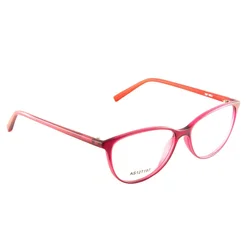
Jimmy, the first thing I can say to be specific is that you are way too far away from the subject assuming the shots of the light tent are what we are seeing. This results in excessive cropping. Remember what I said above about filling your frame with the subject. I tried to clean up the images the best I could.

glasses.jpg


Now that we can see things more clearly I can also tell you that you have a problem with the light placement and exposure. The frames were washed out as Derrel mentioned above. I gave them a healthy dose of contrast and you can see the correction on the red frame is excessive. Photoshop has added some black areas because I had to overdo it. It needs to be reshot. The entire frame should probably be placed behind where your lights strike the tent. You can see that the rails are overexposed relative to the frames.

You need to experiment with your light and subject placement and the exposure and get that camera closer to the subject so that it can fill the frame.
 
Last edited:
It depends on what camera and what lens you use. If it's a Sigma lens, most if not all of them can use the usb dock and be calibrated there, but you need to know which way to correct the focus, ie back or front focus. you do this by taking test shots (at each marked focal length if it's a zoom and just one shot if it's a fixed length) and seeing which way it focuses. Some cameras will have a focus trim setting that will let you make only one adjustment to the camera body for that lens.
 
  • Like
Reactions: oxo
Thanks for the reply, i am new to the game and i have a very basic Nikon
D3100 with the double lens pack, had it a couple of years now only now am i using it more and more just curious to how it was done really.
 
Thanks for the replies Derrel and FMW. Going by the replies by Derrel and FMW I think I am too close to the subject. The distance between the camera and subject is less than 2 feets. And at that distance, I am shooting at 50mm. This is the reason it seems the photo is overexposed.

Also I did the white balance setting yesterday. I had a query for the same. When i click the snap should I adjust the exposure to make the white sheet completely white or should I shoot it as it is without changing the exposure.
 
Thanks for the replies Derrel and FMW. Going by the replies by Derrel and FMW I think I am too close to the subject. The distance between the camera and subject is less than 2 feets. And at that distance, I am shooting at 50mm. This is the reason it seems the photo is overexposed.

Also I did the white balance setting yesterday. I had a query for the same. When i click the snap should I adjust the exposure to make the white sheet completely white or should I shoot it as it is without changing the exposure.

I misunderstood. I thought you were too far away because of the other images. I agree with Derrel. I think you produced some lens flare that washed out the contrast.

When you adjust white balance manually, just light the white subject with your lights and shoot it in auto mode. You may have to put the lens or camera in manual focus to avoid failing focus confirmation. Focus doesn't matter for this purpose. Your camera manual should explain all of this.
 
Get a nice prime lens. Use tripod and focus manually with live view.
 
You don't need a prime lens for this

using tapatalk.
 
Thanks for the reply, i am new to the game and i have a very basic Nikon
D3100 with the double lens pack, had it a couple of years now only now am i using it more and more just curious to how it was done really.
Unfortunately, the entry-level Nikons do not have that feature. I think you have to be in the mid-level range (D7200) to fine-tune the lenses.
 
  • Like
Reactions: oxo
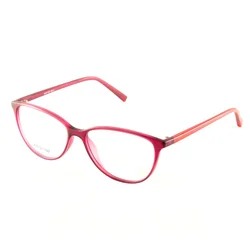
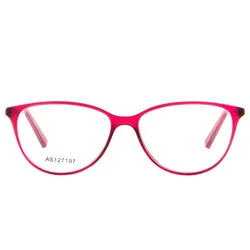
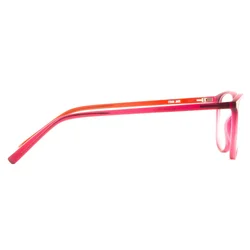
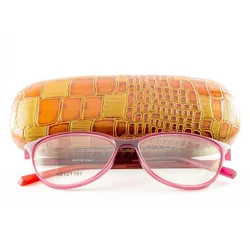
Hi all here are some of the recent pictures I have taken. Any feedback will be valuable.
 

Attachments

  • 45degree_1.webp
    45degree_1.webp
    24.1 KB · Views: 160
  • 45degree_2.webp
    45degree_2.webp
    22.9 KB · Views: 152
  • front.webp
    front.webp
    28.4 KB · Views: 148
  • side_profile.webp
    side_profile.webp
    17 KB · Views: 140
  • with_box.webp
    with_box.webp
    104.3 KB · Views: 167

Create an account or login to comment

You must be a member in order to leave a comment

Create account

Create an account on our community. It's easy!

Log in

Already have an account? Log in here.

Back
Top Bottom