What's new

Grave stones.

FITBMX

Been spending a lot of time on here!
Joined
May 11, 2014
Messages
3,860
Reaction score
1,423
Location
Burns, KS, USA
Can others edit my Photos
Photos OK to edit
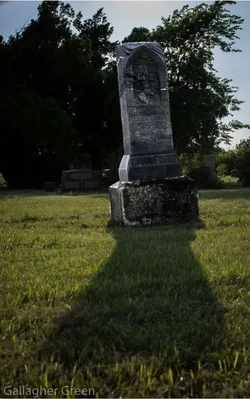
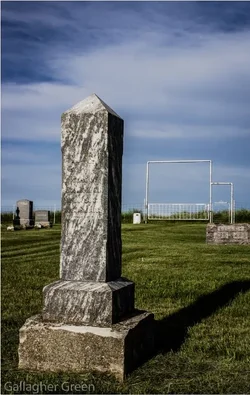
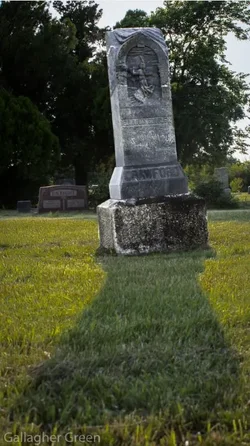
I really want to just go take some photos, I didn't care what they were!
It had been a while since I had taken anything, so I just headed out and found myself in the grave yard.:lmao:

So how are they?

1#
$Capture 36.webp

#2
$Capture 37.webp
 
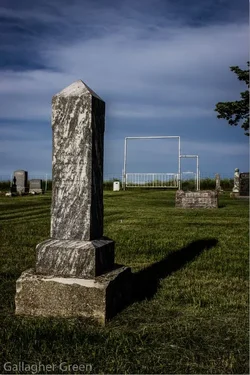
Backgrounds are extremely distracting. Try cropping in to focus purely on the headstones. They also appear to be underexposed.
 
every subject is a good subject for a photographer!

as already said, underexposed, watch for your bg and framing and try numerous compositions on one stone
#2, you did stand in the right spot for backlit photo but, among else, you didn't expose it right
 
I darkened them in Lightroom........ Oops
I will go over them again.:)
 
#2 has some potential as a concept, although the execution - as noted - could easily be improved. There's an element of "going against the grain" with the headstone leaning one way and the trees leaning in the opposite direction.
 
#2 has some potential as a concept, although the execution - as noted - could easily be improved. There's an element of "going against the grain" with the headstone leaning one way and the trees leaning in the opposite direction.

Most of the stones are quite old and are starting to get a bad lean!
 
If any of you want to edit one, just say so and I will post a higher quality file for you. :)
 
I went over them again. :)

#1
$Capture 44.webp

#2
$Capture 45.webp
 
ok.... because obviously it wasn't clear enough...

you can't make these to be good just with trying different edits, none of potential edits would save these captures, because the problem wasn't your edit in the first place.

If you want to capture something better, go there again, think about how and what you want to capture and reshoot
 
ok.... because obviously it wasn't clear enough...

you can't make these to be good just with trying different edits, none of potential edits would save these captures, because the problem wasn't your edit in the first place.

If you want to capture something better, go there again, think about how and what you want to capture and reshoot

I did take several shots, but there's just not much there for a background. It pretty much looks the same on all sides. :(
 
ok.... because obviously it wasn't clear enough...

you can't make these to be good just with trying different edits, none of potential edits would save these captures, because the problem wasn't your edit in the first place.

If you want to capture something better, go there again, think about how and what you want to capture and reshoot

I did take several shots, but there's just not much there for a background. It pretty much looks the same on all sides. :(

Use a larger aperture, and get closer to the subject then, causing the backgrounds to be more OOF.
 
^^^ This.

Also, you did have a low angle, but try even lower. That can create a sort of looming and gloomy effect and also minimize distracting objects in the background. Get yourself down in the dirt, man! ;)
 

Create an account or login to comment

You must be a member in order to leave a comment

Create account

Create an account on our community. It's easy!

Log in

Already have an account? Log in here.

Back
Top Bottom