What's new

Help/Suggestions with PP on this pic

Here is my version:

18346651765_9f22d6d9bd_o - Version 2.webp
 
Like everyone said, I think the only thing not working in that image was the horse's harsh light.

So I softened the light for you.

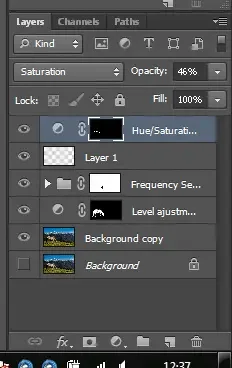
-First made an level ajustment that bring back the shadows and brightned the lights.
-Then created a frequency separation, softened the light on the low-pass layer with multiple selective gaussian blur filter on harsh light and shadows.
- (layer one is a mistake of my part, it is removed from the final psd version)
- a final hue/saturation layer combined with a layer mas to remove the green cast under the horse.

If you decide to use it, I can send you the PSD file no worry.

Hope you like it.

ajustments.webp
18346651765_9f22d6d9bd_o.webp
 
I agree about the light, it created some great contrast in the mountains but is too much for the horse. I wonder if the horse being so much in the left half in the picture makes it more noticeable.

I don't think I'd do much because sometimes the more you mess with it the worse things can get! lol

I feel like I almost want to take a step back, like the horse isn't quite in the best place; I might crop the right side a little to see if that better balances the composition (maybe from just to the right of that line of clumps of grass, and to the left of the peak nearest the edge of the frame).

untitled crop.webp

Something like this, also took a slight bit off the left side and bottom edge to clean up the background a bit.
 
Last edited:
Thanks @jovince3000 for taking the time to help me out, you did a really nice job.
But IMO @Designer 's version is my favorite so far, second only to the mustached bunny :lol:. I prefer his crop, and maybe I'll incorporate some of your suggestions to get the best of both worlds. Thanks everyone for the great response. :)
 
My PP- added some hazy light, bumped the colour, bumped the exposure in areas and added a warm tint. :)
Oh and did a high pass sharpening. Everyone edits differently, and this is definitely my style :P
Had to make image smaller to upload....
18346651765_9f22d6d9bd_o.webp
 
With the horse at the side, I tend to look past him but the mountains aren't anything special.
If the horse is the main subject in the mountain setting, I would make him more prominent in the frame.
By cropping off the second mountain then the horse and the single peak make a decent pair.

upload_2015-6-1_20-36-28.webp
 
Maybe it makes sense to everyone else, but could someone explain to me what the dome shape is between the two mountain ranges. At first I thought it was a shadow because it appears to be part of the last range, but from what? And why is it a different color if it isn't a shadow? I'm pretty sure it is part of the snowy range.
 
I think it's a beautiful shot and the only thing I would have done is give the horse some more space behind him, like Traveler did (though I like the original crop better). I feel like, here's this horse with all this wide-open space and he's crammed in to a corner.
 
My PP- added some hazy light, bumped the colour, bumped the exposure in areas and added a warm tint. :)
Oh and did a high pass sharpening. Everyone edits differently, and this is definitely my style :P
Had to make image smaller to upload....
View attachment 102487

Looks like an Instagram filter
 
My PP- added some hazy light, bumped the colour, bumped the exposure in areas and added a warm tint. :)
Oh and did a high pass sharpening. Everyone edits differently, and this is definitely my style :p
Had to make image smaller to upload....
View attachment 102487

Looks like an Instagram filter
I use Photoshop CC 2015 so its not.

I didn't say you put it through Instagram, I said it looks like one. Congrats on using CC though
 
My PP- added some hazy light, bumped the colour, bumped the exposure in areas and added a warm tint. :)
Oh and did a high pass sharpening. Everyone edits differently, and this is definitely my style :p
Had to make image smaller to upload....
View attachment 102487

Looks like an Instagram filter
I use Photoshop CC 2015 so its not.

I didn't say you put it through Instagram, I said it looks like one. Congrats on using CC though
Ok, keeping in mind this is a edit of someone else's photograph.
I did what I thought would make it look better personally. :)
It by no means represents my work :) And thanks CC has been amazing. Recommend it to anyone.
 
If i wasn't half a country away from my iMac I'd pump the blacks into those mountains to let the horse standout. But as is it is a beautiful shot Raj :headbang:
 

Create an account or login to comment

You must be a member in order to leave a comment

Create account

Create an account on our community. It's easy!

Log in

Already have an account? Log in here.

Back
Top Bottom