What's new

Help! What can I do to make this photo better?

woahnikky

TPF Noob!
Joined
Feb 12, 2013
Messages
10
Reaction score
1
Location
United States
Can others edit my Photos
Photos OK to edit
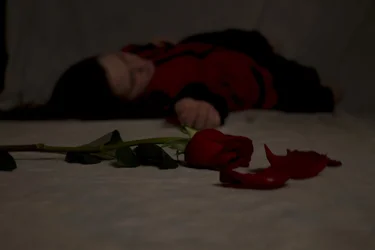
I'm doing a photo project for class and originally, I was really happy with the idea. However, now that I've done it, it seems a little plain or like it's missing something or something's off. I know I still have to fix a little bit of blur around the flower and petals and the one leaf on the stem that's extremely dark, but I'm not sure what else I can do with it (I might also get rid of the black on the top of the rose and just have it on the bottom part). The original idea was a girl dying/dead and the rose signifies the end of her life, that's why it is black and in focus while she is out of focus. Any and all ideas are truly appreciated! Link to the photo is below.


Untitled1 - The Photo Forum Photo Gallery
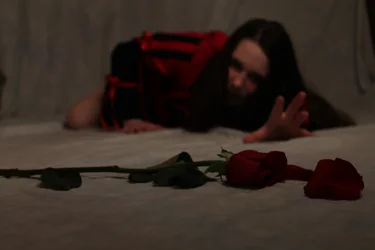
 
the idea is sound, and its well composed but the rose also looks out of focus tho?

Also, out of interest why did you post a screen shot of the picture??
 
It is unfortunately. I was too far on the ground to use a tripod and I couldn't sacrifice my aperture. And no reason. I just didn't want to completely save the entire picture, it was easier to do a screen shot and upload it that way
 
$IMG_3262.webp
Do you think this one would be better? Do you think the flower is more in focus here?
 
View attachment 35790
Do you think this one would be better? Do you think the flower is more in focus here?

The flower is definitely a lot sharper, but the first photo would be a lot better than it IMO if the rose was in focus, but im a total newbie so what do i know lol?

Surely u could shoot the rose wide open though, as your trying to isolate it from the background so i dont really follow what you mean by sacrifice your aperture? Or is the girl to out of focus wide open? Can u not get a pillow/something else to prop the camera on to eliminate shake??
 
ive re read and im guessing its too late to re take the pictures so i thought id give u a little more feed back.....to me the second one looks as if shes trying to grab the rose rather than has just dropped/released it, i thinks that what you were trying to get at? The first one definitely conveys that but the second one looks more like shes gonna crawl across the floor to pick it up!

Could you perhaps photoshop the sharper rose into the first image. Its on the right background for a start so it may not be too difficult and i think it'd be worth it. Maybe bring the exposure up a touch if possible also(of the first pic overall just something else i noticed having another look) But, like i said im just a beginner so dont take too much notice!
 
Yep, it's a bit too late to reshoot. However, I did find this one that might work well. Let me know what you think of it. The roses are a bit more in focus and and it's the pose I wanted. If not, I'll photoshop the other rose in$ex.webp
 
Yep, it's a bit too late to reshoot. However, I did find this one that might work well. Let me know what you think of it. The roses are a bit more in focus and and it's the pose I wanted. If not, I'll photoshop the other rose inView attachment 35791

This ones definitely the one id go for, maybe just crop a little of the white foreground out. Definitely looks underexposed though. Did you shoot raw? can u not lighten it up a bit in PS?
 
I used a soft box for the entire thing. I don't have a beauty dish or a snoot
 
It was in raw. I just posted the original image, definitely needs some fixing-up though. Thanks for all of your advice!
 
The image is horribly underexposed. How about you post the completed image and we go from there?
 
This one tells the tale well. The withered leaves, the discarded petals, the grasp that ceased. Shown in the proper light to convey the story. Read> one's darkest days. This is an art/story shot. Therefore technical exposer perfection is out of play. Well done.
Yep, it's a bit too late to reshoot. However, I did find this one that might work well. Let me know what you think of it. The roses are a bit more in focus and and it's the pose I wanted. If not, I'll photoshop the other rose inView attachment 35791
 
Do it again.

Remember it's always easier to make a bight photo darker than a dark photo brighter.
 
Would one lighten the Mona Lisa?
 

Create an account or login to comment

You must be a member in order to leave a comment

Create account

Create an account on our community. It's easy!

Log in

Already have an account? Log in here.

New Topics

Back
Top Bottom