What's new

I need all the help I can get

paulzeee

TPF Noob!
Joined
Feb 4, 2012
Messages
75
Reaction score
27
Can others edit my Photos
Photos OK to edit
With shooting people.

This seems too snap shotty to me, but I don't really know how to compose people as a subject?
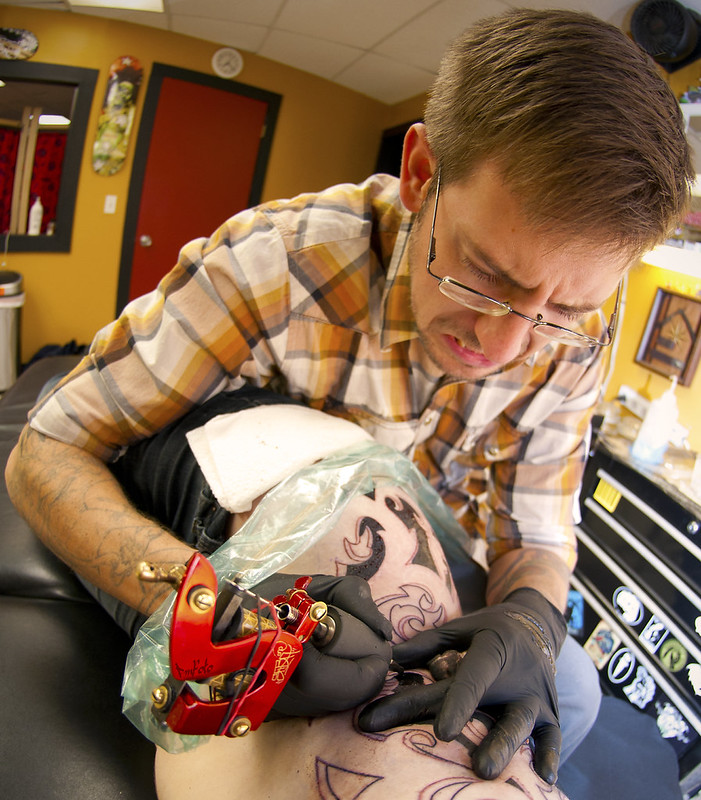

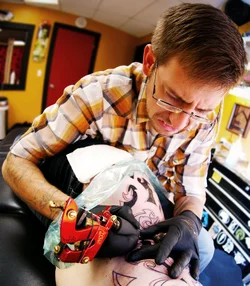
Ink Factory by PMFITCH, on Flickr
 
Its not THAT bad - looks like you shot in program or auto mode? Looks like a wide angle lens per the distortion. White balance appears warm.
 
Okay, first of all, what is your intent for the image? Is this just an environmental portrait, is it an advertising shot, or ?? Context is critical here.

In general, what I see is that the image is too tightly framed, and that there's WAY too much DoF. The perspective created by the wide-angle lens isn't terribly appealing to me either. There's also the expression on his face. He looks like he's gritting his teeth in pain.

A few suggestions: Shoot from farther back with a longer lens and much larger aperture. As well, I would suggest a shoot where someone is getting arm-work done, since in this case it's not immediately clear what part of the person he's working on. As well, look for an angle/perspective where we can see his face.
 
This image is very distorted. I would have either got in really close and focused more on the artists hands and the work being done or stepped back some to get the clients facial expressions.
 
Its not THAT bad - looks like you shot in program or auto mode? Looks like a wide angle lens per the distortion. White balance appears warm.

It was shot in aperture priority at 10.5/2.8. Fixed the lens distortion a bit. I intentionally warmed it with a photo filter, though the RAW file the white balance was way off. I couldn't get it right in camera so I figured I would just correct it in post.

Okay, first of all, what is your intent for the image? Is this just an environmental portrait, is it an advertising shot, or ?? Context is critical here.

In general, what I see is that the image is too tightly framed, and that there's WAY too much DoF. The perspective created by the wide-angle lens isn't terribly appealing to me either. There's also the expression on his face. He looks like he's gritting his teeth in pain.

A few suggestions: Shoot from farther back with a longer lens and much larger aperture. As well, I would suggest a shoot where someone is getting arm-work done, since in this case it's not immediately clear what part of the person he's working on. As well, look for an angle/perspective where we can see his face.

Mostly environmental, I suppose. I never really had an exact intent other than showing someone getting a tattoo. I would attribute this mostly to my severe lack of ability to shoot people. Conceptually, I can't figure out what angles work, where to focus, etc.

This is where I get caught only being able to use what I have - this lens is 2.8. My largest is 1.8 35mm and wasn't wide enough for how the room was arranged - the table was shoved in a corner of a 20x20 room.

Thinking about what I thought would turn out (in my head) was a shot where the capture is in real tight to be able to see what was being tattoo'd while still having the artist in the shot. On this particular photo, I did crop it in tighter.
 
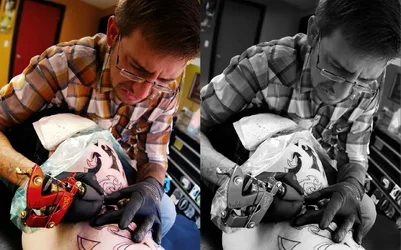
The background is too busy, and it reads a little flat to me. I took the liberty of simulating a little less depth of field, increasing contrast a bit, dropping saturation a bit, and moving the color balance around a bit:
 

Attachments

  • $foo.webp
    $foo.webp
    557.3 KB · Views: 131
I think this is a lost cause.
There are so many bright colors and patterns everywhere that it is really hard to settle on the face - arm tattoo centers of interest.
The backgrounds are bright on both sides, the napkin is blown out, the plaid shirt pulls the eye, the tattoo machine itself is prominent and red and in focus.
I couldn't get to a color version that seemed good; even a bw conversion still seemed way too busy.
I would try to redo this without the light on the backgrounds and blowing out the shirt, a less obvious shirt and a blue towel/napkin.

$fooll.webp
 

Create an account or login to comment

You must be a member in order to leave a comment

Create account

Create an account on our community. It's easy!

Log in

Already have an account? Log in here.

New Topics

Back
Top Bottom