What's new

I will c&c your work for you, beginners welcomed.

Well I'm game for this - and I'll give you something a little different than landscapes - a nice bug!

3890407631_2065d97ac2_o.jpg


The result of a focus stack, a sleepy moth and some flash

good

-tack sharp
-cool compound eye
-great contrast
-great detail
-great colors
-exposure is right on

nit

-to much negative space

tweak

-cropped the photo tighter to get rid of some of the negative space
and placed the moth's eye to 1/3 rule

Hope this helps and thanks for posting.

Take care,

Dwayne Oakes

p525768296.jpg
 
That is so scary...
 
I was also hoping you'd do another one of these!

sorry that the material isn't cityscape, but what do you have to say about this one?
IMG_3751.jpg

Slight clipping, other than that a technically flawless and needs no
additional pp. Excellent work !

Take care,

Dwayne Oakes

SCORE!!!

thanks man.

I actually did some work to try and make the clipping a little better, but that pesky little sun ray got the best of me.
 
good

-tack sharp
-cool compound eye
-great contrast
-great detail
-great colors
-exposure is right on

nit

-to much negative space

tweak

-cropped the photo tighter to get rid of some of the negative space
and placed the moth's eye to 1/3 rule

Hope this helps and thanks for posting.

Take care,

Dwayne Oakes

Many thanks Dwayne!
I'm somewhat amazed that the out of focus leg in the foreground was not sitting in your nits list (its in mine!) though the negative space aspect was something that I did not consider myself. The crop certianly helps to bring out the details more (at websize at least) and is bringing the viewer a lot closer to the insect itself.


Yemme He's not scary, he's pretty. Now scary is when there are 8 of those evil staring eyes looking at you! ;)
 
DSC_0005.JPG


Disregard the "no editing" tag under my name....
 

good

-great 1/3 rule comp
-great mood (sky)
-great shades of green
-great DOF
-good detail
-nice natural colors

nit

-photo is a tad underexposed (still room left in the histogram)
-photo is a tad flat (contrast)

tweak

-moved the white point slider in (levels) to the left to take up the room
still left in the histogram to improve the overall exposure

-added a tad of global contrast boost
-lightened (dodge) the different shades of green through out the photo

-added a tad of global USM (sharpening) to get over the AA filter

Hope this helps and thanks for posting.

Take care,

Dwayne Oakes

p494869936.jpg
 
Last edited:
William is correct ! It is located in front of your camera's sensor.
All that is needed is a slight amount of USM (sharpening) in pp to reduce
its effect on a image.

Take care,

Dwayne Oakes
 

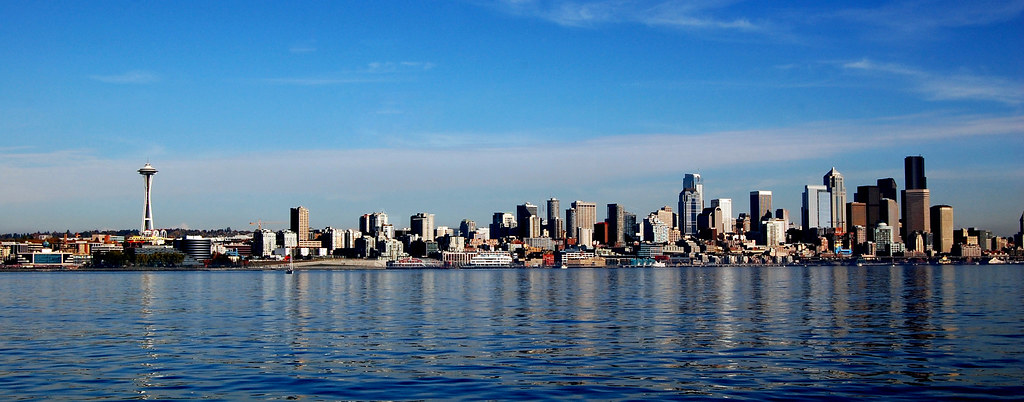
good

-good comp
-great contrast
-great color
-exposure is right on
-great water reflection

nit

-photo has a tilt to the left when placed on a grid
-light to dark effect, maybe from a circular polarizer filter (personal choice)
-sensor dust in the sky (center)

tweak

-straightened the photo

-darkened (burn) the left side of the sky to counter the CP filter effect
(personal choice)

-darkened (burn) the left side of the water to counter the CP filter effect
(personal choice)

-lightened (dodge) the building's water reflections
-added a tad of global USM (sharpening) to get over the AA filter

-healed out the sensor dust in the sky (center)

Hope this helps and thanks for posting.

PS Looks like a CP filter effect in this photo. There is nothing
wrong at all with using a CP filter and its effects. It's a personal choice
thing.

Take care,

Dwayne Oakes

p1064649563-4.jpg
 
Last edited:
DSC_0005.JPG


Disregard the "no editing" tag under my name....

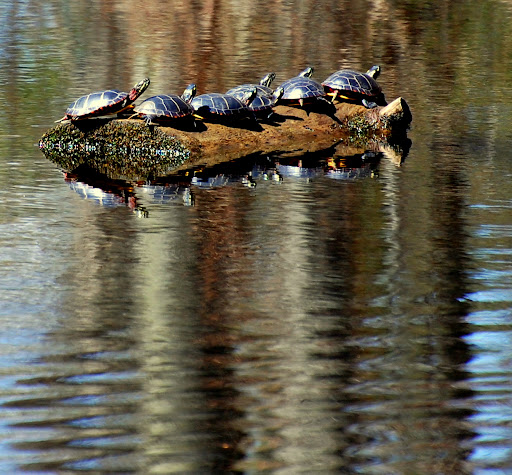
good

-very good off center comp
-great water reflection and its shades of color
-great contrast
-good color
-very good detail
-exposure is right on

nit

-blue color cast in the water reflection in the bottom right
is a bit of a distraction

-water dot in the FG could be healed out

tweak

-lightened (dodge) some of the areas around the water reflection

-added selective color saturation to areas around the water reflection (greens, browns)

-added a tad of selective USM (sharpening) to just the turtles to get over the AA filter

-healed out the blue color cast area in the water reflection in
the bottom right

-healed out the sun's hotspots (clipped) on the turtles backs

-healed out the water dot in the FG

Hope this helps and thanks for posting.

Take care,

Dwayne Oakes

p294906094-3.jpg
 
Last edited:
Thank you Dwayne.
You saw a couple of things I missed.
 

Create an account or login to comment

You must be a member in order to leave a comment

Create account

Create an account on our community. It's easy!

Log in

Already have an account? Log in here.

Back
Top Bottom