What's new

Lack of skill or sensor/lens quality?

LinusKnutsson

TPF Noob!
Joined
Oct 19, 2013
Messages
4
Reaction score
0
Can others edit my Photos
Photos OK to edit
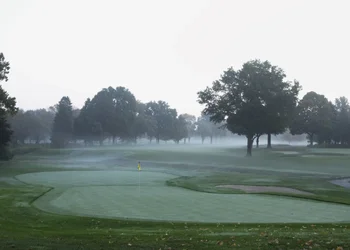
I like to photograph landscapes, but I don't think my pictures get sharp enough, have no depth, not enough color and the dark areas come out really bad. What is the problem here? I try to extend the exposure time to get better detail, but it makes no difference, this one is F/20, 1 Sec, ISO200

I'd like to make large prints out of my photos so all the qualities I am missing from my photos are really important.

Canon T3i
EF-S 15-85mm f/3.5-5.6 IS USM
 

Attachments

  • $Test1.webp
    $Test1.webp
    301.1 KB · Views: 186
  • $Test2.webp
    $Test2.webp
    148 KB · Views: 185
I would say a lack of photography knowledge and not understanding how light relates to photography, rather than lack of skill.

The scenes posted here have little contrast. That is why they have little sense of depth.
The incident light there is in each scene is very gray because it is light from the fog/mist which is why they have little color.

Some post process image editing can be used to create depth and to add some vibrancy to the colors.

For landscape images timing is often critical so the light is 'just right'. The same scene may have to be visited several times to get that 'just right' light.

Use of a CPL (Circular PoLarizing) filter will help to saturate the blues and greens a bit.

The small lens aperture you used, f/20, is likely causing less than sharp focus because of diffraction. Investigate hyperfocus and depth-of-field (DoF).
Diffraction Limited Photography: Pixel Size, Aperture and Airy Disks
Understanding Depth of Field in Photography
Understanding Your Camera?s Hyperfocal Distance
Understanding & Using Polarizing Filters
Using Graduated Neutral Density Filters

Image Files
Tones & Contrast
 
Last edited:
I wouldn't shoot that lens over f16 and would try and stay near f8.

I use same camera with different lenses.
Those photos also have a lot of atmospheric issues.
Post so e daytime or at least better light.
 
These pictures could be improved with some editing, mainly to make the dark areas darker.

Fog is tricky stuff, though, it's very hard to really do justice to the way it actually looks and feels in a picture.
 
Few tips even though I'm a newb too, relatively haha. I personally avoid going smaller than f16, most are my landscapes are around f8 or f11. When I get past f16 I seem to always lose sharpness, probably due to lens diffraction I believe.
http://www.luminous-landscape.com/tutorials/understanding-series/u-diffraction.shtml
Also maybe play with your picture control and boost saturation and sharpness just a bit since you never seem to be happy with your colors. Huge tip is I rarely shoot landscapes without a circular polarizing filter which is what makes my colors pop, as well as nailing custom white balance with my expodisc.
Not sure what other tips right now other than constantly play with the composition and exposure and custom settings to get what you want, and you're using your kit lens and those are never known for being super sharp lenses.
I do very minimal photo editing so I won't go into that, good luck!

Sent from my Verizon Galaxy S III using Tapatalk 2
 
you would get better help if you allowed editing.
many things are difficult or even useless to describe but can be easily demonstrated
 
Thank you, the part about hyperfocal distance should be useful. This picture was taken just at sunrise, before the sun was visible. I thought the light conditions was ideal with no direct sunlight.

Would be possible to get the trees in the zoomed in picture to be sharper by using the proper hyperfocal distance, or are some objects simply too far away for it to come out sharp? What about the light in the same tree area? it seems underexposed, and looks very digital.
 
Thanks, I changed to allow editing
 
Earth's air all by itself causes focus sharpness problems as distance gets greater, so yes some objects are just to far away.

Add small water droplets like fog/mist or other particulate matter to the air and it just gets worse.
 
One of the enemies here is the blank sky and the uneven tree line.
But some things can be exaggerated to make it better, I think.
Still looks a bit dull

(There are two big steps in photography, seeing the possible image in your mind's eye and getting that image.)

Test14444444.jpg~original
 

A quick and dirty edit.
With Camera Raw 8 I warmed up the white balance, added some Clarity and Vibrance, capture sharpened a bit.
In CC I did a little dodge and burn, cropped, and added a narrow black border.

I think this made a good improvement on the depth, is there any specific edit that makes for that, or many different things?
 
I think this made a good improvement on the depth, is there any specific edit that makes for that, or many different things?

I adjust everything according to each individual image. I have never used a one-size-fits-all edit.
 

Create an account or login to comment

You must be a member in order to leave a comment

Create account

Create an account on our community. It's easy!

Log in

Already have an account? Log in here.

New Topics

Back
Top Bottom