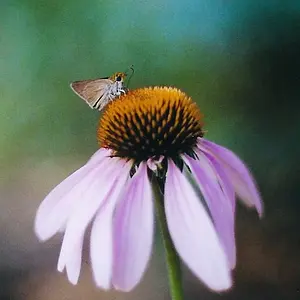
It is difficult, if not impossible, to get everything in focus in a close-up. There is just not much distance (often less than an inch) between back and front, ie. very little (shallow) depth. Some lenses actually tilt to help solve the problem. The top of the lens will be tilted to be close to the back while the bottom of the tilt is away from the near front! If the subject (the side view of a moth) is parallel to the lens then the focusing issue is solved, too, since all parts of the subject are the same distance from the lens.
I use a telephoto lens and an extension tube for close-ups.
You should google a software called
Helicon Focus - extended depth of field, focus stacking, 3D visualization for a fun solution outside of Photoshop.
Ron makes a good suggestion about the f/stop. If you think of a landscape, you use a small aperture to get more depth of field, ie. the background in focus.
It works for macro, too. But, the two thirds rule does not apply in macro, it is more like a "half rule". When you change f/stops the background will change, too, even though it is not in focus. This will alter the effect of your photo. In one the background appears to be all faded color. Change the f/stop and you might be able to pick out more of a defined shape in the background. For example, you might recognize that it is a tree, rather than just a blur of green.
I find that the more of a blur in the background the more the front subject is emphasized, but other times it is nice to know what is behind, even though still not clearly focused.
Note that blurry purple shape in the background of your photo. If you had changed the f/stop to say f/11, the shape in the background would be more defined. We might have seen more clearly that it, too, was a flower. Maybe you want that, but maybe not!



 Thanks for the feedback!





![[No title]](/data/xfmg/thumbnail/37/37280-a7e70a01ccd331918e71645cd4c1f16e.jpg?1734170137)