What's new

OCF, Helo me improve

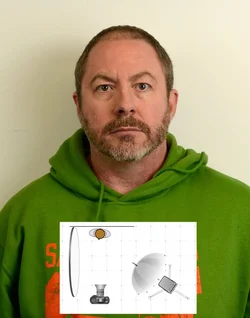
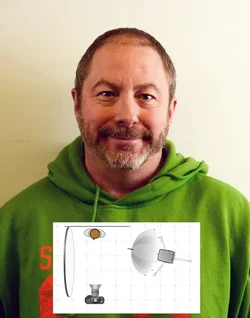
Ok.. I setup a quickie shoot with one 33" shoot through identical to the ones I sent you. I Kept the umbrella about 24" from the subject, and shot three ways. Basically head on, three quarters and sidelit. I used a large reflector subject right. I have included diagrams of the setup on the actual images... to show you how I had it setup.

Just ignore the ugly subject!
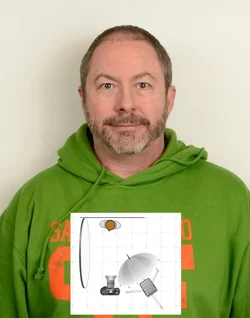
$1 straight-on-1-8.webp $2 3qrtr-example.webp $3-Side-Light-example2.webp

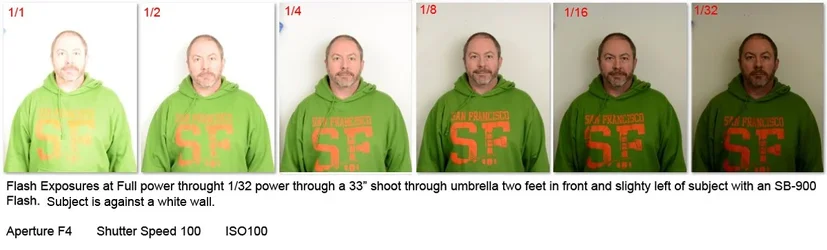
$Flash-Exposure-examples.webp

This is a shot to show you how I had the umbrella setup on the stand... as far from the flash as possible. I had the WA diffuser flipped down on the flash to help cover the entire umbrella. These umbrellas can put out pretty soft light, and I just don't understand where the hotspots you were getting on your self portrait were coming from.
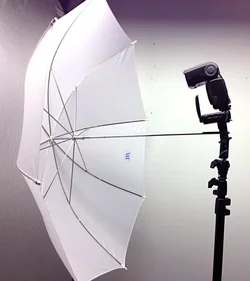
$Umbrella-setup.webp
 
...... and I just don't understand where the hotspots you were getting on your self portrait were coming from.
Likely due to the flash head being set directly at the subject.

Learn to "Feather" your light, young Grasshopper.
 
How far is the flash from the umbrella? Is the flashhead zoomed out? How far away is the umbrella from you? Tell you what, I still have one of those umbrellas that I sent you.. I will set it up and play when I have some time... see what works.

Try taking a shot of the umbrella from the the subject side. See if you have even lighting on it... or obvious hot spots....

Flash was about 12 inches from the umbrella. Not sure about the zoom on the flashhead, but I have the flash difuser and a cap on it. I will move it in and out to see the differences.

Looking at your setups, I have the flash WAY too close to the umbrella.

Those pictures helped a lot.

One last question, the one at 1/8th power is the one that is what I'm looking for..
 
Last edited:
How far is the flash from the umbrella? Is the flashhead zoomed out? How far away is the umbrella from you? Tell you what, I still have one of those umbrellas that I sent you.. I will set it up and play when I have some time... see what works.

Try taking a shot of the umbrella from the the subject side. See if you have even lighting on it... or obvious hot spots....

Flash was about 12 inches from the umbrella. Not sure about the zoom on the flashhead, but I have the flash difuser and a cap on it. I will move it in and out to see the differences.

Looking at your setups, I have the flash WAY too close to the umbrella.

Those pictures helped a lot.

One last question, the one at 1/8th power is the one that is what I'm looking for..

Yes, that exposure basically... but my 1/8 power is going to be different than your 1/8 power! I thought that might be the issue... you were hotspotting the umbrellas
 
Last edited:
...... and I just don't understand where the hotspots you were getting on your self portrait were coming from.
Likely due to the flash head being set directly at the subject.

Learn to "Feather" your light, young Grasshopper.

He was supposed to have a umbrella between him and the flash... but it didn't look like it in the shots he was taking. That was my concern....
 
...... and I just don't understand where the hotspots you were getting on your self portrait were coming from.
Likely due to the flash head being set directly at the subject.

Learn to "Feather" your light, young Grasshopper.

He was supposed to have a umbrella between him and the flash... but it didn't look like it in the shots he was taking. That was my concern....

Okay, but feathering the light will most assuredly alleviate the hotspots, given the output is not set too high. If you have a shoot-through brolly 18" away from the subject AND have the flash head pointing to the broad side of the face, you are still likely to get those hotspots. Adjusting the direction of the flash head to cross in front of the subject, you will get a much softer light. I rarely have the Main light pointed directly at the subject. YMMV
 
Likely due to the flash head being set directly at the subject.

Learn to "Feather" your light, young Grasshopper.

He was supposed to have a umbrella between him and the flash... but it didn't look like it in the shots he was taking. That was my concern....

Okay, but feathering the light will most assuredly alleviate the hotspots, given the output is not set too high. If you have a shoot-through brolly 18" away from the subject AND have the flash head pointing to the broad side of the face, you are still likely to get those hotspots. Adjusting the direction of the flash head to cross in front of the subject, you will get a much softer light. I rarely have the Main light pointed directly at the subject. YMMV

yes.. feathering works very well.. I agree! But that isn't really what we were working on.. not yet anyway! I am sure Ron appreciates the tip... as do I!
 
This is a shot to show you how I had the umbrella setup on the stand... as far from the flash as possible. I had the WA diffuser flipped down on the flash to help cover the entire umbrella. These umbrellas can put out pretty soft light, and I just don't understand where the hotspots you were getting on your self portrait were coming from.

I think the not so obvious tip of the day here is that it matters how far the flash is from the umbrella.

I this case, "As far as possible" with the flash zoomed to "as wide as possible" so the flash is wide before it hits the umbrella, at which point it gets diffused.

The primary difference is the "size" and "consistency" of soft light source. With the flash near the diffuser, you get diffused light, but it is still from a small light source. With the flash far away, the flash spreads to hit a larger area of the umbrella, so you get an "even" light source from the full width of the umbrella.
 
This is a shot to show you how I had the umbrella setup on the stand... as far from the flash as possible. I had the WA diffuser flipped down on the flash to help cover the entire umbrella. These umbrellas can put out pretty soft light, and I just don't understand where the hotspots you were getting on your self portrait were coming from.

I think the not so obvious tip of the day here is that it matters how far the flash is from the umbrella.

I this case, "As far as possible" with the flash zoomed to "as wide as possible" so the flash is wide before it hits the umbrella, at which point it gets diffused.

The primary difference is the "size" and "consistency" of soft light source. With the flash near the diffuser, you get diffused light, but it is still from a small light source. With the flash far away, the flash spreads to hit a larger area of the umbrella, so you get an "even" light source from the full width of the umbrella.

THAT was my point.. although I did not state it so nicely!
 
Wow, I go out to eat and come back to a whole new level of understanding. I'll be back shortly after setting this up again.
 
I finally got in there to set up light Charlie diagrammed out. I have the light as far from the umbrella as I can and the umbrella about as close as I can get to me. Here are the results of a couple of different ISO's and shutterspeeds.

1. 1/100 at f7.1, 85mm and 800 ISO.


IMG_8140 by Ron_Lane, on Flickr

2. 1/15 at f7.1, 85mm and 400 ISO.


IMG_8138 by Ron_Lane, on Flickr

Still have a little bit of a hot spot on the left cheek closest to the light.
 
f7 @800 iso? I still see a LOT of shadow.

How far is the flash umbrella from you?

Try turning down the power and moving it closer. Maybe four stops lower on power! And 1/4 the distance away. And 400 iso.

reason: the closer a soft light is, the softer it will be. (has to do with the crossing angles from both sides of the light to both sides of the subject).

A farther a soft light is from the subject, the harder it gets.
 
LOL, Robin. The only thing Charlie is guilty of is being a nice guy. But that is funny.
 

Create an account or login to comment

You must be a member in order to leave a comment

Create account

Create an account on our community. It's easy!

Log in

Already have an account? Log in here.

Back
Top Bottom