What's new

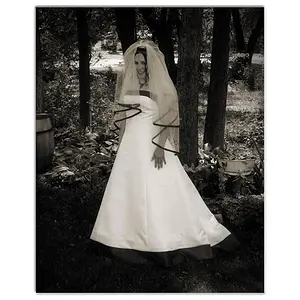
Recent "mini" shoot

sky is still blown... and her face is too dark. Obviously if you lighten her face in PP... you are going to lose even more background. Keep in mind that reflectors are great for filling in light.. but for a shot that is directly and very strongly backlit, it will be almost impossible to get an exposure on the face that will also allow a decent exposure in the background. The light is very harsh also.. and some reflectors can throw hard shadows and highlights in this type of light if not careful. You need someway to override the backlighting enough to where you can expose the face properly and underexpose the background (hint: Flash!) :). Sometimes finding the right mix of ambient and flash can be a pain... but take a lot of them, and vary the settings a good bit until you find what you are after.

pose is a little awkward... could be better...

Thanks!

So I have a 430EXii flash. In using it as a fill flash, should i point it up with a diffuser? I think flashing directly at the subject might over expose the subject as well right? I appreciate your input!
 
I usually use a large on flash bounce outdoor when doing general shots... hardly ever shoot direct. Diffused is almost always better! If you have assistants, or a stand.. you can use your reflectors with the flash to get the light where you want it. Just try to get a good exposure on her with soft shadows and highlights, and drop that background down a notch or two. Having a partially blown sky in strongly backlit shots is not unusual.. but you still need to get her face properly exposed. Initially, try shooting vertically instead of horizontally... typically easier to control the lighting contrast with less background. Play with different exposures until you get the shot you want. (also get the flash off camera.. use a bracket or something). Play with it.. have fun.. share! :)
 
Obviously if you lighten her face in PP... you are going to lose even more background.

Not if he masks it off.

But of course it's always best to get it right in camera. :)
 
Post the original of # 1 and so we can see the image, like others have mentioned overly processed in post.
-
Shoot well, Joe
 
'255' indicates pure, featureless white.
If you're considering all 3 RGB color channels. In other words white is all 3 color channels at 255 - R=255, G=255, B=255.

If you're only looking at the red RGB channel, 255 means pure red.

Any of 16,777,216 colors in an 8-bit color depth (256 gradations of tone) can be expressed as a combination of Red, Green, and Blue, or RGB.

DarkSkyBlue.png


BurntOrange.png


BabyPukeGreen.png
 

Create an account or login to comment

You must be a member in order to leave a comment

Create account

Create an account on our community. It's easy!

Log in

Already have an account? Log in here.

New Topics

Back
Top Bottom