What's new

Sharpness and SkinTone Color Issues

CommeCoco

TPF Noob!
Joined
Jan 4, 2013
Messages
7
Reaction score
0
Location
DC
Can others edit my Photos
Photos OK to edit
Hey all-
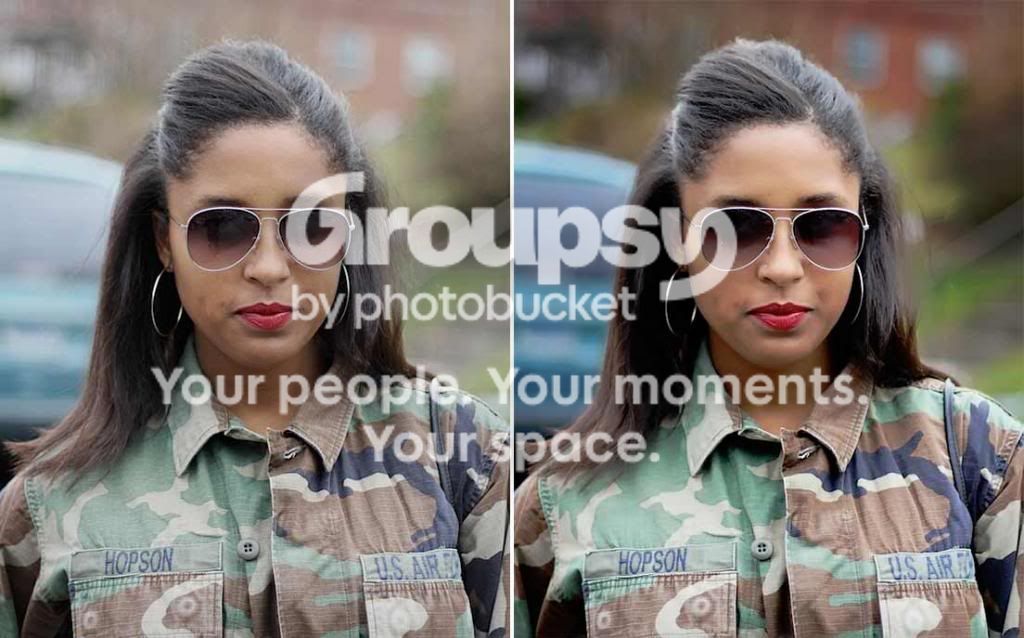
I am fairly new to photography and just recently started shooting in manual and av mode only. I primarily use my canon t3i for blog pictures for my fashion website. I have noticed recently that my images are not very crisp or sharp and my skin looks greenish and washed out. Please let me know what I am doing wrong.

I have tried to attach images here and it states its invalid. Not sure what I am doing wrong. You can view the recent images on Comme Coco: Camo and Military Trend

Thank you so much for your help!
 
I'm wondering how far you are from her, but maybe it's an issue with not focusing in the proper place.

Just a new guy myself. I bet the folks who know will be along to help.


My thought was related mostly to #s 3 & 5
 
thanks!!! My problem is more so the skin coloring... any idea why its so washed out?
 
I think you did ok given that you were shooting wide open (f/1.8)? Most lenses aren't tack sharp wide open so they should stopped down - try f/2.8 or f/4 instead.
I see that you missed focus in at least one of the shots.
I don't see skin tone issues that you're talking about. Maybe it's your monitor (or mine for that matter).
You probably want to work on your composition.

Why limit yourself to just Av and manual modes?
 
thank you for the feedback. I actually didnt shoot them. Its me in the picture and my boyfriend took the pics. I just thought my skin looked funny. He is not a photographer at all but wants to learn so we are doing it together. What do you mean by the composition?

Maybe it is my monitor or my eyes?

what other modes should I try.... when I first got it I was an automatic girl only hahaah..... any ideas what to use? My goal is bokeh... that nice blurred background

** random question but how did you know I used 1.8?
 
Last edited:
Some folks run something that shows them the settings (how we see the 1.8 & settings) or a person can just look at the advanced summary of the properties.

I tried my best to find skin tone issues, but can't see anything. Maybe you have a different photo showing the difference that would help us.

I'm new and just trying to learn, myself. I've seen some of the folks here who are great at diagnosing these things, so I bet you will get some good help.


Do you happen to remember about how far he was from you in those photos?

The only other thing that might be worth considering (that I can come up with) is that he is using pattern metering. I'm wondering if that may be the cause of the difference in skin tone coloring you are seeing? Hopefully someone with more experience will explain if this could actually be an issue or not. I use a Nikon and in this situation I use the spot metering for the best results so far, but I've found that not everyone agrees with that line of thinking.
 
** random question but how did you know I used 1.8?

There is data in the photo.. called Exif or Meta data. There are readers available to access and read that data... typically called Exif Readers. I use PhotoME for instance, and it tells me this about your first photo:

[PhotoME]
PhotoME version: 0.79R17 (Build 856)

[Overview]
URL: http://2.bp.blogspot.com/-BYAeJLmrC9w/UOMtrgWEItI/AAAAAAAAJMc/yf8EDaqhnfU/s1600/IMG_7270.jpg
File type: JPEG
File size: 140.8 KB
Creation date: 12/31/2012 14:25
Last modification: 1/4/2013 15:36
Make: Canon (Canon Global)
Camera: Canon EOS REBEL T3i
Software: QuickTime 7.6.6
Dimension: 600 x 900 px (0.5 MP, 2:3)
Focal length: 50 mm
Aperture: F1.8
Exposure time: 1/4000"
ISO speed rating: 400/27°
Program: Aperture priority
Metering Mode: Pattern
White Balance: Auto
Flash: Flash did not fire, compulsory flash mode

Google Exif reader.. there are a ton of them. Not all photos will have exif data in them, as it is possible to remove it with some software.
 
Last edited:
CommeCoco said:
** random question but how did you know I used 1.8?

Because every new photographer starts at f/1.8. Then they realize 2.8 is a little better and then once their skills get better they realize f/4 can get them the same results as 1.8 with a little knowledge. ;)

But seriously, there are programs that can read the data imbedded in your image. It's very helpful when trying to determine any issues that arise
 
One of the reasons the color is off as seen on a web browser is that some of your pictures are in color profile RGB and web browsers all expect sRGB.
Shoot at a better f stop, with much better and more neutral backgrounds and fill the screen more with the subject.

IMG_7253-1dual_zpsec0acbb4.jpg
 
thank you for the feedback. I actually didnt shoot them. Its me in the picture and my boyfriend took the pics. I just thought my skin looked funny. He is not a photographer at all but wants to learn so we are doing it together. What do you mean by the composition?

Maybe it is my monitor or my eyes?

what other modes should I try.... when I first got it I was an automatic girl only hahaah..... any ideas what to use? My goal is bokeh... that nice blurred background

** random question but how did you know I used 1.8?

Why not get familiar with all the available modes ? In addition to the ones you already use, I would at least also play with Tv and P.
This thread contains tons of great info that you might find useful:
http://www.thephotoforum.com/forum/...-forum/267492-info-those-new-photography.html

As boring as it may sound, you should read the camera's manual (more than once) so you know what the equipment is capable of. That way you'll actually know what's in your toolbox and you'll be able correct options depending on the situation.
Most new photographers are fascinated by shallow depth of field (or as you put it "bokeh") but shooting using shallow DoF all the time is bound to get boring sooner or later. It won't help you grow.
 
Thank you so much. I used to use P and I do use Tv when Im at New York Fashion Week inside the shows. I have used sports and landscape in those situations as well. I really appreciate it all very much! I also have read the manual and I do alot of research online. My goal is to get good at this and for my "photographer" to get good as well. THANK YOU
 
how do I get it to be at sRGB? Is shooting at a higher f stop the answer for that? I noticed that its just recently that it changed. I looked at others and it was fine (the color)
 
Thank you Tee. I appreciate it. I just started using 1.8 because of the shallow dof. For blogging it seems to be huge to have that blurred background but I will go back to 2.8-4. THANK YOU!
 
thank you so much! I am going to look at the metering. I always thought it was on evaluative metering. I will look up what pattern metering is. Thank you for the time you took to respond.
 

Create an account or login to comment

You must be a member in order to leave a comment

Create account

Create an account on our community. It's easy!

Log in

Already have an account? Log in here.

New Topics

Back
Top Bottom