What's new

Tamron 150-600 raw file

coastalconn

Been spending a lot of time on here!
Joined
Mar 24, 2012
Messages
3,594
Reaction score
3,636
Location
Old Saybrook, CT
Can others edit my Photos
Photos NOT OK to edit
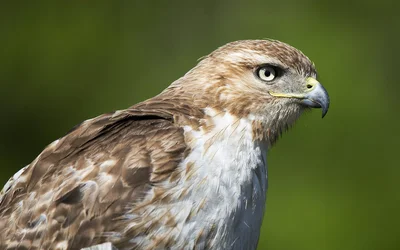
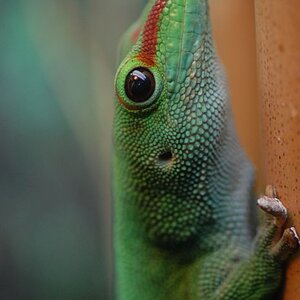
I figured this should be posted here since the Tamron is available in 3 mounts and people are curious.. Some people are saying that my sample images aren't sharp. I think some of that is due to compression and some of it is just biased opinions because its a third party lens.. so I freely offer anyone to download this raw file and take a look, do your normal processing and post back into this thread if you want.. DSC_5604
 
Looks sharp to me, even w/o processing. Pretty impressive IMO.
Granted, almost everything was in your favor for that image, but still...
 
Kris, all your pictures look great with the new lens. If anything I actually think they look better. Don't let a few misguided comments from a few people get into your head, you don't need to be second guessing yourself like this!
 
I cropped it pretty substantially, since the green background is detail-free and far outside the focus zone. Looks like a pretty good file to me. This was cropped to 1,600 pixels wide at 300ppi in PS CC.

$DSC_5604_Cropped to 1600x.webp

for a 725k file, this looks pretty good. I applied only a tiny bit of Unsharp Mask, .25 pixel width at 300%, then faded that down to only 23% because even .25 pixel at 300% looked too overly-sharpened, since the D7100 has no AA blurring filter on it.
 
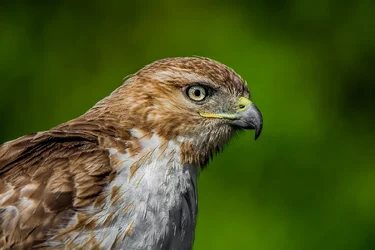
Damn sharp file. I went a little more artsy-fartsy with the edit.

 
Not sure why anyone would even doubt it Kris. What you should do is, post up 4 shots (two from each lens) strip the EXIF and say "you pick which is which". I could easily post up shots from a Sigma 500 F/4.5 and a Canon 500 F/4.5 and only I would know the difference.

Anyway, here's my take on it and the only unsharp part is normal with out of focus areas. That's simply DOF vs focal length vs distance as you already know

$DSC_5604.webp

All the best Kris and a stunning highly detailed shot IMO.

Danny.
 
Kris, all your pictures look great with the new lens. If anything I actually think they look better. Don't let a few misguided comments from a few people get into your head, you don't need to be second guessing yourself like this!
I had mixed feelings the first week, but after the Hawk yesterday I was pretty impressed. On FB and another forum there have been a few comments made, so I figured the best way to know for sure was to make a raw file freely available..
I cropped it pretty substantially, since the green background is detail-free and far outside the focus zone. Looks like a pretty good file to me. This was cropped to 1,600 pixels wide at 300ppi in PS CC.

View attachment 75392

for a 725k file, this looks pretty good. I applied only a tiny bit of Unsharp Mask, .25 pixel width at 300%, then faded that down to only 23% because even .25 pixel at 300% looked too overly-sharpened, since the D7100 has no AA blurring filter on it.

Its interesting since sharpness is somewhat subjective, I would love to know how everyone would sharpen this image.. my original image was default in LR and a. 4 40% high pass...
This is a D600 file, D, I wanted to know what the files would look like on FF.. thanks for your input!
 
Just took a peak, and from this sample, I wouldn't hesitate to buy this lens. Extremely sharp and colors are fantastic.


You do however need to get your sensor cleaned. Not bad but I seen quite a few spots.
 
Thanks again everyone..Nice artsy fartsy.. Danny did you add contrast or just lower the black point?
Just took a peak, and from this sample, I wouldn't hesitate to buy this lens. Extremely sharp and colors are fantastic.


You do however need to get your sensor cleaned. Not bad but I seen quite a few spots.
Lol, it's my friends D600, looks like it's due for an oil change: )
 
Who's telling you it's not sharp?
It's pretty good.
 
In LR, I don't add too much sharpening Kris, I use the clarity control mostly, dropped the highlights and the whites, then dropped the blacks, raised the shadows, no added contrast. That was lightroom done. Into Photoimpact, cloned out those dust spots ;), selected the background, softened the BG, selected the subject and sharpened that only. Finally added a little contrast. Sounds more complicated than it is, probably around 5 mins. Just personal taste Kris and not everyone would go for it. FM, don't start me on what some of those guys get up to :)
 
Facebook mucks with image quality so much, there's no way to properly analyze a photo posted to it.
 
Sorry guys, but NOPE, none of these are sharp enough. Kris just send me the lens and whichever body you used for this blurry mess. I will take care of the problem for you.
 

Create an account or login to comment

You must be a member in order to leave a comment

Create account

Create an account on our community. It's easy!

Log in

Already have an account? Log in here.

Back
Top Bottom