What's new

That Beautiful Wisconsin Road

chaseyourdreams

TPF Noob!
Joined
Feb 1, 2013
Messages
15
Reaction score
5
Location
Milton, WI
Can others edit my Photos
Photos OK to edit
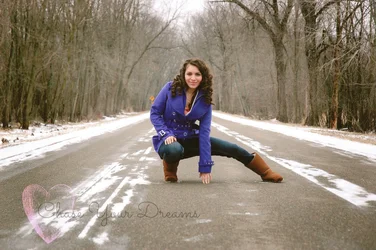
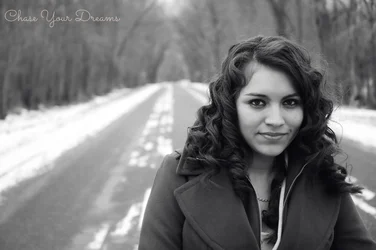
Just finished up a SIX HOUR editing session! WOW! I feel a lot more comfortable with Photoshop and editing actions and such. Hope it starts to show! I can do so much more editing than when using picnik and picmonkey. Loving the upgrade. New Nikon D7000 HERE I COME! <3 Chase Your Dreams Photography

$DSC_6229x3cyd.webp
 
6 hours on just this photo...? I've done like 3 hours max. lol

The photo is pretty coo, the location is nce, the colors, I like the symmetryish of it, would be coo if you played by rules of third and show the vanishing point (if there is one). good job tho.
 
Thank you! I did get one with the vanashing point actually that turned out pretty well! and 6 hours total editing her pictures, not just that one. Three hours for ONE PHOTO! Wow. I wish I knew what I was doing long enough to edit for even an hour on one photo.
 
Thank you! I did get one with the vanashing point actually that turned out pretty well! and 6 hours total editing her pictures, not just that one. Three hours for ONE PHOTO! Wow. I wish I knew what I was doing long enough to edit for even an hour on one photo.

oh wow, I like that second one, its a nice black n white, if you ever got any photoshop related questions feel free to contact me.
 
Thank you! I did get one with the vanashing point actually that turned out pretty well! and 6 hours total editing her pictures, not just that one. Three hours for ONE PHOTO! Wow. I wish I knew what I was doing long enough to edit for even an hour on one photo.

oh wow, I like that second one, its a nice black n white, if you ever got any photoshop related questions feel free to contact me.


I do actually. I ALWAYS have the problem of the light getting trapped under someones eyes, giving them "raccoon eyes". Is there something I need to do when I shoot or maybe an easy edit in photoshop? I have elements. Thanks so much.
 
The b&w is quite lovely. Well done!

The first one is interesting, in a way, I guess? This posing in a road is kind of a "thing" for senior portraits, right? It's not a thing I get, particularly, though. She looks quite nice. I would probably get rid of the yellow road sign over her shoulder, it's slightly distracting and doesn't seem to be to be adding much of anything. If it were closer and more visible it might serve some allegorical purpose "curves ahead in life as on this road" or something, but as is it's worth considering just cloning it out.
 
Thank you! I did get one with the vanashing point actually that turned out pretty well! and 6 hours total editing her pictures, not just that one. Three hours for ONE PHOTO! Wow. I wish I knew what I was doing long enough to edit for even an hour on one photo.

oh wow, I like that second one, its a nice black n white, if you ever got any photoshop related questions feel free to contact me.

I do actually. I ALWAYS have the problem of the light getting trapped under someones eyes, giving them "raccoon eyes". Is there something I need to do when I shoot or maybe an easy edit in photoshop? I have elements. Thanks so much.

You can help minimize it with local adjustments in elements, use an adjustment layer to mimic the functionality of a layer mask. But the best way is to get rid of it during the shoot via the placement of your flash. That will fill in the eyes and prevent the issue all together, plus offers good catch lights in the eyes.
 
One thing that you should do is a have someone make you a vector image for your watermark. making a vector will enable you to change the size of the watermark without it getting pixelated like it is in your photo above.
 
One thing that you should do is a have someone make you a vector image for your watermark. making a vector will enable you to change the size of the watermark without it getting pixelated like it is in your photo above.


Who would I ask to do that for me?!
 
One thing that you should do is a have someone make you a vector image for your watermark. making a vector will enable you to change the size of the watermark without it getting pixelated like it is in your photo above.

Who would I ask to do that for me?!

A graphic designer or someone with access to illustrator and the know-how to use it. It probably can be done in photoshop as well.
 

Be very careful when using leading lines and a visible vanishpoint. In this case the subject is darker and the background, leading lines and vanishing point are much lighter. The eye naturally follows lines, and is naturally attracted to brighter areas vice darker. In general, you should place the subject at/over the vanishing point so that the leading lines bring the eye to the subject, not out of the image. What's happening here is the eye wants to follow the lines in the background and right out of the image. Were the portrait not so strong, this would be a lost shot.
 
One thing that you should do is a have someone make you a vector image for your watermark. making a vector will enable you to change the size of the watermark without it getting pixelated like it is in your photo above.

Who would I ask to do that for me?!

A graphic designer or someone with access to illustrator and the know-how to use it. It probably can be done in photoshop as well.

Yeah, it can be done in photoshop. AS Tyler stated find someone with a bit of graphics experience and they should be able to take care of this for you.
 

Be very careful when using leading lines and a visible vanishpoint. In this case the subject is darker and the background, leading lines and vanishing point are much lighter. The eye naturally follows lines, and is naturally attracted to brighter areas vice darker. In general, you should place the subject at/over the vanishing point so that the leading lines bring the eye to the subject, not out of the image. What's happening here is the eye wants to follow the lines in the background and right out of the image. Were the portrait not so strong, this would be a lost shot.

Yes, I see what you mean. Thank you for the advice. I need to start paying attention to where my subject is a little more. Especially if I want my senior photography to improve, because placing the eye on the subject is what that type of photography is all about. I think I've spent so long being creative with models and such that I need improvement on bringing out the subject as the main event. Thanks again!
 

Create an account or login to comment

You must be a member in order to leave a comment

Create account

Create an account on our community. It's easy!

Log in

Already have an account? Log in here.

New Topics

Back
Top Bottom