What's new

Time for some CC for me! (ohh that rhymed and I didn't even know it)

MWC2

TPF Noob!
Joined
Jun 19, 2011
Messages
261
Reaction score
67
Location
Texas
Can others edit my Photos
Photos OK to edit
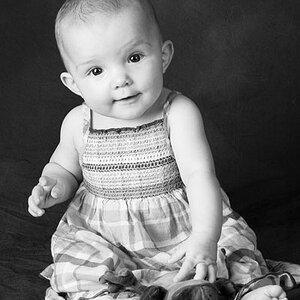
Would like some advice on what I could be doing to make these more "Wow". DD and I were just playing around while waiting on the rest of the household to wake up and get moving this morning.
#1
6159064585_5f6b4b73e4.jpg

ISO 160
SS 1/100
f/3.2
#2
6159602858_5fc87e8516.jpg

ISO 160
SS 1/160
f/3.2
Both were taken using natural light from my living room window (directly in front of my DD). Background is actually a blank painter’s canvas.
My daughter has really yellow undertones to her skin colour so I seem to struggle with getting skin tones correct and not overly correcting and making it not look like her.

ya I know you all LOVE the watermark but I'm using these for my blog later.
 
#1 I dont like the crop, how her elbows are cut off. #2 I think would look nicer if you fixed some of the stray/out of place hairs. Also the hand coming up on the dogs head/ear looks odd as if it is coming out of nowhere.

#1 really shows off her beautiful eyes and I love how happy she looks in #2.
 
First I just want to say that your daughter is adorable, and that first picture is too cute :) I do think though that you've cropped in too close on both. Great pictures though!
 
Ruby covered the major issues that hold these photos back but I'm going to take you through the entire process of what you probably consider a "pop" photo.

1) Overall - great capture, not so great technique.

Composition: This should be a horizontal crop, her elbows pop out sideways and allows you to break the general rule of "Portraits should be portrait."
Should have shot wider, cutting off the arms the way you did really held back this photo.
A portrait shot, very wide would have also worked equally well.

There is no interaction of objects, background, nothing extra in the photo. This doesn't hurt the photo at all, but it does make you need to work on the lighting some more. What makes an interesting photo pop? Lighting. Especially if you have nothing to fall back on like great color coordination.

Your lighting could have been manipulated with mirrors and white boards to help create interesting shadows on her face (Since you were using natural lighting, these shadows would hardly be noticeable. They would, however, add a great layer of depth to the face which in turn creates more interest or "pop")

Editing: This is an advanced section. You should have a pretty decent (maybe 2-3 month experience) of photoshop.
First I would overexpose the image slightly more than you have. Go to Target and look around, every image is high-key. They push the border of overexposed just like every other main stream brand. This is because the general population responds well to very high-key images (due to the way the human eye functions). You don't want to clip your highlights, but then again it isn't the worst thing in the world (assuming you are printing the photo out. If you print it, the white can never get brighter than the white of the paper.)

I would dodge and burn the face to bring back in some detail and to even out the skin tones that are being exaggerated due to her trying so hard. The camera left ear can be cleaned up as well, this is much too red.

Actually I didn't go as far as I was planning on going, but just keep an eye out for unusual skin tones, cut off limbs, and be a little bit more conscious of adding more contrast in shadows.
 
Thank you guys! this is just want I needed. I've have an issue with cropping to tight, it's a habit I need to break and I needed to be reminded about it so thanks. shmne, thanks for the ideas on lighting and PP, I'm always so scared to overexpose and loose any details that I think I go the other way and underexpose a little to much.
 

Create an account or login to comment

You must be a member in order to leave a comment

Create account

Create an account on our community. It's easy!

Log in

Already have an account? Log in here.

Back
Top Bottom