What's new

Waiting for her sailor - Helper, UT for C & C

ttobaben

TPF Noob!
Joined
Jun 22, 2013
Messages
32
Reaction score
1
Location
Salt Lake City
Can others edit my Photos
Photos OK to edit
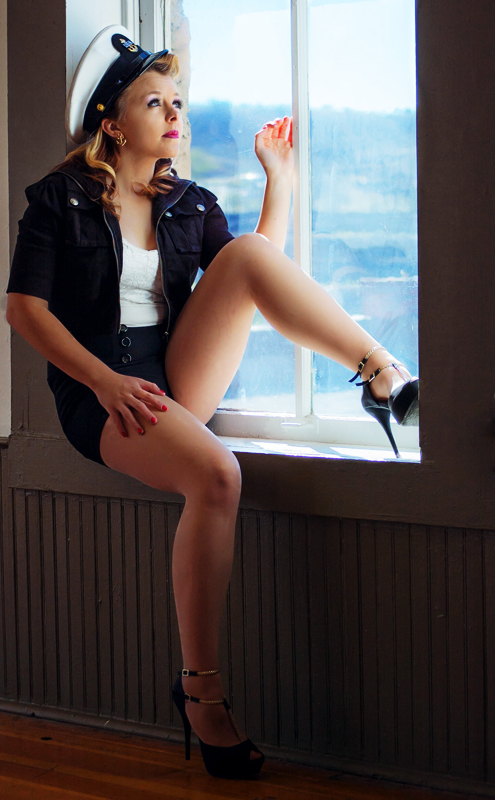
I did a shoot this weekend with a few aspiring models in Helper, UT and in the interest of learning something from my endeavors I would like some feedback on some of my shots. First up is young lady in attempt to do a bit of a pin-up look. Please let me know where you see that i could improve. I don't have a great deal of experience with posing and know that's an area I am lacking in. Thanks in advance for your feedback!
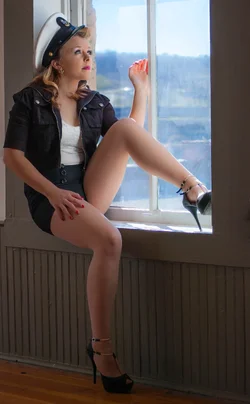
$Courtney Hunter.webp
 
Did you shoot these is RAW? If so, I always feel that RAW images need certain adjustments in order to bring them to life. A subtle curves adjustment in photoshop would enhance the contrast just enough to make her really pop I think, as well as a selective color adjustment in the midtones and blacks to give the atmosphere some more interesting tones. The tones seem a little flat in my opinion and some contrast is needed. I also feel that a slightly looser crop so there is more room above her head would really lend to a better composition. Using the dodge tool to soften the midtones on her face and to brighten the highlights would really enhance the light to be very flattering to her as well. Using these suggestions, this is the edit I got:
courtney_hunterdanoedit_by_danostergren-d6omtfb.jpg


Just my personal opinions.
 
Last edited:
I agree with Dan's points. I'll also add that I wish you'd brought in some fill light so as to knock down the window light a bit more; the over-bright light coming in through the window really hurts the image IMO.
 
Thanks for the feedback gents! Dan, I see what you are saying about the tones being a little flat. I am still learning Photoshop / Lightroom and have never really ventured into playing around with the curves, but I will give it a shot. I agree with the crop being a little close on top as well. In the original photo I do have more of the window and while it did give a little something to the photo, as John pointed out about the light, there was an even larger spot of over-bright light with the extra window in the photo.

John, thanks for the advice. I have never shot in this type of envirement before and wasn't sure how to handle the window light. Will try with a fill flash next time!
 
It's easy; meter the window, and set your flash for a 1/3 or 1/2 stop over (ie if the window is f8, then set your light for somewhere around f8.5, and then feather it got the fall of light across the model that you want.
 
She appears a bit hunched over...mainly in the tummy/front of blouse area. I took the image into a slightly offbeat color area...it also would looks good in a B&W or a faint, sort of hand-tinted look. I do not think a "fantasy" or "pinup" type image needs absolute color fidelity to be successful. I deliberately lightened the wall beneath her window ledge seating position, since to me that says "vintage" as much as anything in the frame.

$Offbeat Color_1.webp
 
Nice edit Derrel...has that off color, pin-up poster look to it. I did notice during my edit that she did appear a little hunched over, but was't sure if that had too much of a negative effect on the photo.
 

Create an account or login to comment

You must be a member in order to leave a comment

Create account

Create an account on our community. It's easy!

Log in

Already have an account? Log in here.

Back
Top Bottom