What's new

What I attempt on Sundays

NikonNewbie

TPF Noob!
Joined
Nov 8, 2010
Messages
635
Reaction score
0
Location
Half past a monkeys ass
Can others edit my Photos
Photos OK to edit
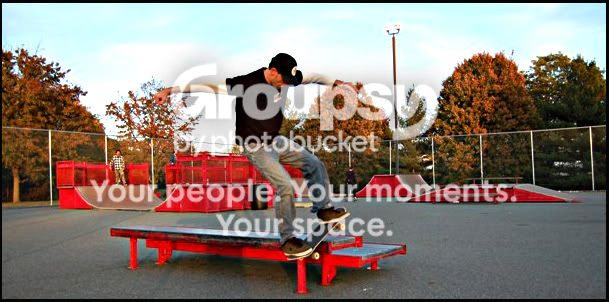
These are not great by far...just thought I'd show you what I do on Sundays. lol
DSC_0085.JPG


DSC_0088.JPG


DSC_0092.JPG


DSC_0167.JPG


DSC_0228.JPG

Hubs says my timing sucks :confused:
But i'm trying...really I am.
 
Sport photography is hard. You will probably need a faster lens to get good shots. It looks like you just uploaded straight from camera. Is that so? Why not crop and edit them some?:confused:
 
Skateboarding is especially tough... put that think on continuous shooting and snap away. You'll get some good shots eventually.

I miss skateboarding... No time for that kind of thing anymore :(
 
Sport photography is hard. You will probably need a faster lens to get good shots. It looks like you just uploaded straight from camera. Is that so? Why not crop and edit them some?:confused:

Ya they are straight out of the camera, see the problem with cropping is...I'm still unsure of what and where to crop, but I'm getting there!
I'm really trying :)
also...I shot these in Auto I think...I may have moved it over to the action mode on the camera but I noticed I can get more shots in a row when I use auto.
 
Skateboarding is especially tough... put that think on continuous shooting and snap away. You'll get some good shots eventually.

I miss skateboarding... No time for that kind of thing anymore :(

I did change it over to the action mode, im still trying to remember what all the different little modes are for, there is one for frames, one for focus...portraits, etc...when and where to use them and changing all the other settings is a lot to remember.lol

and as far as no time...just make time...my husband did! he stoped for like 8 years...and went right back into it like a year ago, being a spring ckn again! Woot!
 
M is the only mode you need.

Here is an example of how you can crop and edit.

DSC_0092.jpg

there is no point in posting your pictures here if you are not going to put some PP effort into them, what software are you using?
 
Last edited:
M is the only mode you need.

Here is an example of how you can crop and edit.

DSC_0092.jpg

there is no point in posting your pictures here if you are not going to put some PP effort into them, what software are you using?

Photoshop Cs2. hubs said he will get me newer software. Ill give it a go.
 
Nothing wrong with CS2. All you really need is camera raw.
 
I did change it over to the action mode, im still trying to remember what all the different little modes are for, there is one for frames, one for focus...portraits, etc...when and where to use them and changing all the other settings is a lot to remember.lol

Herein lies you problem.... you don't need to remember what the little "modes" are because you shouldn't be using the modes. 1st of all, you are never going to learn anything using those modes. Secondly, NONE of those modes will get you exactly what you want.
 
I did change it over to the action mode, im still trying to remember what all the different little modes are for, there is one for frames, one for focus...portraits, etc...when and where to use them and changing all the other settings is a lot to remember.lol

Herein lies you problem.... you don't need to remember what the little "modes" are because you shouldn't be using the modes. 1st of all, you are never going to learn anything using those modes. Secondly, NONE of those modes will get you exactly what you want.

I'm gonna respectfully disagree with this, but I have to qualify my reasons. 5 month's ago I'd have said the same thing.

I started shooing with a Minolta SRT 101... That's about as basic and old school as you can get. Eventually I moved to a Canon F-1, the older version, and 2 A-1's, one for back up and one for color. In those days the "auto" modes were very primitive and I relied mostly on my old Gossen light meter. That was then...

After too many years I just started shooting again a few months ago. I approached the various modes on my T1i with a good deal of suspicion, but to my suprise they are much more sophisticated than I expected.

Why avoid a perfectly useful tool built into your camera? Now when I shoot I'm actively moving from mode to mode, depending on what I want and what I'm shooting. Yes, I could do the same thing in Manual, but why work harder? I think the trick is to learn the modes, learn how they think and what they produce, then let them do the drugery... That frees you to watch the scene in front, watch your composition, and focus on the really important part of the shot, that is, the subject.

Of course, that intuition only comes with a really sound understanding of exposure. Modes are not a replacement for that. It also means a lot of experimentation to see how they react under various conditions and that's where the foundation pays off. If you don't really understand the fundamentals, you'll never really grasp the strengths and weaknesses of each mode.

 
M is the only mode you need.

Here is an example of how you can crop and edit.

DSC_0092.jpg

there is no point in posting your pictures here if you are not going to put some PP effort into them, what software are you using?

Tulsa,
besides the crop, what else did you do to it? did you sharpen it? I'm sitting here with this book The photoshop cs2 book for digital photographers by scott kelby...and I'm reading all the different ways to adjust the color, there are several different ways, would you use drag and drop instant color correction? or he has this other method that looks good to me using auto color adn playing with the channels?
I did this with the pictures of Bridget (old post) I took one pic of her and tried them all, sometimes I didn't see any results worth while.
 
M is the only mode you need.

Here is an example of how you can crop and edit.

DSC_0092.jpg

there is no point in posting your pictures here if you are not going to put some PP effort into them, what software are you using?

Tulsa,
besides the crop, what else did you do to it? did you sharpen it? I'm sitting here with this book The photoshop cs2 book for digital photographers by scott kelby...and I'm reading all the different ways to adjust the color, there are several different ways, would you use drag and drop instant color correction? or he has this other method that looks good to me using auto color adn playing with the channels?
I did this with the pictures of Bridget (old post) I took one pic of her and tried them all, sometimes I didn't see any results worth while.


RAW is the image rendered as close as possible to the way your camera's sensor saw it. JPEG adds things to that, contrast, sharpening for example. A JPEG is going to look better straight out of the camera while a RAW image is going to give you more to work with. Once you get comfortable with PP you'll probably prefer RAW.

I like Kelby's systematic approach to his workflow. I started learning using his method, but now I'm starting to deviate a bit to adapt to what I like in an image. Shoot some RAW images and try his workflow, you'll probably see more of a difference.
 
Unsharp mask
Adjust levels
and crop.

Simple, thats what I do to most of my photos. Play with those settings.
 
M is the only mode you need.

Here is an example of how you can crop and edit.

DSC_0092.jpg

there is no point in posting your pictures here if you are not going to put some PP effort into them, what software are you using?

Tulsa,
besides the crop, what else did you do to it? did you sharpen it? I'm sitting here with this book The photoshop cs2 book for digital photographers by scott kelby...and I'm reading all the different ways to adjust the color, there are several different ways, would you use drag and drop instant color correction? or he has this other method that looks good to me using auto color adn playing with the channels?
I did this with the pictures of Bridget (old post) I took one pic of her and tried them all, sometimes I didn't see any results worth while.


RAW is the image rendered as close as possible to the way your camera's sensor saw it. JPEG adds things to that, contrast, sharpening for example. A JPEG is going to look better straight out of the camera while a RAW image is going to give you more to work with. Once you get comfortable with PP you'll probably prefer RAW.

I like Kelby's systematic approach to his workflow. I started learning using his method, but now I'm starting to deviate a bit to adapt to what I like in an image. Shoot some RAW images and try his workflow, you'll probably see more of a difference.


I also ordered 2 other photoshop books, one called Adobe Photoshop CS2 Classroom in a Book, and Photoshop CS2 Killer Tips.
I'm hoping the 1st one will teach me why and when to crop, I love this guys books but he just jumps right into how to do it several different ways, never says why or when to crop, I just saw a real interesting way to use ps2 to use the rule of thirds while cropping.
ugh...now do I get used to the camera first or spend my entire existance learning ps2...is it impossible to just get good at taking pics enough where edits aren't necessary? I know I'm FAR FAR FAR away from that! lol
 

Create an account or login to comment

You must be a member in order to leave a comment

Create account

Create an account on our community. It's easy!

Log in

Already have an account? Log in here.

Back
Top Bottom