You are using an out of date browser. It may not display this or other websites correctly.
You should upgrade or use an alternative browser.
You should upgrade or use an alternative browser.
What I attempt on Sundays
- Thread Starter NikonNewbie
- Start date


NikonNewbie
TPF Noob!
- Joined
- Nov 8, 2010
- Messages
- 635
- Reaction score
- 0
- Location
- Half past a monkeys ass
- Can others edit my Photos
- Photos OK to edit
- Thread Starter 🔹
- #17
This is me, but almost every shot will need PP. But try and take every shot like you dont need PP. Do Not rely on it.
Ok, Listen, I'm not trying to get on your nerves...but I have a ?...
I'm following this book, it says to unsharp mask you have to enlarge pic, did that...then I go to filter and choose sharpen, then unsharp mask, but I'm getting something that says "This layer type must be Rasterized before preceeding. It's text will no longer be editable, rasterize the type?"
I click ok...then this box comes up "Could not complete the unsharp mask command because the selected area is empty"
now...I'm looking in the index and there is not anything about rasterize, so I have no idea what to do from here. Any ideas? I'm trying...
Chamelion 6
TPF Noob!
- Joined
- Oct 30, 2010
- Messages
- 236
- Reaction score
- 1
- Location
- Texas
- Can others edit my Photos
- Photos OK to edit
None of the software books are going to be much help on when and why to crop. That's really more of a compositional decision, and that gets... well... fuzzy. There are rules, like the rule of thirds, but they're broken as often as not. It's a visual esthetic.
What you want is to have the shot tell what you wanted it to tell and you do that by emphasizing the things you think are important, and trying to minimize the unimportant stuff. After that, its a matter of stepping back and just asking, "is it interesting to look at?" Composition is one of those things that's really simple till you try to make sense out of it then it gets really complicated. Spend a lot of time looking at other people's stuff that you like and try to decide why you like it.
As for the software, don't get too focused on PS. There are others as well. I do 99.9999% of everything in Lightshop 3. I use PS for the stuff LR 3 doesn't do. Both are Adobe and LR 3 can be used along with PS seamlessly. LR is cheaper so it's easier to get started.
What you want is to have the shot tell what you wanted it to tell and you do that by emphasizing the things you think are important, and trying to minimize the unimportant stuff. After that, its a matter of stepping back and just asking, "is it interesting to look at?" Composition is one of those things that's really simple till you try to make sense out of it then it gets really complicated. Spend a lot of time looking at other people's stuff that you like and try to decide why you like it.
As for the software, don't get too focused on PS. There are others as well. I do 99.9999% of everything in Lightshop 3. I use PS for the stuff LR 3 doesn't do. Both are Adobe and LR 3 can be used along with PS seamlessly. LR is cheaper so it's easier to get started.
Chamelion 6
TPF Noob!
- Joined
- Oct 30, 2010
- Messages
- 236
- Reaction score
- 1
- Location
- Texas
- Can others edit my Photos
- Photos OK to edit
Here's and experiment on cropping. Take your #3 photo and crop the top and bottom out like Tulsa did for you, and compare it to the original. Notice how loosing all that excess space brings the focus in on your subject. Then take it a crop the left side out so the shot ends maybe 1/4 inch from the end of the rail he's sliding on. That should puty the main subject on the left side of the image instead of the center. Compare that to the first 2 versions... Notice how that further draws attention to the skater and with the odd angles gives the shot a sense of movement.
NikonNewbie
TPF Noob!
- Joined
- Nov 8, 2010
- Messages
- 635
- Reaction score
- 0
- Location
- Half past a monkeys ass
- Can others edit my Photos
- Photos OK to edit
- Thread Starter 🔹
- #20
Here's and experiment on cropping. Take your #3 photo and crop the top and bottom out like Tulsa did for you, and compare it to the original. Notice how loosing all that excess space brings the focus in on your subject. Then take it a crop the left side out so the shot ends maybe 1/4 inch from the end of the rail he's sliding on. That should puty the main subject on the left side of the image instead of the center. Compare that to the first 2 versions... Notice how that further draws attention to the skater and with the odd angles gives the shot a sense of movement.
Ok I'm gonna try it.
NikonNewbie
TPF Noob!
- Joined
- Nov 8, 2010
- Messages
- 635
- Reaction score
- 0
- Location
- Half past a monkeys ass
- Can others edit my Photos
- Photos OK to edit
- Thread Starter 🔹
- #21
Ok well that cuts his arm(s) off so that looks stupid..lol
but...I see what you mean!
after you crop a picture does it resize it automatically? I see there is a way to to keep the aspect ratio...is that something that I have to choose to happen? because when I cropped the picture of the fox that was in my yard (it was taken from far far away) it blew up so you could see it was a fox..however it got pixilized real bad and looked like crap.
but...I see what you mean!
after you crop a picture does it resize it automatically? I see there is a way to to keep the aspect ratio...is that something that I have to choose to happen? because when I cropped the picture of the fox that was in my yard (it was taken from far far away) it blew up so you could see it was a fox..however it got pixilized real bad and looked like crap.
NikonNewbie
TPF Noob!
- Joined
- Nov 8, 2010
- Messages
- 635
- Reaction score
- 0
- Location
- Half past a monkeys ass
- Can others edit my Photos
- Photos OK to edit
- Thread Starter 🔹
- #22
Nevr mind...I'm an idiot..it just occured to me that I didnt crop the fox, I just used the zoom...der...
Chamelion 6
TPF Noob!
- Joined
- Oct 30, 2010
- Messages
- 236
- Reaction score
- 1
- Location
- Texas
- Can others edit my Photos
- Photos OK to edit
Don't try to crop it to a standard size. Your software should have a cropping tool that lets you set the borders exactly where you want them. Move the top border down until it's just above his head, the bottom up until its a bit below the rail. Refer to Tulsa's crop. The right border (I think I said left before cause I was thinking about it from the skater's POV) should move to just to the right of that light pole leaving the whole of the skater and the platform in tact.
I'd do it and show you but my flicker account is messed up so I can't post it up. When you crop it the soft ware will resize it to fit your screen, but it shouldn't crop more of it than you specified.
I'd do it and show you but my flicker account is messed up so I can't post it up. When you crop it the soft ware will resize it to fit your screen, but it shouldn't crop more of it than you specified.
NikonNewbie
TPF Noob!
- Joined
- Nov 8, 2010
- Messages
- 635
- Reaction score
- 0
- Location
- Half past a monkeys ass
- Can others edit my Photos
- Photos OK to edit
- Thread Starter 🔹
- #24
Don't try to crop it to a standard size. Your software should have a cropping tool that lets you set the borders exactly where you want them. Move the top border down until it's just above his head, the bottom up until its a bit below the rail. Refer to Tulsa's crop. The right border (I think I said left before cause I was thinking about it from the skater's POV) should move to just to the right of that light pole leaving the whole of the skater and the platform in tact.
I'd do it and show you but my flicker account is messed up so I can't post it up. When you crop it the soft ware will resize it to fit your screen, but it shouldn't crop more of it than you specified.
I figured it out! now I just went out in the garage because he wanted me to try to catch his ollie, I tried the pics in M, but some came out like ghosts, and then some are darker...I have to read the manual again for this mode.
Ok...wow...just figured that out! how would I ever get the shots I want if I'm constantly checking to make sure the indicater is directly in the center so it's not over or under exposed? it almost seems easier to use auto for skateboarding pics.
Chamelion 6
TPF Noob!
- Joined
- Oct 30, 2010
- Messages
- 236
- Reaction score
- 1
- Location
- Texas
- Can others edit my Photos
- Photos OK to edit
Don't try to crop it to a standard size. Your software should have a cropping tool that lets you set the borders exactly where you want them. Move the top border down until it's just above his head, the bottom up until its a bit below the rail. Refer to Tulsa's crop. The right border (I think I said left before cause I was thinking about it from the skater's POV) should move to just to the right of that light pole leaving the whole of the skater and the platform in tact.
I'd do it and show you but my flicker account is messed up so I can't post it up. When you crop it the soft ware will resize it to fit your screen, but it shouldn't crop more of it than you specified.
I figured it out! now I just went out in the garage because he wanted me to try to catch his ollie, I tried the pics in M, but some came out like ghosts, and then some are darker...I have to read the manual again for this mode.
Ok...wow...just figured that out! how would I ever get the shots I want if I'm constantly checking to make sure the indicater is directly in the center so it's not over or under exposed? it almost seems easier to use auto for skateboarding pics.
I think we're crossing back and forth here. For the cropping experiment I meant taking the existing shot (or better yet, a copy) that Tulsa cropped and try cropping it again in your processing software.
As for shooting, Auto is probably easier, but what the other guys are gettng at, is that by sticking to Auto you'll never really gain the understanding of how exposure works because the camera is doing everything for you. And those auto settings are easily fooled, so sometimes your stuff will look really good and other times it will be a mess and you won't really know why.
When you use the manual setting it forces you to adjust each setting yourself so you start to understand the relationships between them and how they effect the final product. Exposure wise there is more than one way to get to the same place but each different approach will look different.
I'd even suggest a trip to the library and get some books on beginning photography, even some old film stuff as the basics of exposure are the same. For composition, noting beats just a book of your favorite potographer's or even painter's works. But when you sit down to admire them ask yourself what it is that draws you to that image. That's really the best way to train your eye to see the kinds of images that appeal to you.

Blake.Oney
TPF Noob!
- Joined
- Aug 26, 2010
- Messages
- 566
- Reaction score
- 5
- Location
- Olive Hill, Ky
- Can others edit my Photos
- Photos OK to edit
The only thing I really see wrong with the photo's is the point of view. You have to get in there on the shots. I was shooting at a wider angle in these so I was actually pretty close in most of them. I actually got hit a couple times, but that's part of it. These are high ISO and not really the best quality, but yea, just different angles.
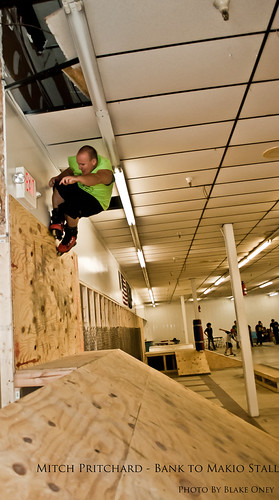
Mitch Pritchard - Makio Stall by Blake Oney Photography, on Flickr
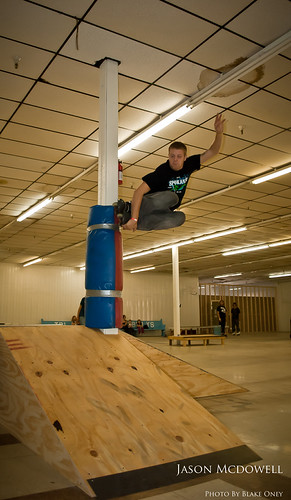
Jason Mcdowell - Mute Tap by Blake Oney Photography, on Flickr
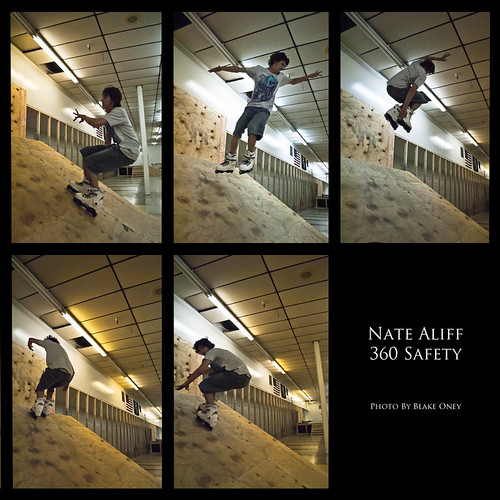
Nate Aliff - 360 by Blake Oney Photography, on Flickr
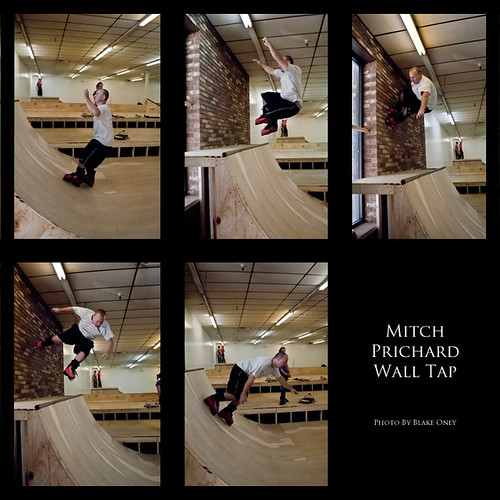
Mitch Pritchard Wall Tap by Blake Oney Photography, on Flickr
This rollerblading, which is obviously different, but if you really want to impress him with your skateboarding shots, take a look at one of his skateboarding magazines and see how they shoot the photo's in there. Good job, though. I wish my wife would even attempt at shooting me skating.
Mitch Pritchard - Makio Stall by Blake Oney Photography, on Flickr
Jason Mcdowell - Mute Tap by Blake Oney Photography, on Flickr
Nate Aliff - 360 by Blake Oney Photography, on Flickr
Mitch Pritchard Wall Tap by Blake Oney Photography, on Flickr
This rollerblading, which is obviously different, but if you really want to impress him with your skateboarding shots, take a look at one of his skateboarding magazines and see how they shoot the photo's in there. Good job, though. I wish my wife would even attempt at shooting me skating.
NikonNewbie
TPF Noob!
- Joined
- Nov 8, 2010
- Messages
- 635
- Reaction score
- 0
- Location
- Half past a monkeys ass
- Can others edit my Photos
- Photos OK to edit
- Thread Starter 🔹
- #27

thanks...for everything everybody!
Blake..ya, I was pretty far away because alot of kids were skating, steve (my husband) put the pics up on his skate forum and they have a critique section as well, I read some of their stuff and they say that getting the face makes the shot.
Ill keep trying!
Chamelion....thanks for all the info! I am currently reading 2 manuals for the D40, another one by Ken Rockwell on the D40, the DSLR for DUmmies...and plus all the photoshop books...I'm gonna have a Migraine for the next 3 weeks!
I love me some multi-tasking

thats why I asked earlier...should I focus on the DSLR 1st or just learning Photoshop and fixing them all? that wasn't a smart ass question...I was trying to micro-manage myself...haha:er:
Chamelion 6
TPF Noob!
- Joined
- Oct 30, 2010
- Messages
- 236
- Reaction score
- 1
- Location
- Texas
- Can others edit my Photos
- Photos OK to edit
My suggestion would be to concentrate on your camera. I also wouldn't try to learn everything in the manual... Get comfortable with the important stuff first, that is work on getting a sound understanding of exposure. Make sure you really grasp what ISO, Apeture, and Shutter speed are and how they inter-relate. More than anything, that's the fundamental essence of photography. All photography is about capturing light.
I'd recoment a good basic book on just general photography that spends a fare amount of time on exposure. Even an older book focusing on film will do because the principals are exactly the same.
Automation can be a wonderful thing and I love it, but when you're a beginner it hides a lot of things you need to understand to use it effectively. Spend some time in manual mode shooting one object. Change the settings and compare the different shots and try to see what's changing. For instance, set the camera on a tripod and shoot something. With each shot, change the apeture setting and nothing else. Then do the same thing changing the shutter speed and nothing else, then the ISO...
Play with things like that and you'll start to visualize what each of those things do...
I'd recoment a good basic book on just general photography that spends a fare amount of time on exposure. Even an older book focusing on film will do because the principals are exactly the same.
Automation can be a wonderful thing and I love it, but when you're a beginner it hides a lot of things you need to understand to use it effectively. Spend some time in manual mode shooting one object. Change the settings and compare the different shots and try to see what's changing. For instance, set the camera on a tripod and shoot something. With each shot, change the apeture setting and nothing else. Then do the same thing changing the shutter speed and nothing else, then the ISO...
Play with things like that and you'll start to visualize what each of those things do...

Boomn4x4
TPF Noob!
- Joined
- Mar 15, 2010
- Messages
- 766
- Reaction score
- 4
- Location
- Ohio
- Can others edit my Photos
- Photos OK to edit
I did change it over to the action mode, im still trying to remember what all the different little modes are for, there is one for frames, one for focus...portraits, etc...when and where to use them and changing all the other settings is a lot to remember.lol
Herein lies you problem.... you don't need to remember what the little "modes" are because you shouldn't be using the modes. 1st of all, you are never going to learn anything using those modes. Secondly, NONE of those modes will get you exactly what you want.
Why avoid a perfectly useful tool built into your camera?
Because too many times the mode has locked me out of doing something I wanted to do, or forced me to do something I didn't. Exposure lock, firing a fill flash, focus mode are three that quickly come to mind.
Chamelion 6
TPF Noob!
- Joined
- Oct 30, 2010
- Messages
- 236
- Reaction score
- 1
- Location
- Texas
- Can others edit my Photos
- Photos OK to edit
Herein lies you problem.... you don't need to remember what the little "modes" are because you shouldn't be using the modes. 1st of all, you are never going to learn anything using those modes. Secondly, NONE of those modes will get you exactly what you want.
Why avoid a perfectly useful tool built into your camera?
Because too many times the mode has locked me out of doing something I wanted to do, or forced me to do something I didn't. Exposure lock, firing a fill flash, focus mode are three that quickly come to mind.
So you switch modes or go to manual. That's why I'm saying it's important to understand what each of the modes are doing and what they emphasize. It takes some time and experimentation to really learn them but eventually it becomes rather intuative. You can almost see before you shoot, what the camera is going to render.
It's going beyond the Action shot = Action mode concept. I've found that by getting to understand the various modes strengths and weaknesses I spend a lot less time fiddeling with exposures and more time shooting and composing. Switch to the appropriate. bracket if possible, and move on. It was a lot of trial and error at first, but less and less as I use them more. And my shooting is becoming MUCH more consistant.
Similar threads
- Replies
- 11
- Views
- 368


- Replies
- 17
- Views
- 743

- Replies
- 6
- Views
- 529


![[No title]](/data/xfmg/thumbnail/41/41779-303c41fcb3e37507cbe986d76dbfcf85.jpg?1734176085)