What's new

Another Veteran's Portrait Project Session

tirediron

Watch the Birdy!
Staff member
Joined
Jul 8, 2005
Messages
45,715
Reaction score
14,785
Location
Victoria, BC
Can others edit my Photos
Photos OK to edit
Lt(N) HB Peterson, OMM, OsJ, CD, (Ret'd)
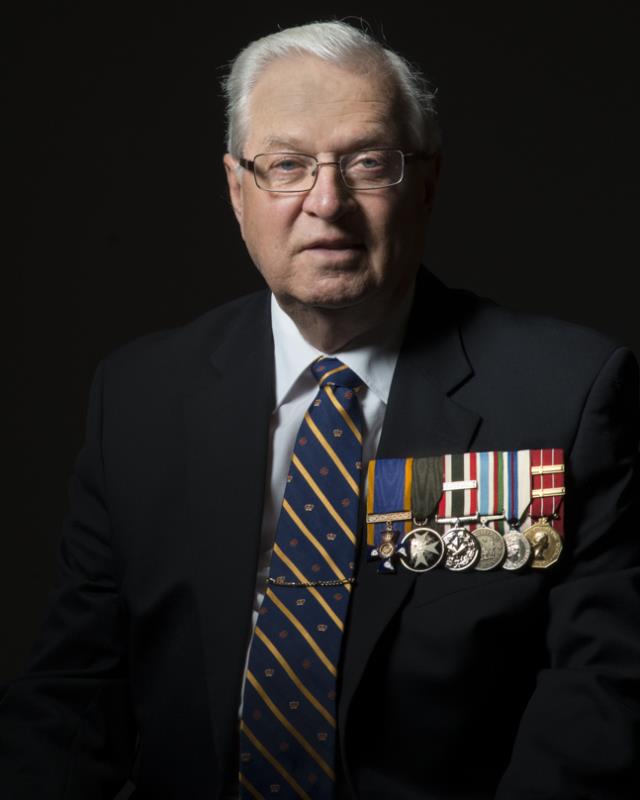
HBP.jpg

As always, comments and critique appreciated.
 
this monitor is too dark so your picture is too dark for me...so... can't really comment but I can bmp :)
 
Funny how much different it looks between my phone (note3) and my calibrated ips monitor. Can't even see his jacket on my phone. :)

I like the lighting on this one.
I'm partial to black backgrounds anyway, and it really suits this guy well
 
I love your lighting here. I had terrible trouble shooting my husband's grandmother's white hair. (I was using Natural light though.) Do you have any good tips for that? Or is it easier to control in the studio?

I don't have the black issue on my phone that others are seeing. I've got plenty of detail!

If I had to nitpick, I think I'd like to see just a hair more space above his head. It would make framing/matting easier and let's face it - I'm partial to equal amounts of negative space above and on the side. ;-) (but really, who am I to nitpick? It's a great picture, and I am sure he is pleased!)
 
John, this is an awesome project. I like the photo as is.

If there were anything that I would change or try, it would be to add a rim light for the camera right side of him. I only say this because his head and neck just seem to fade into the blackness.
 
  • Thread Starter 🔹
  • Moderator 🛠️
  • #7
Funny how much different it looks between my phone (note3) and my calibrated ips monitor. Can't even see his jacket on my phone. :)

I like the lighting on this one.
I'm partial to black backgrounds anyway, and it really suits this guy well
Hopefully it looks good on the calibrated monitor. I find that my calibrated monitors are usually pretty close to both my iPhone and iPad.
Thanks!

I love your lighting here. I had terrible trouble shooting my husband's grandmother's white hair. (I was using Natural light though.) Do you have any good tips for that? Or is it easier to control in the studio?

I don't have the black issue on my phone that others are seeing. I've got plenty of detail!

If I had to nitpick, I think I'd like to see just a hair more space above his head. It would make framing/matting easier and let's face it - I'm partial to equal amounts of negative space above and on the side. ;-) (but really, who am I to nitpick? It's a great picture, and I am sure he is pleased!)
The hair is courtesy of my new hairlight! :D It is definitely easier to control in the studio since all I do is adjust the hairlight until I get the exposure I want, but a dedicated reflector may help for ambient-light images. You're right, this is cropped fairly tightly; it's for use on a display board where the images all sit in clear, lucite pockets. I have lots of room to expand if it's going to be used in a conventional frame.

John, this is an awesome project. I like the photo as is.

If there were anything that I would change or try, it would be to add a rim light for the camera right side of him. I only say this because his head and neck just seem to fade into the blackness.
Thanks Ron! It means a lot to me!

You're right, some more light on that side would be nice, and I've tried it, but in the end, I like the look I get from using the gridded BD to cut across the face and medals. I could try coming from his left (camera right) shoulder with a narrow strip box... Hmmm... that's so crazy it just might work!
 
Looks a little too soft, although that's not always a bad thing, here it looks like you missed the focus.

Props for this project, though. Glad to see you still working on it.
 
  • Thread Starter 🔹
  • Moderator 🛠️
  • #9
Looks a little too soft, although that's not always a bad thing, here it looks like you missed the focus.

Props for this project, though. Glad to see you still working on it.
Thanks! The softness is the result of an unfortunate (read: "lazy") decision to simply use the little right-click image resize utility I have installed which crunches a 12Mb file into ~40Kb in less than a second. The full-res is tack sharp.
 

Create an account or login to comment

You must be a member in order to leave a comment

Create account

Create an account on our community. It's easy!

Log in

Already have an account? Log in here.

New Topics

Back
Top Bottom