What's new

Delete JPG's?

I actually save both RAW & jpeg. After downloading the images, I go through and see if any need the extra oomph of RAW. Thereafter some images both RAW & jpeg are deleted.. 🍻
 
I prefer png format. I keep my data on drive rather than in local storage. It keeps my data safe and quality maintain.
 
G'day mate

If you ever become involved in photo cubs or exhibitions - they -only- accept JPEGs
Similarly for this forum -and others- they only accept JPGs (if memory is correct)
If you ever make up a photo book for printing, either personally or as gifts for family / friends, the printing industry -only- accepts JPGs

As to 'clogging up' - I would suggest that heaps of extraneous RAW images will clog up stuff faster than JPGs
Something to think about
Phil
I think the original post was about the in-camera jpgs taken and stored as companion files with the raw files. (Post-processed jpgs from raw files are typically what is submitted to photo contests.)
 
I shoot both JPG and RAW.
I use the JPG to do a quick reference pass to pick out the ones I like and save those JPG's in a folder. I then locate the accompanying RAW (NEF) and keep both. I then delete the rest of JPG / RAW.
The JPG is a good guide to edit the raw.
CHEERS
JBO
 
I save raw's to one card and JPGs to the other. I shoot both, process the RAWs, and only use the JPG if I need a quick, dirty photo. After transferring the raw's to Lightroom, I reformat both cards.
 
Not necessarily. If the JPEGS are good, and ready to print, why delete them? They are good to go. That's what you ultimately want, right?
 
I shoot both JPG and RAW.
I use the JPG to do a quick reference pass to pick out the ones I like and save those JPG's in a folder. I then locate the accompanying RAW (NEF) and keep both. I then delete the rest of JPG / RAW.
The JPG is a good guide to edit the raw.
CHEERS
JBO
That seems to be unnecessary extra work, since every Raw file has an embedded JPEG preview. When you locate your Raw file, you're looking at the JPEG preview.
 
I only shoot raw. Jpegs are my final step after processing for either web-use or sending off for printing.
 
I shoot RAW plus JPEG and keep everything. Often I just use the JPEG because it's acceptable as is, except for maybe some cropping. Why fix it if it's not broken?
 
If you shoot in raw plus JPG, do you delete the JPG's later? I use mine in Microsoft Photos slideshows to help me locate files to edit, but after that, they seem to do nothing but clog up my drives.
I shoot jpg normally over raw and just get it all right in camera. but I recently have been trying raw with mobile apps on android.
soon I will get a D3200 in mail and try raw on that.
 
That seems to be unnecessary extra work, since every Raw file has an embedded JPEG preview. When you locate your Raw file, you're looking at the JPEG preview.
I do it because the RAW has a much larger dynamic range than the JPG. I can see if there would be any issues when I finally produce the JPG. This especially applies to highlights in the macro stuff.

CHEERS
JBO
 
I do it because the RAW has a much larger dynamic range than the JPG. I can see if there would be any issues when I finally produce the JPG. This especially applies to highlights in the macro stuff.

CHEERS
JBO
I think you're missing my point.

If you never shot a JPEG, and only shot RAW files on both cards in your camera, you would still have a complete RAW file and a JPEG, because the JPEG is embedded in the RAW file's metadata.

What you see when you look at your RAW file in something like Bridge, or your OS preview (Windows Explorer or Mac Finder) is not the RAW file because the RAW file is not an image. You are looking at the JPEG preview of the RAW, which is the same as the other JPEG that you saved separately.

That's why I say it seems to be unnecessary to have two JPEGs.

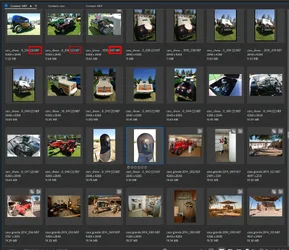
Here is a screenshot of a RAW folder in Bridge. All these are Nikon RAW (.nef) files. You can see that the thumbnails here are fully processed JPEGs and I can click one and get a full size preview, then cycle through them and mark them for saving or deleting, add keywords, etc. The RAW file is never touched, and if I open that file in Adobe Camera Raw, it will be the RAW file, not the JPEG that opens. I can edit and save the result in any format, and there are no extra JPEGS to delete.

 

Attachments

  • previews.webp
    previews.webp
    237.2 KB · Views: 1
I think you're missing my point.

If you never shot a JPEG, and only shot RAW files on both cards in your camera, you would still have a complete RAW file and a JPEG, because the JPEG is embedded in the RAW file's metadata.

What you see when you look at your RAW file in something like Bridge, or your OS preview (Windows Explorer or Mac Finder) is not the RAW file because the RAW file is not an image. You are looking at the JPEG preview of the RAW, which is the same as the other JPEG that you saved separately.

That's why I say it seems to be unnecessary to have two JPEGs.

Here is a screenshot of a RAW folder in Bridge. All these are Nikon RAW (.nef) files. You can see that the thumbnails here are fully processed JPEGs and I can click one and get a full size preview, then cycle through them and mark them for saving or deleting, add keywords, etc. The RAW file is never touched, and if I open that file in Adobe Camera Raw, it will be the RAW file, not the JPEG that opens. I can edit and save the result in any format, and there are no extra JPEGS to delete.
If the JPEG is a full-size file, then there's a file in your computer that is the full JPEG in addition to a full file that is RAW. It would seem that the editing program opens and converts the RAW file to a JPEG when you click on the thumbnail. Thumbnails are not full-size files. That's why they call them thumbnails. The thumbnail resolution is just big enough to make them stamp-size or so and viewable.
 

Create an account or login to comment

You must be a member in order to leave a comment

Create account

Create an account on our community. It's easy!

Log in

Already have an account? Log in here.

New Topics

Back
Top Bottom