What's new

Free NIK software

cdryden

No longer a newbie, moving up!
Joined
Jul 18, 2014
Messages
261
Reaction score
199
Can others edit my Photos
Photos OK to edit
I just found out that google is giving away their NIK software bundle. Just do a search for NIK and you'll find it. I was kind of surprised that they did this since there is still a market for it.
 
I downloaded mine yesterday afternoon.
 
If you don't have LR or PS, you'll have to jump through a lot of hoops to get them to work as they are not stand-alones.
 
If you don't have LR or PS, you'll have to jump through a lot of hoops to get them to work as they are not stand-alones.

It actually tells people that in the system requirements info prior to the download. :) I have PSE10 so the only one I can't use is the HDR program and it automatically did not download..
 
If you don't have LR or PS, you'll have to jump through a lot of hoops to get them to work as they are not stand-alones.

It actually tells people that in the system requirements info prior to the download. :) I have PSE10 so the only one I can't use is the HDR program and it automatically did not download..

It is possible to use them without any PS or LR, but it isn't exactly easy or convenient.
 
what does the NIK package get you thats different if you already have PS and LR?
 
what does the NIK package get you thats different if you already have PS and LR?
I have PS CS6 and I downloaded this bundle. Here is my take on it: PS can do everything this bundle can do and so much more, BUT there are some presets that make it easier by shortening the process. The HDR from NIK handles certain aspects better than photoshops HDR merge and the Dfine 2 is a great shortcut program. Was it worth paying for? Not for me it wasn't. But it is totally worth getting for free! It's a great addition, but should not be looked at as the end all be all.
 
If you don't have LR or PS, you'll have to jump through a lot of hoops to get them to work as they are not stand-alones.

It actually tells people that in the system requirements info prior to the download. :) I have PSE10 so the only one I can't use is the HDR program and it automatically did not download..
It is possible to use them without any PS or LR, but it isn't exactly easy or convenient.
I downloaded the NIK collection and its all working fine on W7. They all work as stand alone applications.

A few of the programs dont have a file/ open API so just drag the file onto the application and it opens just fine. Just make sure you are editing copies.
 
I downloaded the NIK collection and its all working fine on W7. They all work as stand alone applications.

A few of the programs dont have a file/ open API so just drag the file onto the application and it opens just fine. Just make sure you are editing copies.

I cannot launch them directly from the .exe file. All I get is either an option to buy, or I have __ days left for my free trial.

The only way I can get any of them to work is to launch NX-D and export to any of the plug-ins.
 
I downloaded the NIK collection and its all working fine on W7. They all work as stand alone applications.

A few of the programs dont have a file/ open API so just drag the file onto the application and it opens just fine. Just make sure you are editing copies.

I cannot launch them directly from the .exe file. All I get is either an option to buy, or I have __ days left for my free trial.

The only way I can get any of them to work is to launch NX-D and export to any of the plug-ins.
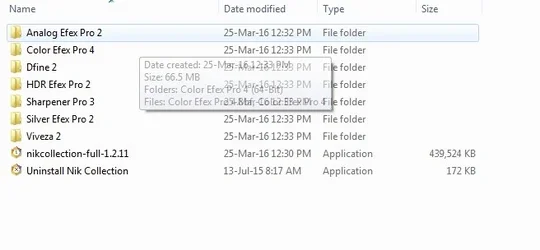
step 1 - download the pack into a dedicated folder
step 2 - double click on the downloaded file to unpack the applications into the dedicated folder
Image4.webp

Step 3 - Double click on the application inside the folder (or create a shortcut)
Image2.webp

If you have previous versions then there might be an issue with shortcuts. If you follow the above then they will work as stand alone items.
 

Attachments

  • Image1.webp
    Image1.webp
    24.3 KB · Views: 111
I just confirmed this, you can open images in the NIK software standalone. This is great news if someone wants a better way to edit their photos for free.

No RAW support obviously, but it will open uncompressed TIFs.

There is a catch though, not every application will allow you to open images standalone. Only Analog Efex Pro 2, Color Efex Pro 4, HDR Efex Pro 2 & Silver Efex Pro 2 will allow you to open images.
 
Last edited:
I just confirmed this, you can open images in the NIK software standalone. This is great news if someone wants a better way to edit their photos for free.

No RAW support obviously, but it will open uncompressed TIFs.

There is a catch though, not every application will allow you to open images standalone. Only Analog Efex Pro 2, Color Efex Pro 4, HDR Efex Pro 2 & Silver Efex Pro 2 will allow you to open images.
All of the applications will let you open images in stand alone mode. See below:

Open folder with Dfine 2
Image5.webp


Drag image onto application and it will open.
Image6.webp

Et Voila
Image7.webp
 

Create an account or login to comment

You must be a member in order to leave a comment

Create account

Create an account on our community. It's easy!

Log in

Already have an account? Log in here.

Back
Top Bottom