What's new

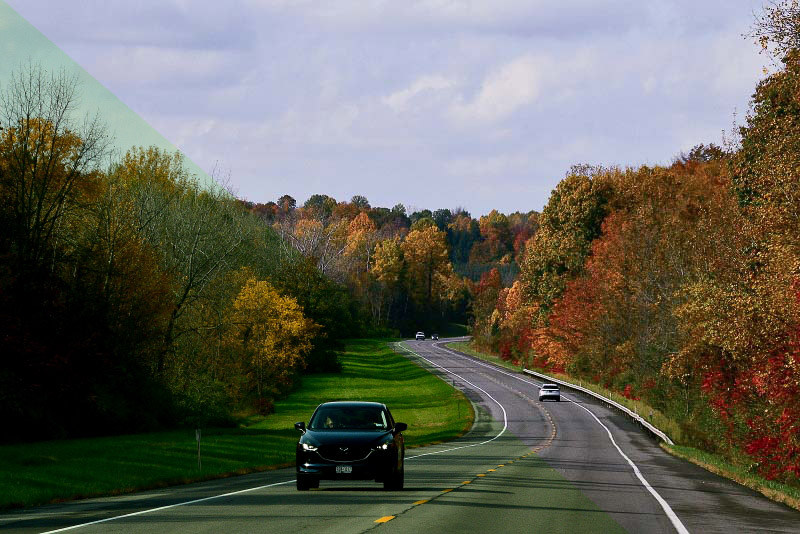
I think i am finally getting better with these settings.. what do you think

A little too far the other way now...

AAAA11.jpg


How are you setting/correcting your WB?
I have to go back to square one afterall.. now at least i am finally really seeing how wrong it looks.
 
I had it on Auto 2 keep warm colors.. i put it on WB keep white reduce warm colors.. on Auto.. i will see how this helps...thanks guys..
 
Shooting in RAW is always a good plan, but if you don't want to use the storage space, or don't have the software to deal with it, it's not the end of the world. Not sure why your images are coming out this way, Nikon is generally very good at AWB, especially in out-of-doors situations. To start, try matching your WB setting to the conditions (sun, cloud, shade, incandescent, etc).

You also need to be able to "see" what the final colours should look like, and then you can correct to them. 99% of the time using the colour-balance tool (or equivalent on your software) will get you decently close; simply adding/decreasing the blue/yellow levels will suffice. There is also lots of freeware (Gimp, Raw Therapee) which may make this easier. Again, remember that this is something that's fixable in post, it's not like you've cut half of of someone's arm off.

 
no monitor is not calibrated.. do you mean my monitor for pc...

This could be a big part of your problem with white balance. Adjusting white balance on an uncalibrated monitor is like closing both eyes and trying to get it right. You could actually be adjusting camera images that don't need to be adjusted. A simple calibration tool like this X-Rite ColorMunki Smile Color Calibration Solution used on a regular basis will keep your monitor calibrated. Without something like this, you're probably better off to do as TI suggested above " try matching your WB setting (on camera) to the conditions (sun, cloud, shade, incandescent, etc), save as JPEG on camera, and leave the white balance adjustment post alone.
 
no monitor is not calibrated.. do you mean my monitor for pc...

This could be a big part of your problem with white balance. Adjusting white balance on an uncalibrated monitor is like closing both eyes and trying to get it right. You could actually be adjusting camera images that don't need to be adjusted. A simple calibration tool like this X-Rite ColorMunki Smile Color Calibration Solution used on a regular basis will keep your monitor calibrated. Without something like this, you're probably better off to do as TI suggested above " try matching your WB setting (on camera) to the conditions (sun, cloud, shade, incandescent, etc), save as JPEG on camera, and leave the white balance adjustment post alone.
wow again i learned so much today... i am due for a new pc by xmas.. so maybe this will help alot.. this monitor is oldie.. and maybe the colors are not accurate that i see..... i also will try to adjust the WB to the scene i will be taking.. instead of auto.. and i will photograph in raw for awhile just to see what kind of differences these adjustments make.. this is a Nikon D500.. i really hate admitting this but i had far better photos with my nikon d7100.. i don't want to blame the camera since i have alot to learn.. but it is getting frustrating.. although i will continue to practice and hopefully get it down...... thanks again ..i appreciate all the help and i will go out for awhile and try different WB and in raw now.. before it gets dark......
 
Shooting in RAW is always a good plan, but if you don't want to use the storage space, or don't have the software to deal with it, it's not the end of the world. Not sure why your images are coming out this way, Nikon is generally very good at AWB, especially in out-of-doors situations. To start, try matching your WB setting to the conditions (sun, cloud, shade, incandescent, etc).

You also need to be able to "see" what the final colours should look like, and then you can correct to them. 99% of the time using the colour-balance tool (or equivalent on your software) will get you decently close; simply adding/decreasing the blue/yellow levels will suffice. There is also lots of freeware (Gimp, Raw Therapee) which may make this easier. Again, remember that this is something that's fixable in post, it's not like you've cut half of of someone's arm off.
I have the storage space..one thing about this pc.. i have lots of space left .. so yes i am going to go out now and shoot in raw.. and change the settings on the WB just to see what it produces.. cloudy etc... but i will try all the settings so i judge it.. also put my wb on regular Auto mode.. thanks so much.. i will be back later...
 
so yes i am going to go out now and shoot in raw.. and change the settings on the WB just to see what it produces.. cloudy etc... but i will try all the settings so i judge it.. also put my wb on regular Auto mode.. thanks so much.. i will be back later...

Before you save to raw, try changing the WB settings on your camera to match the light conditions, and let the camera save as a JPEG. Then post your image without post processing. Let's see what the camera is producing without the influence of your computer.
 

so yes i am going to go out now and shoot in raw.. and change the settings on the WB just to see what it produces.. cloudy etc... but i will try all the settings so i judge it.. also put my wb on regular Auto mode.. thanks so much.. i will be back later...

Before you save to raw, try changing the WB settings on your camera to match the light conditions, and let the camera save as a JPEG. Then post your image without post processing. Let's see what the camera is producing without the influence of your computer.[/QUOTe
I will have to do that tomorrow.. i already took some in raw.. i think much improved so far.. i changed the WB to a few different settings.. kept it off auto... what do you think from these sample tests
test 134.webp
test 096.webp
test 058.webp
 
test 064.webp
 
..this monitor is oldie..
I tried using an old Acer monitor as a second display for my iMac, and it was so bad, I just stopped it. I tried to adjust the color on it, but to no avail.

With photography in mind, I think spending more on the display is well worth the extra money.
 
..this monitor is oldie..
I tried using an old Acer monitor as a second display for my iMac, and it was so bad, I just stopped it. I tried to adjust the color on it, but to no avail.

With photography in mind, I think spending more on the display is well worth the extra money.
yes it is coming in the very near future.. thank you..so good to find out this is my top problem...
 
.. and change the settings on the WB just to see what it produces.. cloudy etc... but i will try all the settings so i judge it.. also put my wb on regular Auto mode..
FWIW; I think auto WB is hard to beat. When I'm going through my photos shot in auto WB, I don't see any changing of the WB in post. It's just that good. (D7100)
 
.. and change the settings on the WB just to see what it produces.. cloudy etc... but i will try all the settings so i judge it.. also put my wb on regular Auto mode..
FWIW; I think auto WB is hard to beat. When I'm going through my photos shot in auto WB, I don't see any changing of the WB in post. It's just that good. (D7100)
and that Nikon 7100 is the so good too.. i took my best photos with my d7100. now a little more complicated with the d500.. but i intend to achieve and advance.. thank you
 
Last edited:
I checked the turkey shot assuming the white of the feathers was actually supposed to be white. WB was better but still off some. Lots of rich colors in there.
test 096-2.webp
 
I checked the turkey shot assuming the white of the feathers was actually supposed to be white. WB was better but still off some. Lots of rich colors in there.
View attachment 181456
I will get new pc and new monitor and i should be much better,,thank you for your help
 

Create an account or login to comment

You must be a member in order to leave a comment

Create account

Create an account on our community. It's easy!

Log in

Already have an account? Log in here.

Back
Top Bottom