What's new

Is my post too harsh? CC

hndlz

TPF Noob!
Joined
Oct 16, 2011
Messages
5
Reaction score
0
Location
Miami
Can others edit my Photos
Photos OK to edit
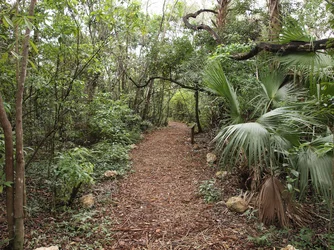
Here's my picture and is essentially what i was going for in post. My question is if it looks a little over the top?
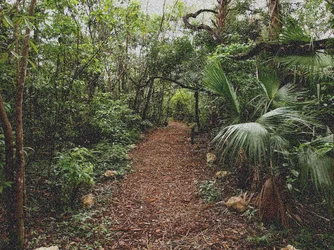
$P1192722(edit3).webp

The original if interested..
$P1192722a.webp

any comments appreciated!


edit: also if I blew this up to 8X10, would it look terrible?
 
Last edited:
First impressions: the first one looks terribly oversharpened, or is it grainy, on my monitor. Not sure what you did an dwhy, but it might be nice if you told us how you processed it.

WesternGuy
 
If that is the outcome you went for, then all's well, isn't it?
I much (!) prefer the original over your post processed photo, but that's me!
What really counts for your photos is what you want to achieve - and how - and if you reached your goal, then good!
 
The original is huge and when viewed huge it looks very good, when zooming in it is sharp. The processed one is quite a bit smaller, but when viewed at the larger displays has terrible noise/over sharpening.


How does the original compare to what you actually saw?
 
I much prefer the second one ( your original version)
 
im new but im pretty sure you should get the image looking good at 100% and it will look awesome zoomed out.....If its too big for your needs resize it first then sharpen afterwards! After all whats the point of having a huge image if it looks terrible at 100% ??
 
Yeah, the original probably did need a little work, but the edited version looks noisier than any picture I've ever seen when I view it larger. Noise is probably not the right term though, since I don't think that's what it really is...but it almost looks like you overlayed a picture of a blizzard of very tiny snowflakes on top of your forest scene.

If what I see enlarged on my monitor is even close to what it would look like printed at 8x10, I definitely wouldn't recommend it.
 
I keep looking and I can't find the post.
 
I use GIMP 2.8 and I wanted a grainy effect, i usually use just rgb noise, but this time i used hurl in addition(which added the tiny snowflakes that sm4him mentioned. I liked how it looked but not completely. Also i'm not sure if you guys are saying the picture looks bad due to grain, or because of how i applied the grain. I know ppl hate grain, but i love it. Lastly, the edited picture came out to 10mb while the regular is only around 3mb. Idk why this is(my guess is the hurl), but if anyone knows please share!

Thanks for your responses

Disclaimer: i am a noob when it comes to post processing work.
 

Create an account or login to comment

You must be a member in order to leave a comment

Create account

Create an account on our community. It's easy!

Log in

Already have an account? Log in here.

Back
Top Bottom