What's new

Love on the Rocks

Trever1t

Been spending a lot of time on here!
Joined
Dec 30, 2010
Messages
9,331
Reaction score
2,724
Location
San Jose, CA
Can others edit my Photos
Photos NOT OK to edit
OK so the title is a bit corny eh? :D I suck at making titles.
D700, 24-70, SB-800 bare fill. Lightroom and Photoshop. Quite a bit of teaking, selective curves, saturation, etc.
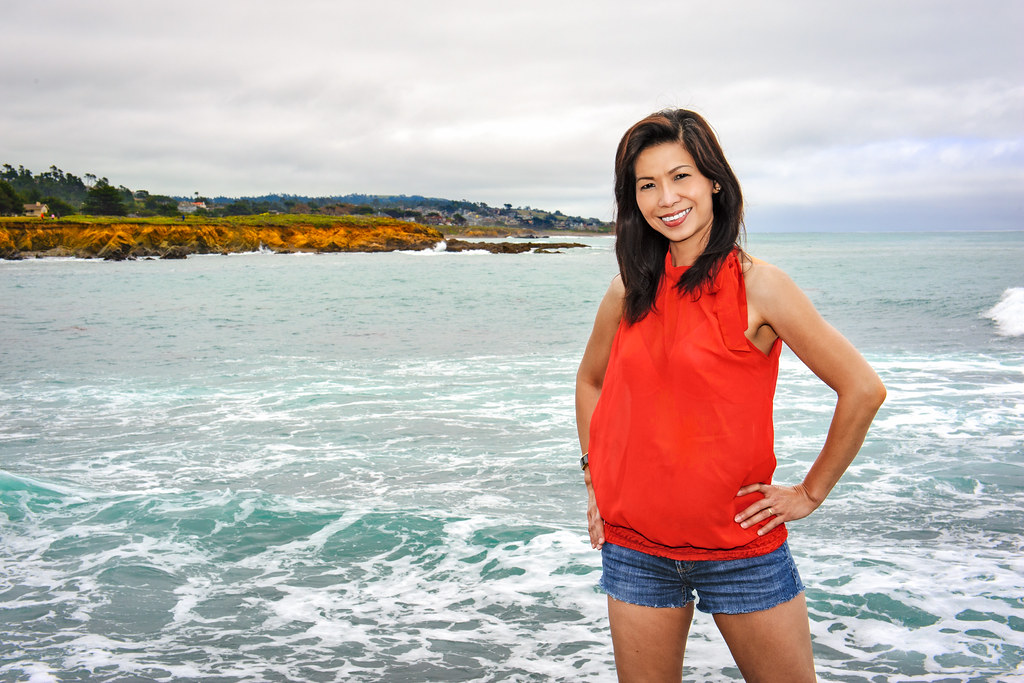


San Simeon, California by Trever1t, on Flickr
 
Where's the love? Where are the rocks? Trever - that is false advertising! ;)

Very nice picture of your wife (and beautiful smile), but did you want to subconsciously behead her with the horizon being at ther neck? My other remark is that her red (VERY RED) top seems to suck all the color from the rest of the landscape. Or maybe that was just you placing with the saturation. Either way, I'd dial it down a bit.
 
lol, I saw that coastline and was like, ah what the heck! As for her blouse, I de-saturated quie a bit. The D700 is very red receptive I suppose ;)
 
Nice shot Trever , whenever I see your shots of her she makes me smile :)
On the right side there is a blob of white water that really catches and keeps my eye, perhaps a smidge off that side...
 
I just noticed that, like a moment before...it's my darn lazy eyes, I always miss something!
 
The red shirt is definitely dominant to me. She has a pretty face, I'd accent that a little more. Good white balance and lighting. The breaking wave to the right draws my attention. I'd probably crop that out. I don't know if it's a hard, fast rule or not, but you're close to cropping at the knee joint. I've heard it's best to stay away from cropping at the joints.... Knee, elbow, wrist, etc.

Overall good though.

Sent from my iPad using PhotoForum
 
Is that near the Monterey golf course? The coastline looks familiar. Not sure if it fits though, if it's where I first thought there shouldn't be a town in the distance. How can I possibly be thinking about the background when there's a picture of your wife in the foreground? I must be getting older than I thought I was. :grumpy:


Edit: DUH!! The location is in the title - San Simeon - never made it that far down Hwy 1.
 
Hey thanks! The wave cresting on the right is a perfect example of my need to pay attention to the whole frame, I tend to miss those types of details. I spent a bit of time getting the most DR out of the image, correcting color, skin detail and didn't notice the wave until after posting.

Tommyboy, I tried to tone down her red blouse yet keep it natural, can you clarify what more I can do to accent her face?
 
3 things I would do...
1. Crop between bottom of shorts and bottom of image. This makes her a little more prominent in the photo while keeping her eyes at the top right intersection of thirds.
2. Yes tone down the shirt just a little more. Because the rest of the image doesn't have nearly as much color the shirt really grabs the eye.
3. Desaturate the rocks, sand just a little. This will make her skin pop a little more and not fight the orange rocks, sand.

Overall very good, so my comments are meant to be minor only.

Sent from my iPad using PhotoForum
 

Create an account or login to comment

You must be a member in order to leave a comment

Create account

Create an account on our community. It's easy!

Log in

Already have an account? Log in here.

Back
Top Bottom