What's new

My Nieces - newbie criticism welcome!

DaffodilHill

TPF Noob!
Joined
May 9, 2013
Messages
23
Reaction score
6
Location
Northern California
Can others edit my Photos
Photos OK to edit
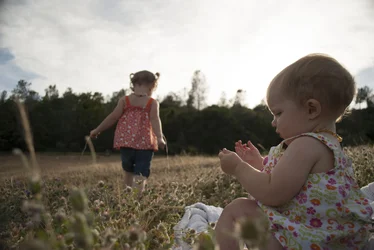
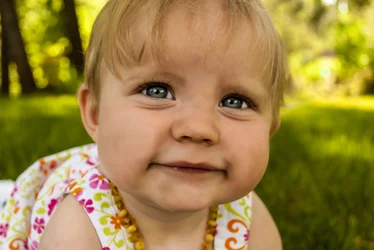
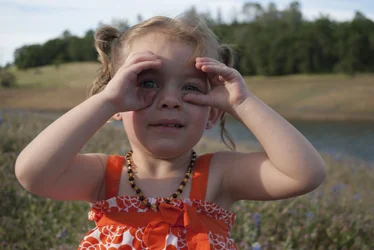
$DSC_0289.webp$DSC_0116.webp$DSC_0212.webp
 
Something seems off on #2. I can't tell whether it's the yellow &/or green.
 
welcome :) and high five on the amber necklaces.

1 and 3 look cool to me.. and might have came out better if you had them facing the sunlight? all 3 could use an exposure bump as well, they are kind of dark.
 
I love that first image 1 thing tho you might wanna add a hint more of yellow i could be wrong.. and the eyes in the second amazing.. great work :)
 
I took these in raw, I need to learn how to edit though!

Thank you for the feedback.
 
I took these in raw, I need to learn how to edit though!

Thank you for the feedback.

Check the whitebalance. It may help if you change your setting to allow edits and then we could look and help you better.

What are you using to edit raw files with?
 
I took these in raw, I need to learn how to edit though!

Thank you for the feedback.

Check the whitebalance. It may help if you change your setting to allow edits and then we could look and help you better.

What are you using to edit raw files with?

I have photoshop (30 day trial, for now) I changed my setting.
 
That will work. Here is #2 and all I did was selected auto white balance.

$DSC_0116.webp
 
You are welcome. The white balance (wb) on all three of them need adjusting. The other two you can use sunlight but try Cloudy and see if you like that better. You have WAY better wb control on photoshop than I did with this edit. I'm at work and have to use photoshop.com's editor, which is simple.

 
Is anyone else seeing strange blurred stuff going on with the skin in 2?
 
Is anyone else seeing strange blurred stuff going on with the skin in 2?

Yes there is, she has rosacea, and I attempted to edit it out but my photoshop skills are nonexistent (obviously :confused::confused: lol)

Here is my attempt at better white balance using a threshold layer in photoshop (thank you youtube), except now she seems really pink?
 

Create an account or login to comment

You must be a member in order to leave a comment

Create account

Create an account on our community. It's easy!

Log in

Already have an account? Log in here.

New Topics

Back
Top Bottom