What's new

Nikon 55~200 AFS

ummm, I have just been reading Steves article, and I think it's crazy I am trying to shoot in M, let me try A and P.
Wow I never noticed this meter on the screen before, thank you.
 
ummm, I have just been reading Steves article, and I think it's crazy I am trying to shoot in M, let me try A and P.
Wow I never noticed this meter on the screen before, thank you.
NO.

actually it may kinda work since you have a fixed output lights.
But it won't work with strobes/speedlights.
Once you learn, you'll be back in Manual mode.
 
Wow I never noticed this meter on the screen before, thank you.
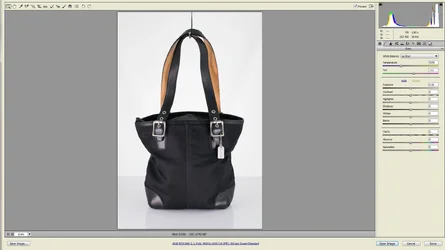
deja_q_hd_046_resized_6484.jpg
 
getting there slowly
decreased ISO to 400, but also had to decrease shutter speed, because I lowered the light intensity.
At least The aperture is out of the way (for now anyway).
The bag is now too dark, and the metal still too bright...ummm
 

Attachments

  • decrease iso.webp
    decrease iso.webp
    91.5 KB · Views: 125
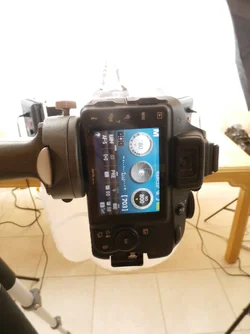
ummm, my screen does not have an exposure meter? I checked A S M and it's not there. Is it something i need to turn on in the menu?
 

Attachments

  • P8030047.webp
    P8030047.webp
    86.3 KB · Views: 107
Ok i see it,
what does 703 mean?
I think it's the number of pictures left that you can store on your SD card based upon the Quality setting, which looks like "RAW-F"

If you change it from RAW to say FINE, etc that number should change (if it's what I think it is).

There's a manual that tells you about these things.
 
I have exposure set to zero, Is the camera telling me I need to increase it? Or is it telling me where it is? The graph says half way between zero and the +. What does this mean?
 
The bag is now too dark, and the metal still too bright...ummm
Agreed.

As I wrote in response to one of your earliest posts, The bag needs more light, and I did not mean just "MORE LIGHT" from the exact same position and angle. I was assuming ...

(yeah, I know, right? :icon_lol:)

... that you would realize you need to MOVE the light to get the right amount of light on the parts of the bag that actually need more light.

See..... the FRONT of the bag needs more light HOWEVER, the top and sides DO NOT need more light. The bright reflection from the metallic tag can be reduced by placing your light(s) in the proper position, using the correct modifier, and using the correct light power output.

Thank goodness you're going to get that book and read it, because it is all explained in the book.

Let me know when you've read it.

Also let me know when you've read your user's manual.
 
Ok got you
Less light on the metal tag and more on the black canvas. ummm, by any means, not an easy task.
Probably easier to take 2 different pics in photoshop one with more light and one less, and layer them, then use the eraser tool or selection tools etc, ...The tag and buckles are so small, that it's impossible to position the lights so as to get a bright canvas and darker metal parts. No doubt the book will help, just hope it's explained in an easy to understand way. I find most of the articles on the internet are way too technical, and not practical enough.
Granted it's not easy to explain all this either. I read the camera manual a few times, and like all manuals it explains the functions but does not explain how to apply said functions in a real life situation. Having said this, I could always use P mode, and play around with the lights until I get some semi-descent shots.
Now with all this raising ISO and increasing shutter speed, the bags look quite good but my background is darker gray..so now a new issue has arisen.

 
Guys just received the book, and will be reading during the next week.
As of this writing the the best setting with the current light set up, for black bags is ISO800 and 1/60S.
I do have one major concern :
Whilst removing specs of dust on the canvas in photoshop, I occasionally get a red blue green or yellow pixel stuck in the canvas. These are not in one fixed location but random. Blue and red are more frequent than green or yellow. This never ever, used to happen with my other lenses, the specs were white.
Any ideas? or is this normal? I can always remove them in photoshop.
 

Create an account or login to comment

You must be a member in order to leave a comment

Create account

Create an account on our community. It's easy!

Log in

Already have an account? Log in here.

New Topics

Back
Top Bottom