What's new

OCF C&C Please

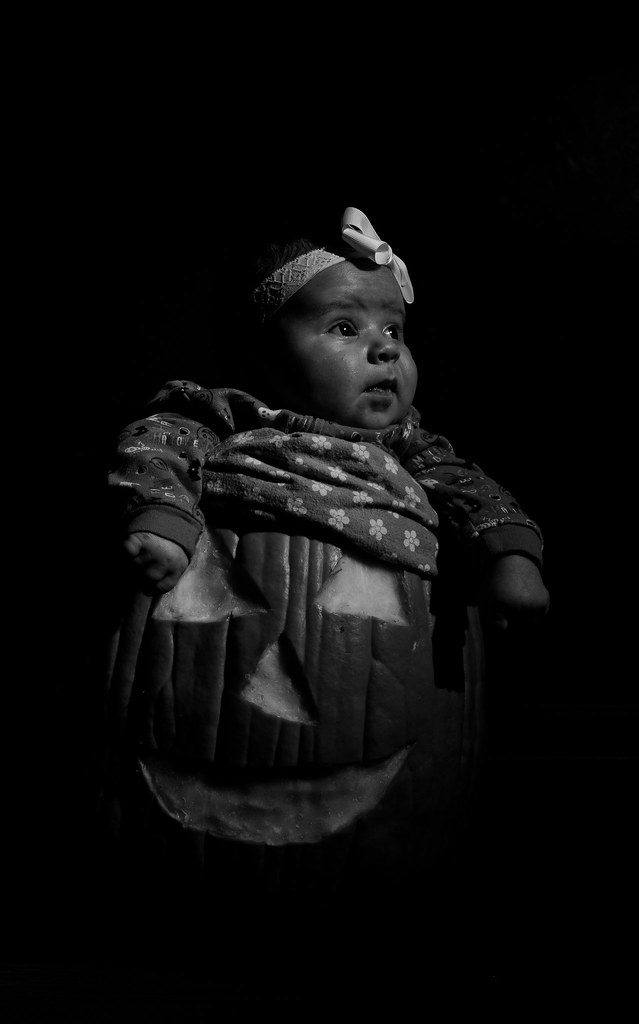
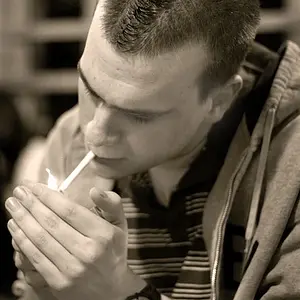
Having thought about how I did this I wish I would of stopped down to f/11 to cut the background even more.

Aperture would equally darken the whole scene, not just the background. Was there ambient light on the background? If so, raising your shutter speed would be how you darken the background.

I was under the impression that aperture is how you control ambient light and shutter is how you control flash light. At least without monkeying with the flash power.

I am totally new to OCF work though so.....
 
yeah, I actually wouldn't even darken the background, I'd just clone the moulding out. I like the very subtle orange glow of the background.
 
Having thought about how I did this I wish I would of stopped down to f/11 to cut the background even more.

Aperture would equally darken the whole scene, not just the background. Was there ambient light on the background? If so, raising your shutter speed would be how you darken the background.

I was under the impression that aperture is how you control ambient light and shutter is how you control flash light. At least without monkeying with the flash power.

I am totally new to OCF work though so.....

No, that's backwards. Flash flashes for as long as the flash flashes. Since that amount of light is a constant, one time thing, your shutter speed has no bearing on the light from the flash. However, since ambient light goes into your camera as long as the shutter is open, shutter speed does change it.

Aperture controls the rate at which light enters your camera per unit of time (among other things), and thus the source of the light doesn't matter so far as aperture is concerned.
 
Aperture would equally darken the whole scene, not just the background. Was there ambient light on the background? If so, raising your shutter speed would be how you darken the background.

I was under the impression that aperture is how you control ambient light and shutter is how you control flash light. At least without monkeying with the flash power.

I am totally new to OCF work though so.....

No, that's backwards. Flash flashes for as long as the flash flashes. Since that amount of light is a constant, one time thing, your shutter speed has no bearing on the light from the flash. However, since ambient light goes into your camera as long as the shutter is open, shutter speed does change it.

Aperture controls the rate at which light enters your camera per unit of time (among other things), and thus the source of the light doesn't matter so far as aperture is concerned.

That makes more sense. A lot more in fact. However, you can only adjust shutter speed to cut out ambient to whatever the max sync speed of the camera is right?
 
I think i wise women Leek once told me "aperture controls flash, shutter speed controls ambient" I tried this the other night and holy crap is that true.... i couldnt get the shutter speed to effect the flash at all, pretty cool
 
I was under the impression that aperture is how you control ambient light and shutter is how you control flash light. At least without monkeying with the flash power.

I am totally new to OCF work though so.....

No, that's backwards. Flash flashes for as long as the flash flashes. Since that amount of light is a constant, one time thing, your shutter speed has no bearing on the light from the flash. However, since ambient light goes into your camera as long as the shutter is open, shutter speed does change it.

Aperture controls the rate at which light enters your camera per unit of time (among other things), and thus the source of the light doesn't matter so far as aperture is concerned.

That makes more sense. A lot more in fact. However, you can only adjust shutter speed to cut out ambient to whatever the max sync speed of the camera is right?


Correct, but you can then up the power on your flash, then stop down the aperture. Which has a very similar (if not the same) effect. Think of it this way:

Shutter speed controls the ambient
Flash power controls the flash
Aperture controls everything
ISO controls everything

So, if your background (lit by ambient) is too bright, you can fix it two ways:

1) You can simply speed up your shutter speed

2) However, let's say you're at your sync speed. You can turn up your light power (saw you were at 1/64). This will at first leave your background mostly untouched and blow your subject out. WTF, I thought this was supposed to fix things? Well, then that's where aperture comes back into play. Now you might have your relative brightness between background and subject right, but the whole scene is overexposed (your background already was, and you just made your subject too bright). Luckily for us, we have a tool that allows us to change the exposure on the whole scene equally: aperture. So, we now stop our aperture down until we have a proper exposure. (if your ISO wasn't already at base ISO, you should have turned it down first, here I'm assuming you were already at base ISO)

You can think of this as shutter speed and flash power being two sides of the same coin when it comes to your ambient/flash balance. You can change either one to get the proper balance between ambient and flash, and then use ISO and aperture to get a proper exposure. (sometimes in extreme cases you may even need a ND filter, if you need a shallow DoF and a really dark background, such that you're already at max sync speed and base ISO).

 
Thanks for the explanation. Really helpful.
 
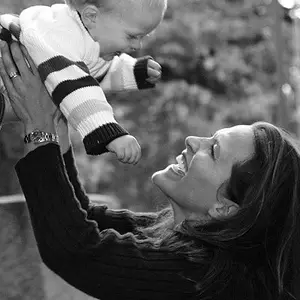
I like the first one; i miss a smile on baby's face to suit the theme :D
 
Here is my attempt at cloning out the baseboard. I used Lightroom 3 and I freakin hate the clone tool in LR3. I can't get a damn straight line. Photoshop's clone tool is just so much better. But oh well


OH MY GOD IM IN A PUMPKIN no baseboard by JChick526, on Flickr

EDIT: I also tried to straighten and loosen up the crop.
 

Create an account or login to comment

You must be a member in order to leave a comment

Create account

Create an account on our community. It's easy!

Log in

Already have an account? Log in here.

New Topics

Back
Top Bottom