What's new

Panorama Lighting Problem?

rcfreak339

TPF Noob!
Joined
Jul 12, 2010
Messages
20
Reaction score
0
Location
Frankfort, Kentucky
Can others edit my Photos
Photos OK to edit
Hey all! I am new to shooting Panoramas and I have not yet gotten the lighting down pat. I have had some seccessful ones and some that just fail. But this past week I visited a spanish church in Michigan and they were nice enough to accept and have a good meal with them. I thought it would be a nice shot to get the whole group in. The lighting on it thought has just been kicking my butt...I have tried for the past 2 days to fix the problem but just can't. Here are the two pictures...

img6428.jpg


img6429.jpg


Is there anything I could do? Or do I just have to scrap it and try again next time? Any help would be great! Thanks!
 
Set the white balance / color temperature the same in both shots before merging them.

When planning to shoot a pan, it's best to set that up in camera before pulling the trigger on the multiple shots. If you let the camera decide for each shot, they usually won't match.
 
you also need to use exactly the same exposure in both shots. You need to either set the exposure manually or lock the exposure through the whole set.


John's basic 'How-to' guide to Panoramas...

1. In order to get a good pano, your camera has to be level, and has to rotate around the nodal point. This the point at which the image inverts. For practical purposes, with most lenses, using the sensor plane will work fine. What this means is that you have to shoot from a tripod for best results.

Therefore, put your camera on your tripod and level it. Even though my tripod legs and head both have levels built-in, I carry a small dollar-store spirit level in my camera bag to make sure everything is as close to level as I can get it.

2. Once I'm satisfied that everything is level and square and my tripod is locked (except for the rotating axis) where I want it, it's time to work on the exposure. Another important factor is to NEVER SHOOT PANOS IN AUTO! Set your camera to a manual or semi-manual mode (I use full manual, but either shutter or apeture priority will work as well).

Determine the range of your pano (eg the left and right limits) and then go through and meter the different areas. Find out what the camera is recommending as maximum and minimum exposure, and when you've done this for the full range of the image, then average the settings. Don't change these settings; yes some will likely be slightly under exposed, and some slightly over, but deal with it in post.

3. Now you're ready to start shooting. I always start at the left-hand end of the intended pano and work right, simply so that the images are in the correct order when they're on my computer, but that's up to you. Expose the first image, and choose a landmark about 2/3 of the way to the right-hand side of the frame. Now, being careful to ensure that you don't upset your level, move your camera so that the left-hand edge of the frame lines up on the land mark you just chose. Ideally you want about a 30-35% (or 1/3) overlap between each image. Continue shooting in this manner until you have the whole sequence captured.

4. Download and stitch using your favorite software.
A few tips: With respect to the issue of exposure: If there is an extreme dynamic range within the pano, (say bright sun to deep shade) I will often bracket each image 1/3 stop on each side, so that for every image used in the pano, you actually expose three. This gives you a bit of latitude in terms of trying to produce an image with a pleasing and realistic dynamic range, but be warned, it often looks hokey.

One of the most important tools you can have for taking panos (aside from a good tripod) are filters. There are two types, one is the circular polarizer (CPOL)for enhancing colours and deepening the blue in sky and the other is graduated neutral density(G-ND); these help to prevent blown skies and preserve detail on the ground. When using a CPOL, it's important to remember not to change it's setting through the course of the pano either. Find the optimum setting and use it at that setting for the whole image. Likewise with your G-ND; don't change their position or intensity.

 
And if you wanted to do a 360 panorama and light it, sourcemaker has lighting balloons. They float above you so you dont need any lighting stands that could otherwise get in the shot.
 
I made a big mistake in shooting those in auto, but is there anyway to save these? In Photoshop or any other editor?
 
You can try adjusting the images separately in your photo-editor of choice and getting them as close as possile in exposure, brightness, contrast, etc and re-creating the pano.
 
Another thing you can do if you have very different exposure across your pano, is to take multiple shots with multiple exposures

Then merge them together (e.g. with photomatix or photoshop) to ensure an even exposure across the whole pano.

This might be difficult with people as a subject though since a minute movement could result in a problem stitching. I'm actually amazed you got the thing to stitch, you must have been very fast and your people must have been very still
 
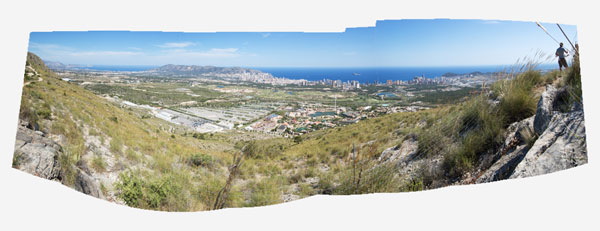
I think you are all underestimating the POWER of photoshop..

As long as your taking the shots one after another, and on the same settings, your pretty much going to get fairly similar shots, or similar enough for photoshop to work its magic.

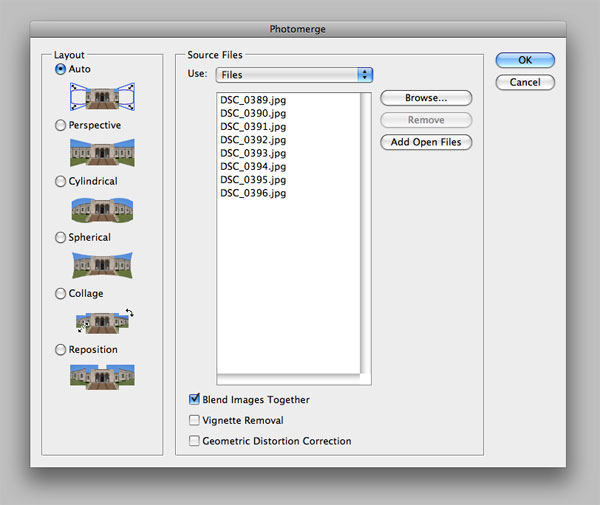
Simply go to 'File' - 'Automate' - 'Photomerge'

step4.jpg

^Select your images with these settings

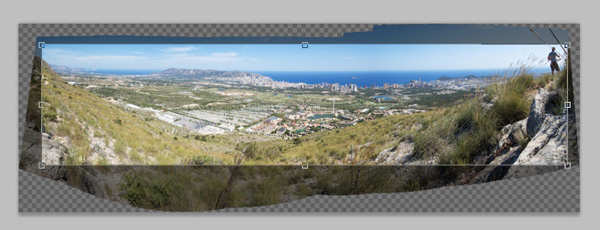
If you didnt use a tripod it will probably look like this:
step5.jpg


So just crop it!
step6.jpg


Image Source
 
that is awesome how did you stich them together?

There's a lot of programs out there that would give you that kind of result with a single click of a button. Things like AutoPano Pro I can highly recommend. Check out their 30 day trial. If you're really into panoramas in a big way it's worth checking out. I've even had it successfully blend together a panorama at a beach where the waves didn't line up, quite a few other programs including photoshop just keeled over at that point.

I think you are all underestimating the POWER of photoshop.

I think you're over estimating. Photoshop works really well on source images which blend well, but tends to do some foul blending work when images have parallax errors and colour / exposure differences. Don't get me wrong, Photoshop's tool is quite useful, but if you've ever used a dedicated program, especially if your pano extend across more than a small handful of images then it's absolutely blown away by about any dedicated panorama program out there.

The only question is, does it become worth the cost of getting yet another tool if you already have photoshop to play with :)
 
CS5 has improved in those areas significantly, especially with content aware fill. I don't think its a true statement to say that its blown away by about any dedicated panorama program out there.
 
Content aware fill has no impact on the generation of panoramas beyond being able to manually fix up the result. That said what I am really impressed with is the ability to fill in sections of the panorama that would otherwise need to be cropped out with content aware fill. But then you could use another program to stitch the panorama and then import into photoshop for that.

As for blown away, when you get serious about panoramas you'll see the shortcomings quite quickly. CS5 gives you a whole 5 options for positioning of images, and a further 3 checkboxes allowing blending, vignetting correction, distortion correction.

Compare that with Autopano Pro (and I'm only using this example because this is the program I use, other after market solutions offer similar solutions).

- Able to extract multiple panoramas out of a single folder of images.
- Able to create HDR panoramas automatically
- Adjusts colour and brightness across images and gives the option of which to choose as master. With choice of various methods of auto correction.
- Option of several different blending algorithms, each with advantages.
- Support for motorised panoramic heads.
- Effortless creation of panoramas of pretty much any size (in comparison photoshop has problems with images larger than 30000px wide).
- Pano unwrap from fisheye lenses.
- Far better Multi-cpu support
- Many options for resizing and distortion methods (more than photoshop would normally give the user, if it would give a user a choice at all in panoramas)

And that's just some of the fancy advertised marketing features. Then there's usability too. Some great features such as:

- Control point selection. Very bloody helpful if you have a moving subject in your panorama, or have things like clouds which photoshop thinks is a good idea to align your ultimately curly panorama.
- The ability to move a panorama around a horizon point and automatically have distortion re-rendered on the fly with GPU acceleration.
- Control over the control point detection, selection and optimisation settings.


Don't get me wrong Photoshop does a great job of panoramas, and it's just fine for the occasional panorama. But even if it did perform as good as some of the dedicated solutions it would still blown away by features alone, and the control gained by the use of other programs will ultimately result in a better panorama. It's just a toy in comparison.
 

Create an account or login to comment

You must be a member in order to leave a comment

Create account

Create an account on our community. It's easy!

Log in

Already have an account? Log in here.
Back
Top Bottom